Final Front: Z
Aktualisiert
Aktuelle Version
0.7.636
Angeboten von

Bei all Ihrer Leidenschaft für das Spielen von Final Front: Z sollten Ihre Hände nicht auf einen winzigen Bildschirm Ihres Telefons beschränkt sein. Spielen Sie wie ein Profi und übernehmen Sie die volle Kontrolle über Ihr Spiel mit Tastatur und Maus. MEmu bietet Ihnen all die Dinge, die Sie erwarten. Laden Sie Final Front: Z herunter und spielen Sie es auf dem PC. Spielen Sie so lange, wie Sie wollen, ohne Grenzwerte für Akku, mobile Daten und störende Anrufe. Das brandneue MEmu 9 ist die beste Wahl, um Final Front: Z auf dem PC zu spielen. Das exquisite voreingestellte Tastaturbelegungssystem, das mit unserem Fachwissen vorbereitet wurde, macht Final Front: Z zu einem echten PC-Spiel. Der MEmu Multi-Instanz-Manager ermöglicht das Spielen von 2 oder mehr Konten auf demselben Gerät. Und das Wichtigste: Unsere exklusive Emulations-Engine kann das volle Potenzial Ihres PCs freisetzen und für reibungslose Abläufe sorgen.
Mehr anzeigen
Laden Sie Play Final Front: Z auf dem PC mit MEmu Android Emulator. Viel Spaß beim Spielen auf großmundieren. Oh, no!
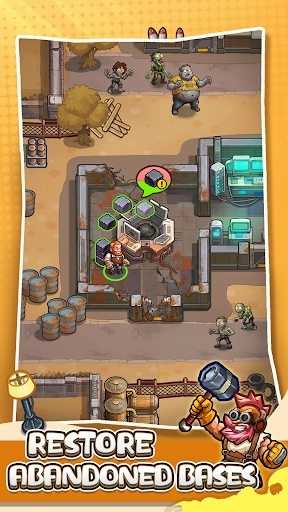
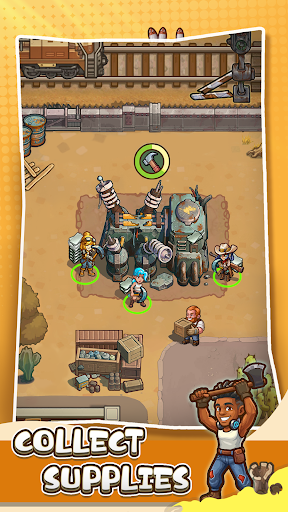
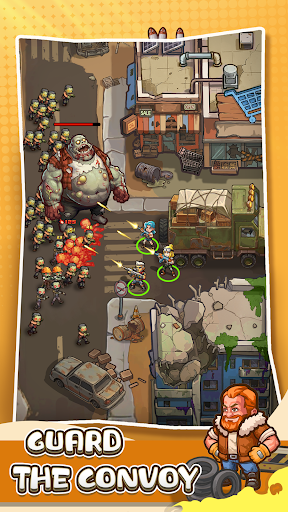

Oh, no! The apocalypse has arrived! Two meteorites brought the decay virus, and the world has descended into a zombie inferno. Civilization has collapsed, and the land has been contaminated. Only you and the other survivors are still resisting. Now, the ultimate counterattack plan, code name "Titan," has been initiated, and you are the commander of the human counterattack plan. Together with the other heroes, you will go deep into the ruins on the territory, rebuild the doomsday fortress, and reactivate the huge weapons for the decisive battles to reclaim the future for humanity!
Rebuild the Doomsday Fortress
- Collect abandoned materials to repair buildings in the wasteland.
- Build purification facilities, weapon workshops, and defense turrets.
- Increase the base's technological levels.
- Develop the decay virus antibodies, EMP cannons, nana armor, and more equipment for the apocalypse.
- Recruit and train heroes with unique skills to form your own super teams.
War of Survival
- In the depths of the areas ridden with the virus, search for leftover research data and rare stock supplies.
- Take back the R&D base crawling with zombies and recover the design plans for combat weapons.
- Explore the edge of the meteorite crater to uncover the secret origins of the decay virus and the natural disaster.
Join an Alliance, Fight Together
- Meet other powerful commanders to seek energy sources and food together.
- Donate resources to the alliance, unlock the shared technology trees, and defend against zombie attacks!
Epic Zombie Battles
- Real-time PvP battles for strategic fortresses and resource spots to expand your safe zone in the shambles.
- Train your squad of heroes and use the powerful hero skills to conquer the mutant zombies.
- Rally the alliance's forces to challenge the giant mountain-sized "ultimate zombie kings," and terminate their will to destroy!
Commander, act now! Could the key to saving the world lie in your hands?
Mehr anzeigen

1. Laden das MEmu-Installationsprogramm herunter und beenden die Installation

2. MEmu starten und Google Play auf der Homepage öffnen

3. Suchen Final Front: Z in Google Play
Install
4. Herunterladen und Installieren Final Front: Z
5. Klicken nach Abschluss der Installation auf das Symbol, um es zu starten

6. Viel Spaß beim Spielen von Final Front: Z auf dem PC mit MEmu
MEmu App Player ist der beste kostenlose Android-Emulator und 50 Millionen Menschen genießen bereits seine hervorragende Android-Gaming-Erfahrung. Mit der MEmu-Virtualisierungstechnologie können Sie Tausende von Android-Spielen problemlos auf Ihrem PC spielen, selbst bei grafikintensiven Spielen.
BGrößeres Bild mit besserer Grafik; Keine unterbrechungen, keine sorgen um Akku
Komplette Tastenbelegung unterstützt mit Maus und Tastatur oder Controller
Mit dem „Multi-Instance-Manager“ können Sie mehrere Spielkonten oder Spiele gleichzeitig auf einem PC ausführen.
Play Final Front: Z on PC by following steps: