Fruit Days
Aktualisiert
Aktuelle Version
1.0.19
Angeboten von

Bei all Ihrer Leidenschaft für das Spielen von Fruit Days sollten Ihre Hände nicht auf einen winzigen Bildschirm Ihres Telefons beschränkt sein. Spielen Sie wie ein Profi und übernehmen Sie die volle Kontrolle über Ihr Spiel mit Tastatur und Maus. MEmu bietet Ihnen all die Dinge, die Sie erwarten. Laden Sie Fruit Days herunter und spielen Sie es auf dem PC. Spielen Sie so lange, wie Sie wollen, ohne Grenzwerte für Akku, mobile Daten und störende Anrufe. Das brandneue MEmu 9 ist die beste Wahl, um Fruit Days auf dem PC zu spielen. Das exquisite voreingestellte Tastaturbelegungssystem, das mit unserem Fachwissen vorbereitet wurde, macht Fruit Days zu einem echten PC-Spiel. Der MEmu Multi-Instanz-Manager ermöglicht das Spielen von 2 oder mehr Konten auf demselben Gerät. Und das Wichtigste: Unsere exklusive Emulations-Engine kann das volle Potenzial Ihres PCs freisetzen und für reibungslose Abläufe sorgen.
Mehr anzeigen
Laden Sie Play Fruit Days auf dem PC mit MEmu Android Emulator. Viel Spaß beim Spielen auf großmundieren. Start with a tiny seed and slowly grow the orchard of your dreams.

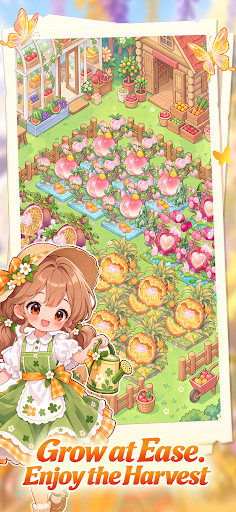

Start with a tiny seed and slowly grow the orchard of your dreams.
Plant, harvest, and decorate your way to a cozy orchard life in 《Fruit Days》
Grow fresh fruits in-game, get real fruits in real life
Plant, grow, and manage your orchard. Complete special missions and bring fresh fruits home!
Plant your favorite fruits, watch your orchard bloom
From planting to harvest, enjoy the joy of growing and harvesting fruits with your own hands.
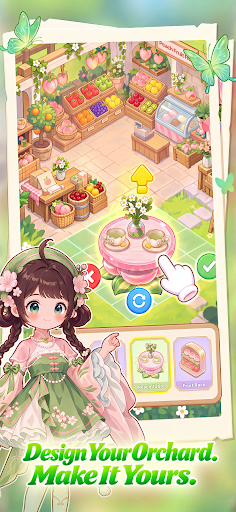
DIY your orchard, create your dream garden
Customize your little house and decorations however you like. Build an orchard that feels uniquely yours.
Mix & match outfits, create your own style
Choose from a variety of outfits and mix them your way. Dress up in a style you love every day!
Discover and collect 1,000+ fruits
Explore all kinds of fruits, complete your collection, and fill up your fruit encyclopedia one by one.
Join us now and start your dreamy orchard life!
Mehr anzeigen

1. Laden das MEmu-Installationsprogramm herunter und beenden die Installation

2. MEmu starten und Google Play auf der Homepage öffnen

3. Suchen Fruit Days in Google Play
Install
4. Herunterladen und Installieren Fruit Days
5. Klicken nach Abschluss der Installation auf das Symbol, um es zu starten

6. Viel Spaß beim Spielen von Fruit Days auf dem PC mit MEmu
MEmu App Player ist der beste kostenlose Android-Emulator und 50 Millionen Menschen genießen bereits seine hervorragende Android-Gaming-Erfahrung. Mit der MEmu-Virtualisierungstechnologie können Sie Tausende von Android-Spielen problemlos auf Ihrem PC spielen, selbst bei grafikintensiven Spielen.
BGrößeres Bild mit besserer Grafik; Keine unterbrechungen, keine sorgen um Akku
Komplette Tastenbelegung unterstützt mit Maus und Tastatur oder Controller
Mit dem „Multi-Instance-Manager“ können Sie mehrere Spielkonten oder Spiele gleichzeitig auf einem PC ausführen.
Play Fruit Days on PC by following steps: