Journey of Monarch
Aktualisiert
Aktuelle Version
1.0.11
Angeboten von

Bei all Ihrer Leidenschaft für das Spielen von Journey of Monarch sollten Ihre Hände nicht auf einen winzigen Bildschirm Ihres Telefons beschränkt sein. Spielen Sie wie ein Profi und übernehmen Sie die volle Kontrolle über Ihr Spiel mit Tastatur und Maus. MEmu bietet Ihnen all die Dinge, die Sie erwarten. Laden Sie Journey of Monarch herunter und spielen Sie es auf dem PC. Spielen Sie so lange, wie Sie wollen, ohne Grenzwerte für Akku, mobile Daten und störende Anrufe. Das brandneue MEmu 9 ist die beste Wahl, um Journey of Monarch auf dem PC zu spielen. Das exquisite voreingestellte Tastaturbelegungssystem, das mit unserem Fachwissen vorbereitet wurde, macht Journey of Monarch zu einem echten PC-Spiel. Der MEmu Multi-Instanz-Manager ermöglicht das Spielen von 2 oder mehr Konten auf demselben Gerät. Und das Wichtigste: Unsere exklusive Emulations-Engine kann das volle Potenzial Ihres PCs freisetzen und für reibungslose Abläufe sorgen.
Mehr anzeigen
Laden Sie Play Journey of Monarch auf dem PC mit MEmu Android Emulator. Viel Spaß beim Spielen auf großmundieren. Embark on a journey to the land of your dreams!
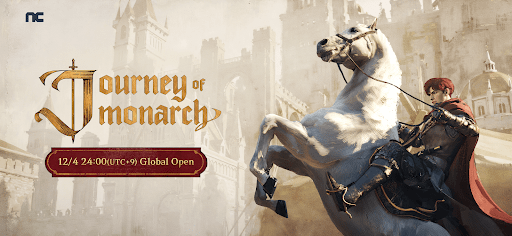
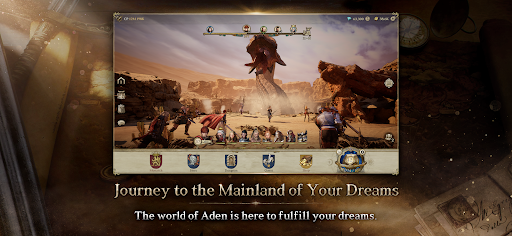
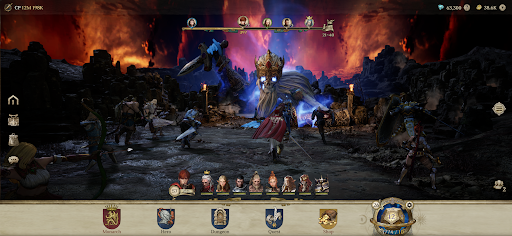
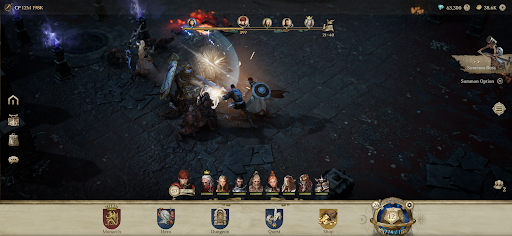
Embark on a journey to the land of your dreams!
Journey of Monarch
Grand Open
▣ About the game ▣
▶Journey of Monarch, a game where fantasy becomes reality
Explore vast, unbounded fields.
Fulfill your dreams in the world of Aden.
▶ An epic story awaits
With you as the Monarch, leader of the journey.
Embark on a new adventure with heroes by your side.
▶ Change your appearance
Transform your gear and the mounts that carry you on your journey.
Don’t limit your wardrobe to just a red cloak!
▶ Make history on your new adventure!
A new era of honor, sacrifice, and infinite growth!
Hunt leisurely in a world without limits.
▶ A new evolution of adventure!
The dynamic world of Aden unfolds in 3D on Unreal Engine 5.
Experience your adventure coming to life!
▶ Fight your way to the top
An arena for everyone and anyone!
Only those who come prepared will have the chance to show their skill.
▣ Official Website & Channel ▣
* Official Website: https://journey.plaync.com
* Official YouTube Channel: https://www.youtube.com/@Journey_NC
▣ Journey of Monarch with PURPLE ▣
You can install PURPLE and Journey of Monarch at the same time on your PC.
▣ Journey of Monarch requires the following permissions for a smooth gaming experience.
Optional permissions are not mandatory to play the game, and permissions can be changed or disabled later.
[Optional] Location: Permission to use location to provide region-specific ads
[Optional] Notifications: Permission to receive informational and advertising push notifications from the app
[Optional] Camera: Permission to record and save photos, screenshots, and videos
[Optional] Microphone: Permission to record audio when recording videos
※ Notification permissions are allowed by default on Android versions below 13.
※ Permission to save may be requested for screen/video capture on Android 10 and below.
[How to change permission settings]
1. Android 6.0 or higher version
- How to manage permission via Privacy Settings: Settings > Security and privacy > Privacy > Permission Manager > Select the app > Allow or Don’t Allow
- How to manage permission via App Settings: Settings > Apps > Select the app > Select permissions > Allow or Don’t Allow
2. Android 6.0 or lower version
Due to the nature of the operating system, it is not possible to manage app permissions via Privacy Settings. The only viable option would be to delete the app. We recommend that you upgrade your Android to the latest version.
Mehr anzeigen

1. Laden das MEmu-Installationsprogramm herunter und beenden die Installation

2. MEmu starten und Google Play auf der Homepage öffnen

3. Suchen Journey of Monarch in Google Play
Install
4. Herunterladen und Installieren Journey of Monarch
5. Klicken nach Abschluss der Installation auf das Symbol, um es zu starten

6. Viel Spaß beim Spielen von Journey of Monarch auf dem PC mit MEmu
MEmu App Player ist der beste kostenlose Android-Emulator und 50 Millionen Menschen genießen bereits seine hervorragende Android-Gaming-Erfahrung. Mit der MEmu-Virtualisierungstechnologie können Sie Tausende von Android-Spielen problemlos auf Ihrem PC spielen, selbst bei grafikintensiven Spielen.
BGrößeres Bild mit besserer Grafik; Keine unterbrechungen, keine sorgen um Akku
Komplette Tastenbelegung unterstützt mit Maus und Tastatur oder Controller
Mit dem „Multi-Instance-Manager“ können Sie mehrere Spielkonten oder Spiele gleichzeitig auf einem PC ausführen.
Play Journey of Monarch on PC by following steps: