Magic Lines: Connect Dots Game
Aktualisiert
Aktuelle Version
Angeboten von

Bei all Ihrer Leidenschaft für das Spielen von Magic Lines: Connect Dots Game sollten Ihre Hände nicht auf einen winzigen Bildschirm Ihres Telefons beschränkt sein. Spielen Sie wie ein Profi und übernehmen Sie die volle Kontrolle über Ihr Spiel mit Tastatur und Maus. MEmu bietet Ihnen all die Dinge, die Sie erwarten. Laden Sie Magic Lines: Connect Dots Game herunter und spielen Sie es auf dem PC. Spielen Sie so lange, wie Sie wollen, ohne Grenzwerte für Akku, mobile Daten und störende Anrufe. Das brandneue MEmu 9 ist die beste Wahl, um Magic Lines: Connect Dots Game auf dem PC zu spielen. Das exquisite voreingestellte Tastaturbelegungssystem, das mit unserem Fachwissen vorbereitet wurde, macht Magic Lines: Connect Dots Game zu einem echten PC-Spiel. Der MEmu Multi-Instanz-Manager ermöglicht das Spielen von 2 oder mehr Konten auf demselben Gerät. Und das Wichtigste: Unsere exklusive Emulations-Engine kann das volle Potenzial Ihres PCs freisetzen und für reibungslose Abläufe sorgen.
Mehr anzeigen
Laden Sie Play Magic Lines: Connect Dots Game auf dem PC mit MEmu Android Emulator. Viel Spaß beim Spielen auf großmundieren. Dot Match: Connect Dots Game is an addictive and relaxing dot connecting puzzle game that helps train your brain while you link the dots in fun and challenging ways.

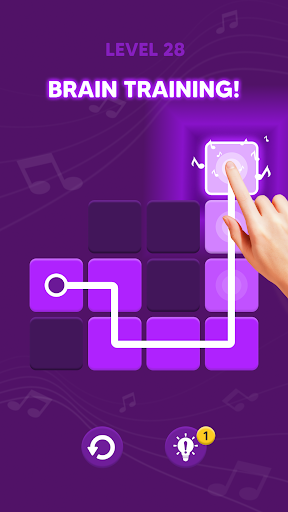
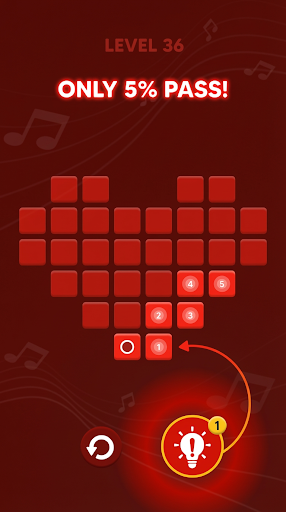

Dot Match: Connect Dots Game is an addictive and relaxing dot connecting puzzle game that helps train your brain while you link the dots in fun and challenging ways.
In Dot Match, your mission is simple yet satisfying: connect matching color dots without letting the lines cross. This brain game offers hundreds of clever levels designed to sharpen your logic, focus, and memory – perfect for both quick sessions and long relaxing playtimes.
▶ Easy to learn, hard to master:
▪ Link pairs of same-color dots with smooth paths.
▪ Clear every dot on the board without overlapping lines.
▪ Progress through increasingly difficult levels.
Why players love Dot Match:
▪ Completely play anywhere.
▪ Beautiful minimal design with colorful dots and soothing music.
▪ Multiple difficulty levels from beginner to expert.
▪ Helpful hints, unlimited undo, and restart options.
▪ Day & Night themes with color blind friendly mode.
Whether you enjoy connect the dots games, logic puzzles, or brain training games, Dot Match: Connect Dots Game offers the perfect balance of challenge and relaxation. Suitable for all ages, this puzzle game keeps your mind sharp while delivering hours of satisfying gameplay.
Download Dot Match: Connect Dots Game for free today and start linking the dots – become a true dot master!
Mehr anzeigen

1. Laden das MEmu-Installationsprogramm herunter und beenden die Installation

2. MEmu starten und Google Play auf der Homepage öffnen

3. Suchen Magic Lines: Connect Dots Game in Google Play
Install
4. Herunterladen und Installieren Magic Lines: Connect Dots Game
5. Klicken nach Abschluss der Installation auf das Symbol, um es zu starten

6. Viel Spaß beim Spielen von Magic Lines: Connect Dots Game auf dem PC mit MEmu
MEmu App Player ist der beste kostenlose Android-Emulator und 50 Millionen Menschen genießen bereits seine hervorragende Android-Gaming-Erfahrung. Mit der MEmu-Virtualisierungstechnologie können Sie Tausende von Android-Spielen problemlos auf Ihrem PC spielen, selbst bei grafikintensiven Spielen.
BGrößeres Bild mit besserer Grafik; Keine unterbrechungen, keine sorgen um Akku
Komplette Tastenbelegung unterstützt mit Maus und Tastatur oder Controller
Mit dem „Multi-Instance-Manager“ können Sie mehrere Spielkonten oder Spiele gleichzeitig auf einem PC ausführen.
Play Magic Lines: Connect Dots Game on PC by following steps: