
Outbound
Aktualisiert
Aktuelle Version
Angeboten von

Bei all Ihrer Leidenschaft für das Spielen von Outbound sollten Ihre Hände nicht auf einen winzigen Bildschirm Ihres Telefons beschränkt sein. Spielen Sie wie ein Profi und übernehmen Sie die volle Kontrolle über Ihr Spiel mit Tastatur und Maus. MEmu bietet Ihnen all die Dinge, die Sie erwarten. Laden Sie Outbound herunter und spielen Sie es auf dem PC. Spielen Sie so lange, wie Sie wollen, ohne Grenzwerte für Akku, mobile Daten und störende Anrufe. Das brandneue MEmu 9 ist die beste Wahl, um Outbound auf dem PC zu spielen. Das exquisite voreingestellte Tastaturbelegungssystem, das mit unserem Fachwissen vorbereitet wurde, macht Outbound zu einem echten PC-Spiel. Der MEmu Multi-Instanz-Manager ermöglicht das Spielen von 2 oder mehr Konten auf demselben Gerät. Und das Wichtigste: Unsere exklusive Emulations-Engine kann das volle Potenzial Ihres PCs freisetzen und für reibungslose Abläufe sorgen.
Mehr anzeigen
Laden Sie Play Outbound auf dem PC mit MEmu Android Emulator. Viel Spaß beim Spielen auf großmundieren. Outbound is an innovative survival and exploration game that invites players to embrace a sustainable, off-grid lifestyle while traveling through a vibrant and colorful world.
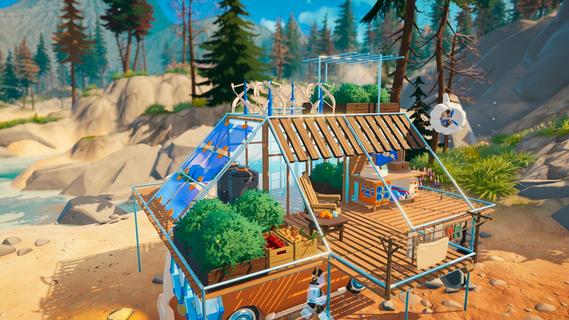

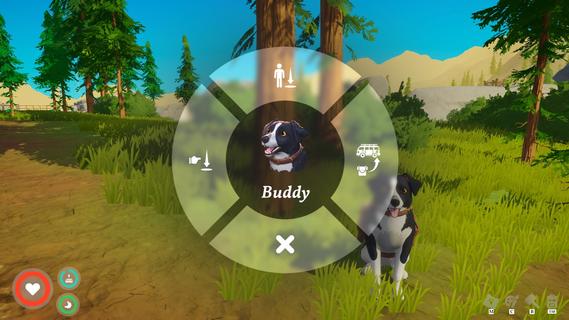
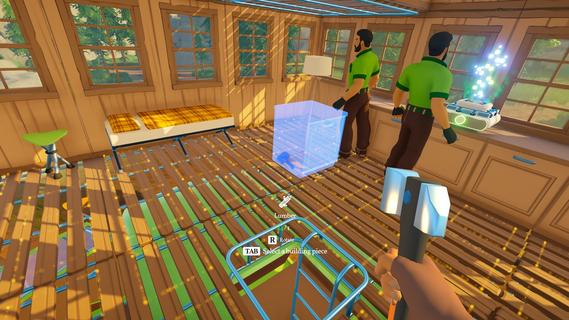
Outbound is an innovative survival and exploration game that invites players to embrace a sustainable, off-grid lifestyle while traveling through a vibrant and colorful world. In this game, you build and customize your own mobile home—a vehicle that serves as your base of operations as you journey across diverse landscapes. With a strong emphasis on sustainability, resource management, and cooperative gameplay, Outbound offers a fresh take on the survival genre. At the heart of Outbound is the concept of living off the grid. Players are tasked with crafting essential workstations and power supplies to maintain their mobile home’s functionality. Unlike traditional survival games that rely heavily on scavenging fuel or electricity from conventional sources, Outbound encourages players to harness renewable energy. You can install solar panels, wind turbines, or water generators on your vehicle to create a self-sustaining power system. This approach not only adds depth to the gameplay but also promotes awareness of eco-friendly living. Crafting plays a central role in Outbound. Players gather resources from the environment to build and upgrade various components of their mobile home, including power systems, storage units, and crafting benches. The ability to customize and enhance your vehicle is extensive, allowing you to tailor it to your preferred playstyle. Whether you prioritize speed, storage capacity, or energy efficiency, the game provides numerous options to optimize your home on wheels. Farming and food production are also vital aspects of survival in Outbound. Players can cultivate crops in portable gardens attached to their vehicle, ensuring a steady supply of food as they explore. Managing your food resources requires planning and care, especially when venturing into remote areas where supplies are scarce. Growing your own crops not only sustains your character but also adds a rewarding layer of strategy to the gameplay. Exploration is another key element that sets Outbound apart. The game world is richly detailed and filled with diverse biomes, from lush forests and rolling hills to arid deserts and snowy mountains. Each environment offers unique resources, challenges, and secrets to uncover. Traveling across this expansive map in your customized vehicle provides a sense of freedom and adventure rarely seen in survival games. Outbound supports cooperative multiplayer for up to four players, allowing friends to join forces and share the experience. Together, players can build, explore, and survive as a team, combining their skills and resources to overcome obstacles and thrive off-grid. The multiplayer aspect enhances the game’s social dynamics and adds replayability, as different groups can develop unique strategies and approaches. The game’s art style is vibrant and colorful, with a warm, inviting aesthetic that contrasts with the often harsh realities of survival gameplay. This visual design helps create a relaxing yet engaging atmosphere, making Outbound accessible to a wide range of players. In summary, Outbound offers a compelling blend of survival, crafting, exploration, and sustainability. By focusing on renewable energy, mobile living, and cooperative play, it delivers a unique experience that encourages creativity and strategic thinking. Whether you’re farming crops on the road, upgrading your vehicle’s solar panels, or discovering new territories with friends, Outbound invites you to embrace a new way of living—one that’s adventurous, sustainable, and entirely your own.
Mehr anzeigen

1. Laden das MEmu-Installationsprogramm herunter und beenden die Installation

2. MEmu starten und Google Play auf der Homepage öffnen

3. Suchen Outbound in Google Play
Install
4. Herunterladen und Installieren Outbound
5. Klicken nach Abschluss der Installation auf das Symbol, um es zu starten

6. Viel Spaß beim Spielen von Outbound auf dem PC mit MEmu
MEmu App Player ist der beste kostenlose Android-Emulator und 50 Millionen Menschen genießen bereits seine hervorragende Android-Gaming-Erfahrung. Mit der MEmu-Virtualisierungstechnologie können Sie Tausende von Android-Spielen problemlos auf Ihrem PC spielen, selbst bei grafikintensiven Spielen.
BGrößeres Bild mit besserer Grafik; Keine unterbrechungen, keine sorgen um Akku
Komplette Tastenbelegung unterstützt mit Maus und Tastatur oder Controller
Mit dem „Multi-Instance-Manager“ können Sie mehrere Spielkonten oder Spiele gleichzeitig auf einem PC ausführen.
Play Outbound on PC by following steps: