
Outbound
อัปเดตเมื่อ
เวอร์ชันปัจจุบัน
ให้บริการโดย

เวลาคุณเล่น Outbound, คุณอาจรู้สึกว่ามือคุณอาจบังจอแล้วทำให้ไม่ได้เล่นแบบเต็มที่. เล่นแบบไร้ขีดจำกัดด้วยเม้าส์และคีย์บอร์ด. MEmu มีตัวเลือกหลายอย่างให้คุณใช้งานเกมที่คุณเล่นแบบที่คุณต้องการ. ดาวน์โหลดและเล่น Outbound บน PC. เล่นนานแค่ไหนก็ได้, ไม่ต้องชาร์จแบตเตอรี่, หรือเจอคนโทรเข้ามาระหว่างเล่น. MEmu 9 เป็นตัวเลือกสำหรับการเล่น Outbound บน PC. ทางทีมงานเราได้ปรับแต่งเกม, ปรับให้เล่นเกมบางเกมได้เหมือนเล่น Outbound เป็นเกม PC เช่นเล็งด้วยเม้าส์หรือใช้คีย์บอร์ด. ระบบของเรายังทำให้คุณสามารถเปิดเล่นได้มากกว่า 2 เกมพร้อมๆกันในคอมของคุณ. และที่สำคัญที่สุด, ระบบโปรแกรมของเราสามารถทำให้คุณใช้ระบบของ PC ทำให้เกมลื่นเหมือนกับใช้โทรศัพท์รุ่นล่าสุด. เราไม่ได้ดูแลเรื่องการเล่นเกม, แต่เราดูแลถึงความสนุกสนานที่คุณได้จากการเล่นด้วย.
แสดงเพิ่มเติม
ดาวน์โหลด Outbound บน PC ด้วย MEmu Android Emulator สนุกกับการเล่นบนหน้าจอขนาดใหญ่ Outbound is an innovative survival and exploration game that invites players to embrace a sustainable, off-grid lifestyle while traveling through a vibrant and colorful world.
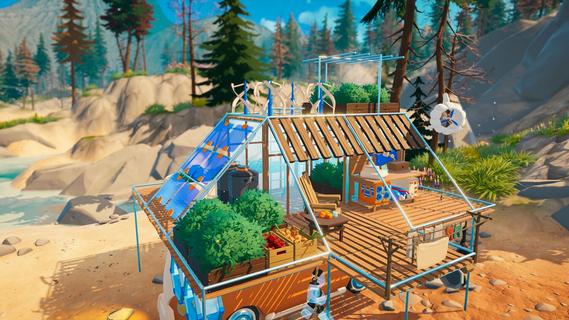
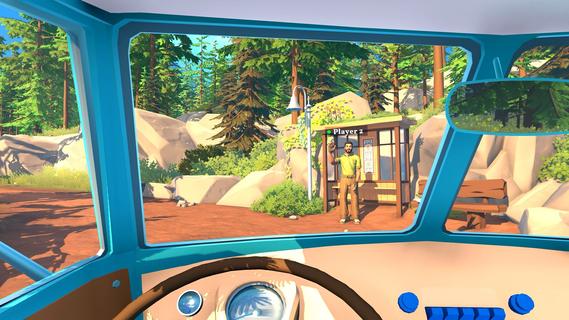
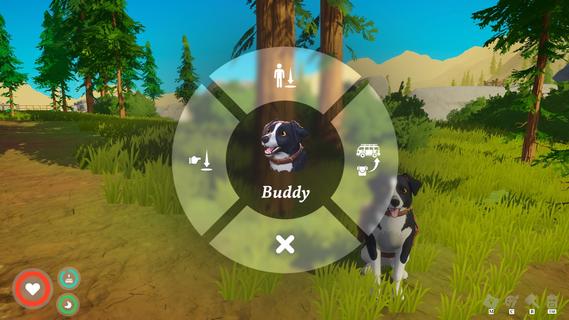
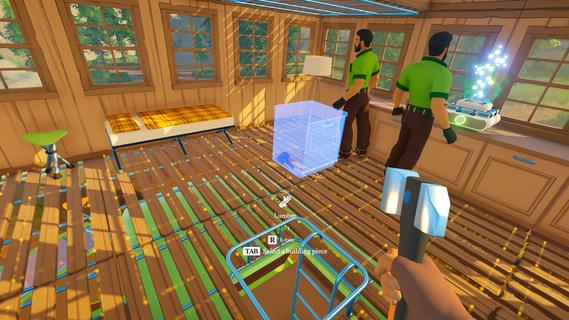
Outbound is an innovative survival and exploration game that invites players to embrace a sustainable, off-grid lifestyle while traveling through a vibrant and colorful world. In this game, you build and customize your own mobile home—a vehicle that serves as your base of operations as you journey across diverse landscapes. With a strong emphasis on sustainability, resource management, and cooperative gameplay, Outbound offers a fresh take on the survival genre. At the heart of Outbound is the concept of living off the grid. Players are tasked with crafting essential workstations and power supplies to maintain their mobile home’s functionality. Unlike traditional survival games that rely heavily on scavenging fuel or electricity from conventional sources, Outbound encourages players to harness renewable energy. You can install solar panels, wind turbines, or water generators on your vehicle to create a self-sustaining power system. This approach not only adds depth to the gameplay but also promotes awareness of eco-friendly living. Crafting plays a central role in Outbound. Players gather resources from the environment to build and upgrade various components of their mobile home, including power systems, storage units, and crafting benches. The ability to customize and enhance your vehicle is extensive, allowing you to tailor it to your preferred playstyle. Whether you prioritize speed, storage capacity, or energy efficiency, the game provides numerous options to optimize your home on wheels. Farming and food production are also vital aspects of survival in Outbound. Players can cultivate crops in portable gardens attached to their vehicle, ensuring a steady supply of food as they explore. Managing your food resources requires planning and care, especially when venturing into remote areas where supplies are scarce. Growing your own crops not only sustains your character but also adds a rewarding layer of strategy to the gameplay. Exploration is another key element that sets Outbound apart. The game world is richly detailed and filled with diverse biomes, from lush forests and rolling hills to arid deserts and snowy mountains. Each environment offers unique resources, challenges, and secrets to uncover. Traveling across this expansive map in your customized vehicle provides a sense of freedom and adventure rarely seen in survival games. Outbound supports cooperative multiplayer for up to four players, allowing friends to join forces and share the experience. Together, players can build, explore, and survive as a team, combining their skills and resources to overcome obstacles and thrive off-grid. The multiplayer aspect enhances the game’s social dynamics and adds replayability, as different groups can develop unique strategies and approaches. The game’s art style is vibrant and colorful, with a warm, inviting aesthetic that contrasts with the often harsh realities of survival gameplay. This visual design helps create a relaxing yet engaging atmosphere, making Outbound accessible to a wide range of players. In summary, Outbound offers a compelling blend of survival, crafting, exploration, and sustainability. By focusing on renewable energy, mobile living, and cooperative play, it delivers a unique experience that encourages creativity and strategic thinking. Whether you’re farming crops on the road, upgrading your vehicle’s solar panels, or discovering new territories with friends, Outbound invites you to embrace a new way of living—one that’s adventurous, sustainable, and entirely your own.
แสดงเพิ่มเติม

1. ดาวน์โหลดตัวติดตั้ง MEmu และสิ้นสุดการติดตั้ง

2. เริ่ม MEmu จากนั้นเปิด Google Play บนหน้าแรก

3. ค้นหา Outbound ใน Google Play
Install
4. ดาวน์โหลดและติดตั้ง Outbound
5. เมื่อติดตั้งเสร็จให้คลิกที่ไอคอนเพื่อเริ่มใช้งาน

6. สนุกกับการเล่น Outbound บนพีซีด้วย MEmu
MEmu App Player เป็นอีมูเลเตอร์ Android ที่ดีที่สุดและผู้คนกว่า 50 ล้านคนเพลิดเพลินไปกับประสบการณ์การเล่นเกม Android ที่ยอดเยี่ยม เทคโนโลยีการจำลองเสมือนของ MEmu ช่วยให้คุณเล่นเกม Android หลายพันเกมได้อย่างราบรื่นบนพีซีของคุณแม้แต่เกมที่ต้องใช้กราฟิกมากที่สุด
จอใหญ่และกราฟฟิกสวยกว่า; เล่นได้นาน, ไม่ต้องใช้แบตเตอรี่โทรศัพท์หรือเน็ตโทรศัพท์.
ระบบปรับแต่งปุ่มคีย์บอร์ดและเม้าส์ตามที่คุณเลือก
เล่นมากกว่าหนึ่งเกมบน PC ในเวลาเดียวกันด้วยระบบหลายจอหรือ Multi-Instance manager.
Play Outbound on PC by following steps: