Ruler of the Land: Fire dragon
Aktualisiert
Aktuelle Version
1.14.2
Angeboten von

Bei all Ihrer Leidenschaft für das Spielen von Ruler of the Land: Fire dragon sollten Ihre Hände nicht auf einen winzigen Bildschirm Ihres Telefons beschränkt sein. Spielen Sie wie ein Profi und übernehmen Sie die volle Kontrolle über Ihr Spiel mit Tastatur und Maus. MEmu bietet Ihnen all die Dinge, die Sie erwarten. Laden Sie Ruler of the Land: Fire dragon herunter und spielen Sie es auf dem PC. Spielen Sie so lange, wie Sie wollen, ohne Grenzwerte für Akku, mobile Daten und störende Anrufe. Das brandneue MEmu 9 ist die beste Wahl, um Ruler of the Land: Fire dragon auf dem PC zu spielen. Das exquisite voreingestellte Tastaturbelegungssystem, das mit unserem Fachwissen vorbereitet wurde, macht Ruler of the Land: Fire dragon zu einem echten PC-Spiel. Der MEmu Multi-Instanz-Manager ermöglicht das Spielen von 2 oder mehr Konten auf demselben Gerät. Und das Wichtigste: Unsere exklusive Emulations-Engine kann das volle Potenzial Ihres PCs freisetzen und für reibungslose Abläufe sorgen.
Mehr anzeigen
Laden Sie Play Ruler of the Land: Fire dragon auf dem PC mit MEmu Android Emulator. Viel Spaß beim Spielen auf großmundieren. Verpasse nicht diese zeitlich begrenzten Boni für neue Spieler.
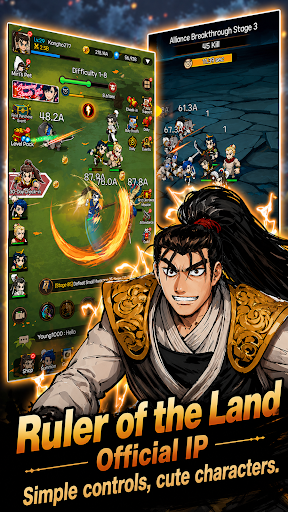
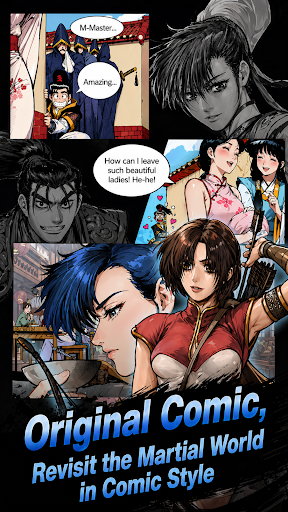
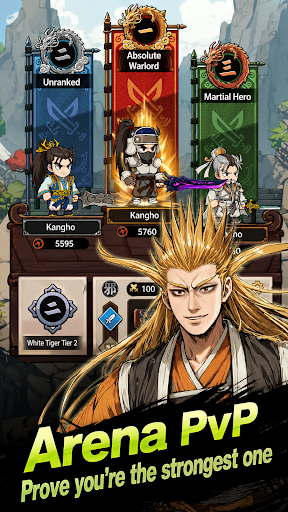
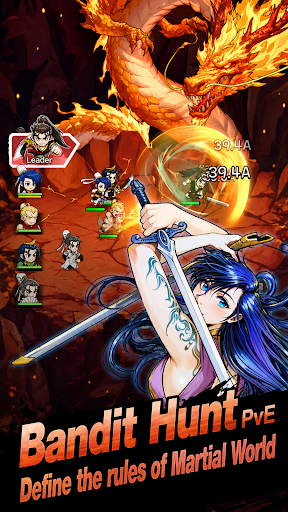
Verpasse nicht diese zeitlich begrenzten Boni für neue Spieler
[Belohnungen] Legendäre Dam-Hwarin-Karte, 20.000 Edelsteine, 120 Beschwörungsschriftrollen, 200 Drachenkugeln
======================================
Die am längsten laufende koreanische Comic-IP, Ruler of the Land (Yulgang)
Die legendäre Saga ist zurück! Tauche ein in die Welt von Ruler of the Land, dem weltberühmten Martial-Arts-Epos mit über 30 Jahren Geschichte. Erlebe das offizielle Mobile-Game zur Yulgang-IP, das atemberaubende Action mit der Leichtigkeit eines Idle-RPGs verbindet.
Folgst du dem Ruf des Feuerdrachen?
ERWECKE DEINE INNERE KRAFT
Beginne deine Reise als rebellischer Krieger und entfessle das wahre Potenzial der legendären Feuerdrachenklinge. Meistere die Geheimtechniken des Yulgang-Universums und steige auf, um deinen Thron als höchster Meister zu beanspruchen.
NON-STOP-AFK-FORTSCHRITT
Keine Zeit? Kein Problem! Genieße das ultimative Idle-RPG-Erlebnis. Dein Held trainiert ununterbrochen. Verdiene gewaltige Belohnungen, steige im Level auf und sammle epische Ausrüstung – sogar im AFK-Modus. Kehre stärker denn je zurück!
STRATEGISCHE KAMPFKUNST-GEFECHTE
Sammle und entwickle ikonische Charaktere aus der Ruler-of-the-Land-Reihe. Stelle dein ultimatives Team zusammen, passe deine Fähigkeiten an und überliste deine Gegner strategisch in rasanten, stilvollen Kämpfen.
EPISCHE GILDENKRIEGE & PVP
Du bist auf dieser Reise nicht allein. Tritt einer Sekte (Gilde) bei, nimm an gewaltigen Fraktionskriegen teil und beweise deine Stärke in der globalen PvP-Arena. Wählst du den Pfad der Gerechtigkeit oder den Weg des Chaos?
SPIEL-FEATURES
- Offizielle Yulgang-IP: originalgetreu nachgebildete Charaktere und Spielwelt.
- Einfaches Wachstum: simple Steuerung mit tiefgründigen Meta-Progressionssystemen.
- Atemberaubende Grafik: spektakuläre Skill-Effekte und hochwertige Grafik im Anime-Stil.
- Endloser Content: Boss-Raids, Dungeon-Crawls und saisonale Events.
Schließe dich Millionen von Fans an und beginne noch heute deine legendäre Kultivierung!
Mehr anzeigen

1. Laden das MEmu-Installationsprogramm herunter und beenden die Installation

2. MEmu starten und Google Play auf der Homepage öffnen

3. Suchen Ruler of the Land: Fire dragon in Google Play
Install
4. Herunterladen und Installieren Ruler of the Land: Fire dragon
5. Klicken nach Abschluss der Installation auf das Symbol, um es zu starten

6. Viel Spaß beim Spielen von Ruler of the Land: Fire dragon auf dem PC mit MEmu
MEmu App Player ist der beste kostenlose Android-Emulator und 50 Millionen Menschen genießen bereits seine hervorragende Android-Gaming-Erfahrung. Mit der MEmu-Virtualisierungstechnologie können Sie Tausende von Android-Spielen problemlos auf Ihrem PC spielen, selbst bei grafikintensiven Spielen.
BGrößeres Bild mit besserer Grafik; Keine unterbrechungen, keine sorgen um Akku
Komplette Tastenbelegung unterstützt mit Maus und Tastatur oder Controller
Mit dem „Multi-Instance-Manager“ können Sie mehrere Spielkonten oder Spiele gleichzeitig auf einem PC ausführen.
Play Ruler of the Land: Fire dragon on PC by following steps: