Tile Fun - Triple Puzzle Game
Aktualisiert
Aktuelle Version
2.1.6
Angeboten von

Bei all Ihrer Leidenschaft für das Spielen von Tile Fun - Triple Puzzle Game sollten Ihre Hände nicht auf einen winzigen Bildschirm Ihres Telefons beschränkt sein. Spielen Sie wie ein Profi und übernehmen Sie die volle Kontrolle über Ihr Spiel mit Tastatur und Maus. MEmu bietet Ihnen all die Dinge, die Sie erwarten. Laden Sie Tile Fun - Triple Puzzle Game herunter und spielen Sie es auf dem PC. Spielen Sie so lange, wie Sie wollen, ohne Grenzwerte für Akku, mobile Daten und störende Anrufe. Das brandneue MEmu 9 ist die beste Wahl, um Tile Fun - Triple Puzzle Game auf dem PC zu spielen. Das exquisite voreingestellte Tastaturbelegungssystem, das mit unserem Fachwissen vorbereitet wurde, macht Tile Fun - Triple Puzzle Game zu einem echten PC-Spiel. Der MEmu Multi-Instanz-Manager ermöglicht das Spielen von 2 oder mehr Konten auf demselben Gerät. Und das Wichtigste: Unsere exklusive Emulations-Engine kann das volle Potenzial Ihres PCs freisetzen und für reibungslose Abläufe sorgen.
Mehr anzeigen
Laden Sie Play Tile Fun - Triple Puzzle Game auf dem PC mit MEmu Android Emulator. Viel Spaß beim Spielen auf großmundieren. Kachel-Spaß ist ein brandneues Tile-Matching-Spiel!
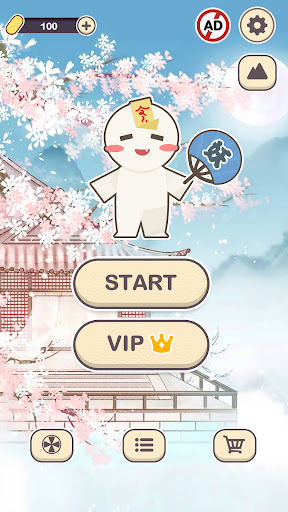
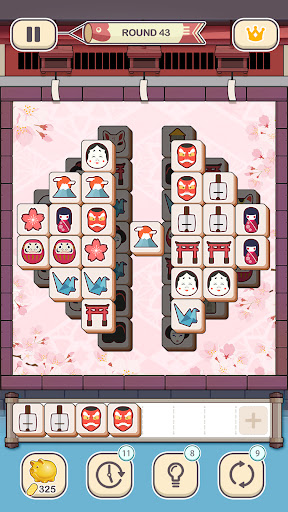
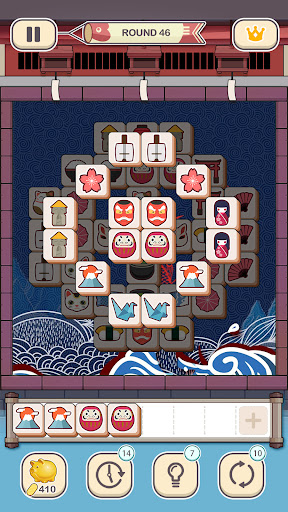
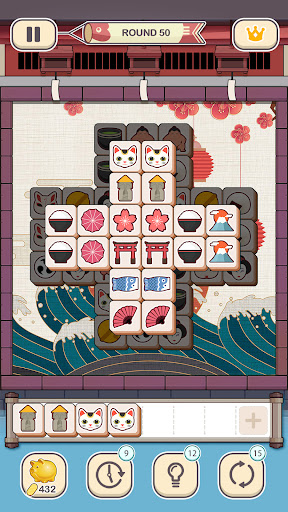
Kachel-Spaß ist ein brandneues Tile-Matching-Spiel! Es ist kein gewöhnliches Mahjong- oder Paarungsspiel, aber es wird dir ein völlig neues Gameplay bieten. Paare 3 gleiche Kacheln, um anspruchsvolle Puzzles zu lösen. Es ist einfach am Anfang und während du vorankommst wirst du vielen anspruchsvollen Levels gegenüberstehen. Das Spiel benötigt immer eine gute Logik und Strategie, um die Levels zu lösen. Sobald du die Fähigkeiten beherrschst, wirst du das spannende Spiel genießen. Kachel-Spaß ist für jedes Alter geeignet. Komm und erlebe es!
Anleitung:
Tippe auf die Quadrate auf der Tatami und platziere 3 identische Quadrate auf der Rolle, um diese Quadrate zu eliminieren. Nachdem du alle Blöcke auf dem Feld eliminiert hast, ist das Spiel gewonnen! Wenn es mehr als 7 Blöcke auf der Rolle gibt, wird das Spiel enden.
Spielmerkmale:
- Über 1.000 Level, Nonstop-Spaß
- Prächtige Wallpaper, nach Wunsch zu wechseln
- Glücksrad, dreht Glück
- Tägliches Spielen, üppige und kostenlose Geschenke
SUBSCRIPTION PRICING AND TERMS
In Tile Fun we offer you the following two subscription options:
1. A weekly subscription costing $3.99 (or equivalent in your currency) per week after a 3-day free trial period.
2. A monthly subscription costing $9.99 (or equivalent in your currency) per month.
After buying any of the subscriptions, you will remove the non-optional banner and interstitial adverts from the game.After purchasing any subscription, you will remove non-optional banner ads and interstitial ads from the game. In addition, you will get exclusive background wallpapers, free resurrection once per game, and double rewards every day.
This is an auto-renewable subscription. The payment is charged to your account after confirmation. The subscription is renewed unless you unsubscribe 24 hours before the period ends. Your account will also be charged for renewal. The above-mentioned prices are for customers in the United States. Pricing in other countries may change and actual charges may be converted to local currency.
End of trial/introductory periods and subscription renewal:
- The payment will be charged to your iTunes Account after a confirmation of purchase.
- The subscription will be renewed unless you unsubscribe 24 hours before the end of the current period.
- The account will be charged for renewal 24 hours before the end of the current period at the standard cost of the subscription.
- Subscriptions may be managed by the user and auto-renewal may be turned off by going to the user's Account Settings after purchase.
- No cancellation of the current subscription is permitted during the active subscription period.
- Any unused portion of the free trial period will be forfeited when the subscription is purchased.
Canceling a trial or subscription:
- In order to cancel a subscription during the free trial period, you need to cancel it through your account in the App Store. This must be done at least 24 hours before the end of the free trial period to avoid being charged.
Terms of Service and Privacy Policy please go to the following link:
Terms of Use:
https://docs.google.com/document/d/1yPUU3nnGpZgSKEuduBRVVmF4fHuQOUhKpUCgPsUTfBk/
Privacy Policy:
https://www.firedragongame.com/privacy.html
If you have any questions or concerns, please do not hesitate to contact us:
mintgames@gmail.com
Mehr anzeigen

1. Laden das MEmu-Installationsprogramm herunter und beenden die Installation

2. MEmu starten und Google Play auf der Homepage öffnen

3. Suchen Tile Fun - Triple Puzzle Game in Google Play
Install
4. Herunterladen und Installieren Tile Fun - Triple Puzzle Game
5. Klicken nach Abschluss der Installation auf das Symbol, um es zu starten

6. Viel Spaß beim Spielen von Tile Fun - Triple Puzzle Game auf dem PC mit MEmu
MEmu App Player ist der beste kostenlose Android-Emulator und 50 Millionen Menschen genießen bereits seine hervorragende Android-Gaming-Erfahrung. Mit der MEmu-Virtualisierungstechnologie können Sie Tausende von Android-Spielen problemlos auf Ihrem PC spielen, selbst bei grafikintensiven Spielen.
BGrößeres Bild mit besserer Grafik; Keine unterbrechungen, keine sorgen um Akku
Komplette Tastenbelegung unterstützt mit Maus und Tastatur oder Controller
Mit dem „Multi-Instance-Manager“ können Sie mehrere Spielkonten oder Spiele gleichzeitig auf einem PC ausführen.
Play Tile Fun - Triple Puzzle Game on PC by following steps: