
Al-Moazin Lite (Prayer Times)
Aktualisiert
Aktuelle Version
4.0.1307
Angeboten von

Machen Sie sich keine Sorgen mehr über überhöhte Gebühren, wenn Sie Al-Moazin Lite (Prayer Times) auf Ihrem Mobiltelefon verwenden, befreien Sie sich von dem winzigen Bildschirm und genießen Sie die Nutzung der App auf einem viel größeren Display. Von nun an können Sie Ihre App mit Tastatur und Maus im Vollbildmodus nutzen. MEmu bietet Ihnen all die überraschenden Funktionen, die Sie erwartet haben: schnelle Installation und einfache Einrichtung, intuitive Steuerung, keine Einschränkungen mehr durch Batterie, mobile Daten und störende Anrufe. Der brandneue MEmu 9 ist die beste Wahl für die Nutzung von Al-Moazin Lite (Prayer Times) auf Ihrem Computer. Mit unserer Absorption kodiert, ermöglicht der Multi-Instanz-Manager die Eröffnung von 2 oder mehr Konten zur gleichen Zeit. Und das Wichtigste, unsere exklusive Emulations-Engine kann das volle Potenzial Ihres PCs freisetzen und alles reibungslos und angenehm gestalten.
Mehr anzeigen
Laden Sie Play Al-Moazin Lite (Prayer Times) auf dem PC mit MEmu Android Emulator. Viel Spaß beim Spielen auf großmundieren. Al-Moazin prayer times application, is a must have companion for all Muslims.
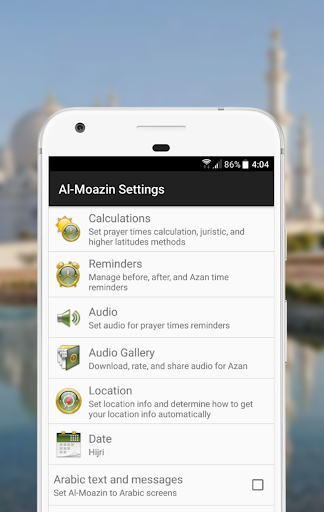
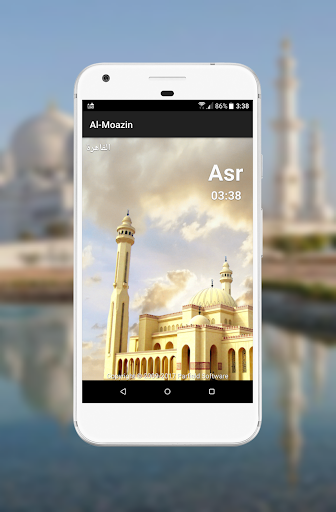
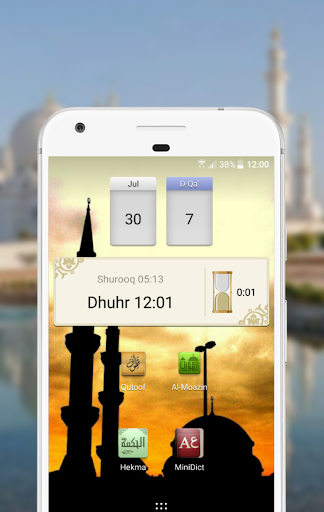
Al-Moazin prayer times application, is a must have companion for all Muslims. With Al-Moazin, you will not miss Salat again even if you traveled to a totally new country.
GPS integration feature will help you get accurate prayer times wherever you are on earth!
You don't need to ask anyone for Qibla direction anymore. with digital compass integration feature, Al-Moazin will show you the exact direction accurately.
Application is equipped with a Hijri Calendar to be able to display and check dates in Hijri or convert Hijri to Gregorian dates and vise versa.
Follow Me feature will initiate an automatic location update when you travel or change location.
Multiple set of notifications related to Prayer times to plan whatever actions you need related to Prayer times before or after. (Full support in paid version only)
Features list:
* Islamic prayer times with different calculation methods:
- Umm al-Qura, Makkah
- Egyptian General Survey Authority
- University of Islamic Sciences, Karachi
- Islamic Society of North America
- Muslim World League
- Iraqi Sunni Endowment (Available for download for Iraqi cities)
* Hijri calendar, and ability to correct it manually according to Hilal sighting.
* Qiblah direction based on phone's compass capabilities
* Follow me, update prayer time automatically while traveling using wireless mobile capabilities.
* Fajr wakup notification, additional to the default notifications set before and after Prayers. (Paid version only)
* Follow phone ringer mode which make Azan notifications are played as audio, visual or vibration.
* Visual warning for the time left before the next Prayer comes in, using simple widget.
A companion app for Wear OS is available:
The companion app shares the same settings of your mobile phone.
The companion app includes a tile to show today's prayer times.
Mehr anzeigen

1. Laden das MEmu-Installationsprogramm herunter und beenden die Installation

2. MEmu starten und Google Play auf der Homepage öffnen

3. Suchen Al-Moazin Lite (Prayer Times) in Google Play
Install
4. Herunterladen und Installieren Al-Moazin Lite (Prayer Times)
5. Klicken nach Abschluss der Installation auf das Symbol, um es zu starten

6. Verwenden Sie MEmu, um Al-Moazin Lite (Prayer Times) auf Ihrem PC zu nutzen
MEmu Play ist aktuell der beste kostenlose Android-Emulator und bietet 50 Millionen Nutzern ein überragendes Android-App-Erlebnis. Dank der Virtualisierungstechnologie von MEmu können Sie Tausende von Android-Apps problemlos auf Ihrem Computer nutzen, selbst solche mit hohen Grafikanforderungen.
BGrößeres Bild mit besserer Grafik; Keine unterbrechungen, keine sorgen um Akku
Komplette Tastenbelegung unterstützt mit Maus und Tastatur oder Controller
Mit dem „Multi-Instance-Manager“ können Sie mehrere Spielkonten oder Spiele gleichzeitig auf einem PC ausführen.
Use Al-Moazin Lite (Prayer Times) on PC by following steps: