Australia Birds ID
Aktualisiert
Aktuelle Version
1.0.0
Angeboten von

Machen Sie sich keine Sorgen mehr über überhöhte Gebühren, wenn Sie Australia Birds ID auf Ihrem Mobiltelefon verwenden, befreien Sie sich von dem winzigen Bildschirm und genießen Sie die Nutzung der App auf einem viel größeren Display. Von nun an können Sie Ihre App mit Tastatur und Maus im Vollbildmodus nutzen. MEmu bietet Ihnen all die überraschenden Funktionen, die Sie erwartet haben: schnelle Installation und einfache Einrichtung, intuitive Steuerung, keine Einschränkungen mehr durch Batterie, mobile Daten und störende Anrufe. Der brandneue MEmu 9 ist die beste Wahl für die Nutzung von Australia Birds ID auf Ihrem Computer. Mit unserer Absorption kodiert, ermöglicht der Multi-Instanz-Manager die Eröffnung von 2 oder mehr Konten zur gleichen Zeit. Und das Wichtigste, unsere exklusive Emulations-Engine kann das volle Potenzial Ihres PCs freisetzen und alles reibungslos und angenehm gestalten.
Mehr anzeigen
Genieße Australia Birds ID auf deinem PC mit MEmu Play in einer fantastischen Version. Dieser leistungsstarke, kostenlose Android-Emulator bietet dir Zugriff auf Tausende von Android-Apps für deinen Desktop. Bleib mit Freunden in Kontakt und arbeite effizienter! Australian birds smart guide app acts as a smart field guide to identify 700+ birds in Australia.
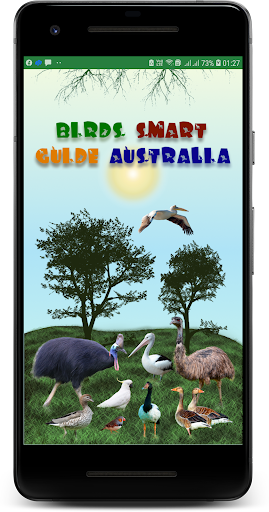
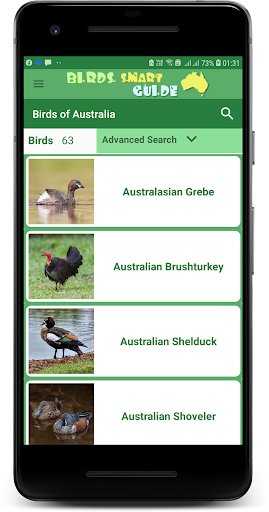
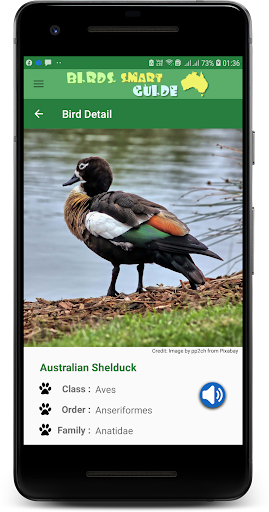
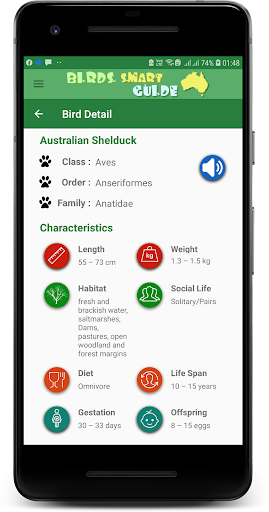
Australian birds smart guide app acts as a smart field guide to identify 700+ birds in Australia. The search engine provides filters to search for any specific bird. Filters available in the app are as follows -
Location
Size
Color
Habitat
Bird Type
Voice
Flight Type
Conservation Status
Using combination of filters returns a birds list matching the selected criteria. The app uses a simple but very user friendly User Interface for the ease of use and efficient search performance.
The app also provides information on the bird that includes
Class, order & Family
Length, Weight,
Habitat, Social Life,
Diet, Life Span,
Incubation, Offspring
Physical Description, Habitat Description, Diet Description, Reproduction Description & Distribution details.
Other Birds Apps
Australia Birds ID demo Version -
https://play.google.com/store/apps/details?id=com.mgtigercreations.birdssmartguideaustraliademo
Birds of Kakadu National Park -
https://play.google.com/store/apps/details?id=com.mgtigercreations.birdsofkakadu
Birds of DAINTREE National Park - https://play.google.com/store/apps/details?id=com.mgtigercreations.birdsofdaintree
Mehr anzeigen

1. Laden das MEmu-Installationsprogramm herunter und beenden die Installation

2. MEmu starten und Google Play auf der Homepage öffnen

3. Suchen Australia Birds ID in Google Play
Install
4. Herunterladen und Installieren Australia Birds ID
5. Klicken nach Abschluss der Installation auf das Symbol, um es zu starten

6. Verwenden Sie MEmu, um Australia Birds ID auf Ihrem PC zu nutzen
MEmu Play ist aktuell der beste kostenlose Android-Emulator und bietet 50 Millionen Nutzern ein überragendes Android-App-Erlebnis. Dank der Virtualisierungstechnologie von MEmu können Sie Tausende von Android-Apps problemlos auf Ihrem Computer nutzen, selbst solche mit hohen Grafikanforderungen.
BGrößeres Bild mit besserer Grafik; Keine unterbrechungen, keine sorgen um Akku
Komplette Tastenbelegung unterstützt mit Maus und Tastatur oder Controller
Mit dem „Multi-Instance-Manager“ können Sie mehrere Spielkonten oder Spiele gleichzeitig auf einem PC ausführen.
Use Australia Birds ID on PC by following steps: