BAND - App for all groups
Aktualisiert
Aktuelle Version
0
Angeboten von

Machen Sie sich keine Sorgen mehr über überhöhte Gebühren, wenn Sie BAND - App for all groups auf Ihrem Mobiltelefon verwenden, befreien Sie sich von dem winzigen Bildschirm und genießen Sie die Nutzung der App auf einem viel größeren Display. Von nun an können Sie Ihre App mit Tastatur und Maus im Vollbildmodus nutzen. MEmu bietet Ihnen all die überraschenden Funktionen, die Sie erwartet haben: schnelle Installation und einfache Einrichtung, intuitive Steuerung, keine Einschränkungen mehr durch Batterie, mobile Daten und störende Anrufe. Der brandneue MEmu 9 ist die beste Wahl für die Nutzung von BAND - App for all groups auf Ihrem Computer. Mit unserer Absorption kodiert, ermöglicht der Multi-Instanz-Manager die Eröffnung von 2 oder mehr Konten zur gleichen Zeit. Und das Wichtigste, unsere exklusive Emulations-Engine kann das volle Potenzial Ihres PCs freisetzen und alles reibungslos und angenehm gestalten.
Mehr anzeigen
Laden Sie Play BAND - App for all groups auf dem PC mit MEmu Android Emulator. Viel Spaß beim Spielen auf großmundieren. Organize your group on BAND!
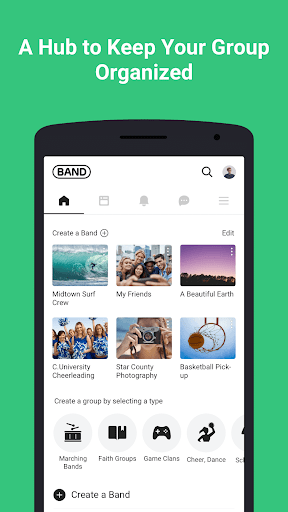
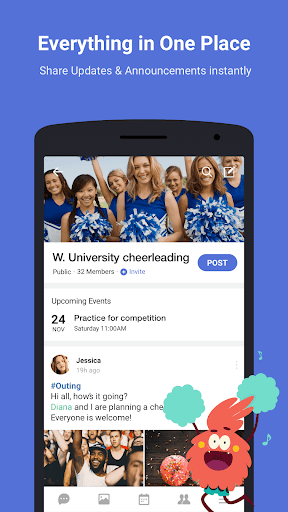
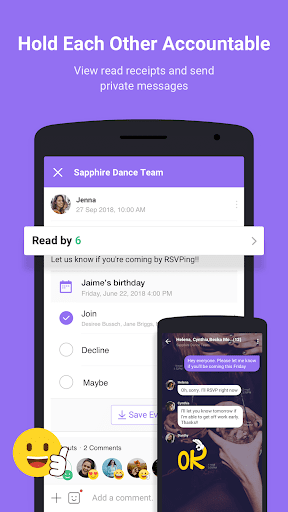
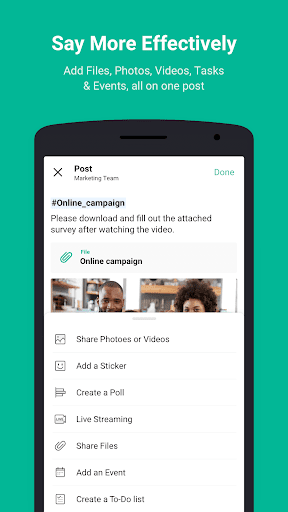
Organize your group on BAND! It’s the perfect group communication app, with features like the Community Board, Shared Calendar, Polls, To-Do Lists, Private Chat & much more!
BAND is BEST for:
● Sports Teams – Keep track of game days and team practices with the Calendar, send quick notifications about canceled practices, and share team videos and photos, all in one place.
● Work/Projects - Share files and keep everyone in the loop with the community board. Have a quick group call with remote teams. Hold everyone accountable with shared to-do lists.
● School Groups - Plan all your school events easily with the group Calendar. Use Polls to plan activities and food options. Send group messages to keep everyone updated.
● Faith Groups - Organize activities with weekly notices and event RSVPs. Support each other throughout the week by privately sharing prayer requests through chat.
● Gaming Clans and Guilds - Set up a raiding schedule with the group calendar and share important information about any game with all your members. Use multiple chat rooms to find groups, manage recruitment and share strategies.
● Family, Friends, Communities - Stay connected with your family and friends. BAND also has Public groups! Use the Discover feature to find communities with similar interests.
Why BAND?
BAND is the best way to stay connected with your group! BAND is trusted by group leaders as the Official Team Communication App for Varsity Spirit, AYSO, USBands, and Legacy Global Sports.
● Be social & stay organized in the same place
Community Board / Calendar / Poll / Group File Sharing / Photo Album / Private Chat / Group Call
● Create or join a space that meets your group’s unique needs
Adjust privacy settings (secret, closed, public), control notifications, manage members (admin & co-admins), assign privileges, and make a vanity URL or home cover design dedicated to your group. Customize your group and use it how you want to!
● Accessibility
You can chat wherever you are. BAND can be used on any device including your phone, desktop, or tablet by going to http://band.us.
We value your feedback! Send us your feedback and/or suggestions so we can make BAND better for you & your groups.
Help Center: http://go.band.us/help/en
Facebook: www.facebook.com/BANDglobal
Youtube: www.youtube.com/user/bandapplication
Twitter: @BANDtogetherapp @BAND_Gaming
Instagram: thebandapp
Blog: blog.band.com
Mehr anzeigen

1. Laden das MEmu-Installationsprogramm herunter und beenden die Installation

2. MEmu starten und Google Play auf der Homepage öffnen

3. Suchen BAND - App for all groups in Google Play
Install
4. Herunterladen und Installieren BAND - App for all groups
5. Klicken nach Abschluss der Installation auf das Symbol, um es zu starten

6. Verwenden Sie MEmu, um BAND - App for all groups auf Ihrem PC zu nutzen
MEmu Play ist aktuell der beste kostenlose Android-Emulator und bietet 50 Millionen Nutzern ein überragendes Android-App-Erlebnis. Dank der Virtualisierungstechnologie von MEmu können Sie Tausende von Android-Apps problemlos auf Ihrem Computer nutzen, selbst solche mit hohen Grafikanforderungen.
BGrößeres Bild mit besserer Grafik; Keine unterbrechungen, keine sorgen um Akku
Komplette Tastenbelegung unterstützt mit Maus und Tastatur oder Controller
Mit dem „Multi-Instance-Manager“ können Sie mehrere Spielkonten oder Spiele gleichzeitig auf einem PC ausführen.
Use BAND - App for all groups on PC by following steps: