Barnes & Noble NOOK
Aktualisiert
Aktuelle Version
1733784830
Angeboten von

Machen Sie sich keine Sorgen mehr über überhöhte Gebühren, wenn Sie Barnes & Noble NOOK auf Ihrem Mobiltelefon verwenden, befreien Sie sich von dem winzigen Bildschirm und genießen Sie die Nutzung der App auf einem viel größeren Display. Von nun an können Sie Ihre App mit Tastatur und Maus im Vollbildmodus nutzen. MEmu bietet Ihnen all die überraschenden Funktionen, die Sie erwartet haben: schnelle Installation und einfache Einrichtung, intuitive Steuerung, keine Einschränkungen mehr durch Batterie, mobile Daten und störende Anrufe. Der brandneue MEmu 9 ist die beste Wahl für die Nutzung von Barnes & Noble NOOK auf Ihrem Computer. Mit unserer Absorption kodiert, ermöglicht der Multi-Instanz-Manager die Eröffnung von 2 oder mehr Konten zur gleichen Zeit. Und das Wichtigste, unsere exklusive Emulations-Engine kann das volle Potenzial Ihres PCs freisetzen und alles reibungslos und angenehm gestalten.
Mehr anzeigen
Laden Sie Play Barnes & Noble NOOK auf dem PC mit MEmu Android Emulator. Viel Spaß beim Spielen auf großmundieren. Get the FREE Barnes & Noble NOOK App for your Android smartphone or tablet to enjoy all your favorite digital content.
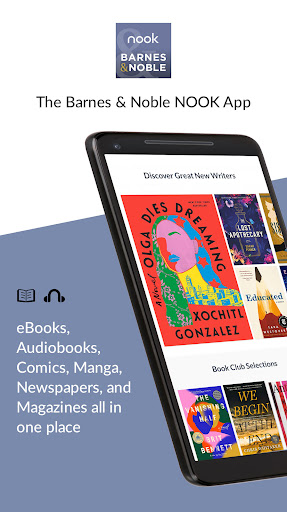
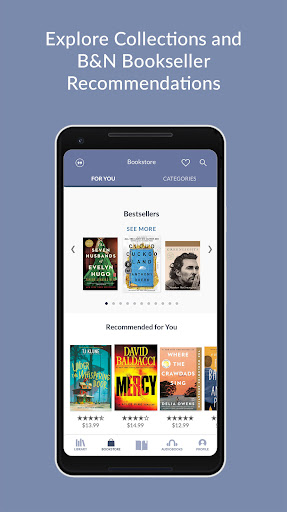
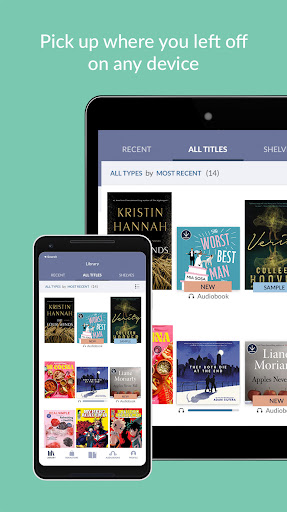
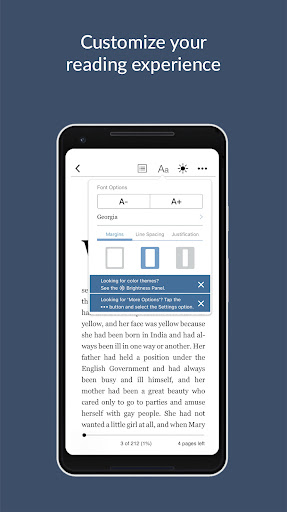
Get the FREE Barnes & Noble NOOK App for your Android smartphone or tablet to enjoy all your favorite digital content. Access our vast online library of over 4 million eBooks, graphic novels, comics, manga and magazines. Plus discover over 300,000 audiobooks. Enjoy recommendations just for you curated by our expert booksellers. Customize your experience with multiple font and page styles, customized bookshelves and social sharing tools. And never lose your spot— the Barnes & Noble NOOK App syncs across all your devices.
Barnes & Noble at Your Fingertips
-Browse the latest new eBook and audiobook releases, bestsellers, promotions, and expert recommendations just for you!
-Discover books in every genre, about every subject, for every age: contemporary fiction, romance, mystery and thriller, classics, sci-fi and fantasy, manga, kids, young adult, non-fiction and more!
-Digital content purchased from Barnes & Noble will automatically appear in this app.
-Explore over 75,000 free eBooks and more than 10,000 free audiobooks.
-Sync your books, bookmarks, notes and highlights across all your devices for a seamless reading experience.
-Listen safely while you drive with Android Auto.
Rich, Customizable Reading and Listening
-Adjust font styles, line spacing, margins, page animations, narration speed, background color, and screen brightness for more comfortable reading.
-Add notes, bookmarks, and highlights as you read or listen. Share favorite highlights with friends across social networks.
-Set the Sleep Timer to coordinate audiobook listening to your schedule.
-Download, read, or listen to free eBook and audiobook samples, and add favorites to your Wishlist.
-Organize your Library into custom shelves.
-Search inside the book and look up words with the in-app dictionary.
-Store content on your device or in the cloud.
- Accessible to blind and low-vision users leveraging Android assistive technology that includes screen magnification and TalkBack.
One App for the Whole Family
-With Profiles, family members can share an account while still enjoying their own customized experience.
-Share eBooks audiobooks, magazines, newspapers and comics across Profiles—no need to purchase again! Reading position, bookmarks, highlights and notes are saved to each Profile.
-Child Profiles allow parents to control what each child sees.
Mehr anzeigen

1. Laden das MEmu-Installationsprogramm herunter und beenden die Installation

2. MEmu starten und Google Play auf der Homepage öffnen

3. Suchen Barnes & Noble NOOK in Google Play
Install
4. Herunterladen und Installieren Barnes & Noble NOOK
5. Klicken nach Abschluss der Installation auf das Symbol, um es zu starten

6. Verwenden Sie MEmu, um Barnes & Noble NOOK auf Ihrem PC zu nutzen
MEmu Play ist aktuell der beste kostenlose Android-Emulator und bietet 50 Millionen Nutzern ein überragendes Android-App-Erlebnis. Dank der Virtualisierungstechnologie von MEmu können Sie Tausende von Android-Apps problemlos auf Ihrem Computer nutzen, selbst solche mit hohen Grafikanforderungen.
BGrößeres Bild mit besserer Grafik; Keine unterbrechungen, keine sorgen um Akku
Komplette Tastenbelegung unterstützt mit Maus und Tastatur oder Controller
Mit dem „Multi-Instance-Manager“ können Sie mehrere Spielkonten oder Spiele gleichzeitig auf einem PC ausführen.
Use Barnes & Noble NOOK on PC by following steps: