
Bitcoin Wallet Crypto Ethereum
Aktualisiert
Aktuelle Version
1.34.4
Angeboten von

Machen Sie sich keine Sorgen mehr über überhöhte Gebühren, wenn Sie Bitcoin Wallet Crypto Ethereum auf Ihrem Mobiltelefon verwenden, befreien Sie sich von dem winzigen Bildschirm und genießen Sie die Nutzung der App auf einem viel größeren Display. Von nun an können Sie Ihre App mit Tastatur und Maus im Vollbildmodus nutzen. MEmu bietet Ihnen all die überraschenden Funktionen, die Sie erwartet haben: schnelle Installation und einfache Einrichtung, intuitive Steuerung, keine Einschränkungen mehr durch Batterie, mobile Daten und störende Anrufe. Der brandneue MEmu 9 ist die beste Wahl für die Nutzung von Bitcoin Wallet Crypto Ethereum auf Ihrem Computer. Mit unserer Absorption kodiert, ermöglicht der Multi-Instanz-Manager die Eröffnung von 2 oder mehr Konten zur gleichen Zeit. Und das Wichtigste, unsere exklusive Emulations-Engine kann das volle Potenzial Ihres PCs freisetzen und alles reibungslos und angenehm gestalten.
Mehr anzeigen
Laden Sie Play Bitcoin Wallet Crypto Ethereum auf dem PC mit MEmu Android Emulator. Viel Spaß beim Spielen auf großmundieren. Atomic Wallet is universal non-custodial app for over 300 cryptocurrencies.
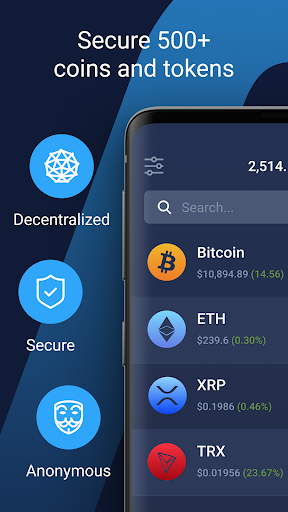
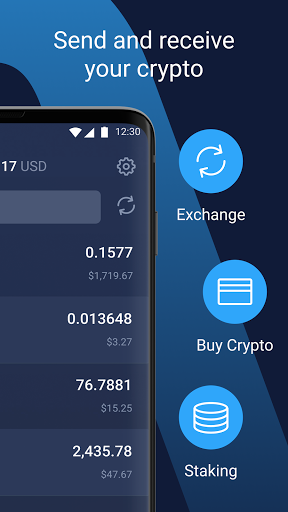
Atomic Wallet is universal non-custodial app for over 300 cryptocurrencies. Secure, manage and exchange your assets right in your hand!
Exceptional security
Your private keys are encrypted on your device and never leave it. Only you have access to your funds. Atomic is build on top of common open source libraries.
Buy Bitcoin
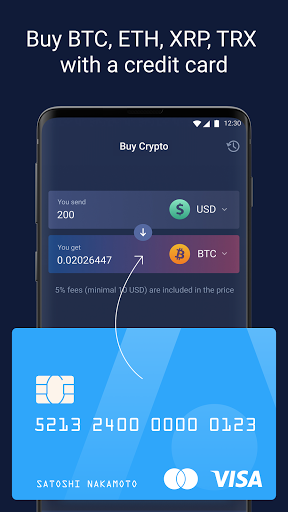
You can buy various cryptocurrencies with your bank card right from the app.
Buy Bitcoin
Buy Ethereum
Buy XRP Ripple
Buy Solana
Buy Litecoin
Buy Dogecoin
Buy Monero XMR
Stake & Earn
Stake Ethereum, Stake Solana, Stake Atom, Stake Near, Stake Tezos, Stake Ada
Instant swap
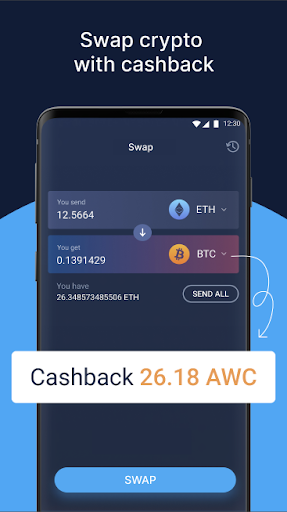
You can swap a range of coins and tokens to any other just in one click. No external services needed. Provided by ChangeNOW.
Cachback Program
Atomic is the first decentralized wallet that launched the Membership program based on its native token AWC. All holders of AWC tokens can receive up to 1% rewards monthly for using a built-in swap and buy crypto services.
Decentralization and Anonymity
Atomic is fully decentralized application. We don't store any of your data, don't require any verification for basic services. We never have access to your funds.
24/7 Live support
Our engineers are always happy to assist you by email support@atomicwallet.io or live telegram chat @AtomicWallet
Smooth and handy interface
We are focusing on exceptional user experience. App is fully optimised for your device.
Supported cryptocurrencies
Bitcoin Wallet BTC
Ethereum Wallet ETH
Solana Wallet SOL
NFT Wallet
Ripple Wallet XRP
Cardano Wallet ADA
Polkadot Wallet
Monero XMR Wallet
Near Wallet
DASH Wallet
Tron Wallet TRX
Litecoin Wallet LTC
DogeCoin Wallet DOGE
Stellar Wallet XLM
DigiByte Wallet DGB
BitcoinCash Wallet BCH
Vechain Wallet VET
BitcoinSV Wallet BSV
Ontology ONG
NANO Wallet
ALGO Wallet
NEO Wallet
Nem Wallet XEM
QTUM Wallet
Binance Chain wallet BNB
ERC20 Wallet all Tokens
Mehr anzeigen

1. Laden das MEmu-Installationsprogramm herunter und beenden die Installation

2. MEmu starten und Google Play auf der Homepage öffnen

3. Suchen Bitcoin Wallet Crypto Ethereum in Google Play
Install
4. Herunterladen und Installieren Bitcoin Wallet Crypto Ethereum
5. Klicken nach Abschluss der Installation auf das Symbol, um es zu starten

6. Verwenden Sie MEmu, um Bitcoin Wallet Crypto Ethereum auf Ihrem PC zu nutzen
MEmu Play ist aktuell der beste kostenlose Android-Emulator und bietet 50 Millionen Nutzern ein überragendes Android-App-Erlebnis. Dank der Virtualisierungstechnologie von MEmu können Sie Tausende von Android-Apps problemlos auf Ihrem Computer nutzen, selbst solche mit hohen Grafikanforderungen.
BGrößeres Bild mit besserer Grafik; Keine unterbrechungen, keine sorgen um Akku
Komplette Tastenbelegung unterstützt mit Maus und Tastatur oder Controller
Mit dem „Multi-Instance-Manager“ können Sie mehrere Spielkonten oder Spiele gleichzeitig auf einem PC ausführen.
Use Bitcoin Wallet Crypto Ethereum on PC by following steps: