
CamAPS FX
Aktualisiert
Aktuelle Version
1.4(193).201
Angeboten von

Machen Sie sich keine Sorgen mehr über überhöhte Gebühren, wenn Sie CamAPS FX auf Ihrem Mobiltelefon verwenden, befreien Sie sich von dem winzigen Bildschirm und genießen Sie die Nutzung der App auf einem viel größeren Display. Von nun an können Sie Ihre App mit Tastatur und Maus im Vollbildmodus nutzen. MEmu bietet Ihnen all die überraschenden Funktionen, die Sie erwartet haben: schnelle Installation und einfache Einrichtung, intuitive Steuerung, keine Einschränkungen mehr durch Batterie, mobile Daten und störende Anrufe. Der brandneue MEmu 9 ist die beste Wahl für die Nutzung von CamAPS FX auf Ihrem Computer. Mit unserer Absorption kodiert, ermöglicht der Multi-Instanz-Manager die Eröffnung von 2 oder mehr Konten zur gleichen Zeit. Und das Wichtigste, unsere exklusive Emulations-Engine kann das volle Potenzial Ihres PCs freisetzen und alles reibungslos und angenehm gestalten.
Mehr anzeigen
Genieße CamAPS FX auf deinem PC mit MEmu Play in einer fantastischen Version. Dieser leistungsstarke, kostenlose Android-Emulator bietet dir Zugriff auf Tausende von Android-Apps für deinen Desktop. Bleib mit Freunden in Kontakt und arbeite effizienter! Key Functionality.
Key Functionality
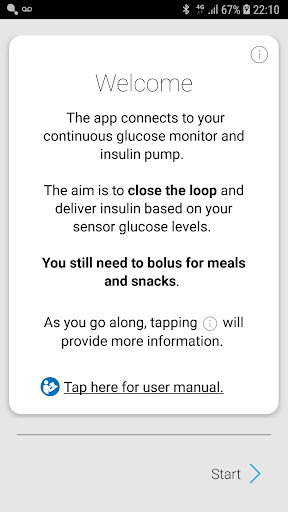
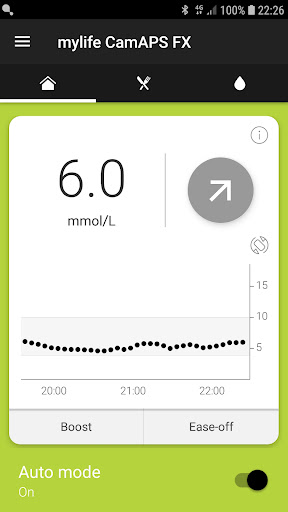
The CamAPS FX app connects to a continuous glucose sensor, processes the sensor data, and determines the amount of insulin to be administered by an insulin pump in response to glucose levels. A key feature of the app is its ability to send SMS alerts generated by the connected glucose sensor (e.g., Dexcom G6) to “followers.”
This system is known as a hybrid closed-loop or automated insulin delivery.
The CamAPS FX app also enables alerts to be received through its Companion mode. SMS monitoring and Companion mode are key safety features used by parents and guardians for remote monitoring of their children's glucose levels.
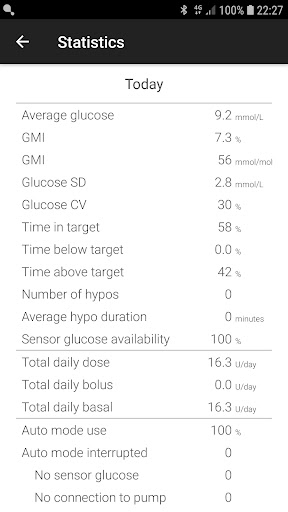
Additionally, the CamAPS FX app allows data to be uploaded to the cloud for visualization.
Modes of Operation
The CamAPS FX app operates in one of two modes:
Auto Mode Off (open loop)
Auto Mode Off is the mode most familiar to current pump users. In this mode, the pump operates according to the pre-programmed basal profile or as directed by the user. Auto Mode Off is the default mode at system start-up.
Auto Mode On (closed loop)
Auto Mode or closed loop mode is when:
a) Insulin delivery is managed by the app, replacing pre-programmed basal insulin delivery. or
b) The app is attempting to enter Auto Mode but a condition is preventing it from doing so, such as when CGM data becomes unavailable. During the ‘attempting’ status, insulin infusion reverts to the pre-programmed basal rate after approximately 30 minutes until the issue is resolved.
SMS-Based Remote Monitoring
The CamAPS FX app supports SMS-based remote monitoring in both Auto Mode On and Off. All app-generated alarms and alerts are sent via SMS to up to five ‘Followers.’
How Does Closed-Loop Work?
The CamAPS FX app uses a mathematical model of insulin action to determine insulin infusion to target a glucose level of around 6 mmol/L.
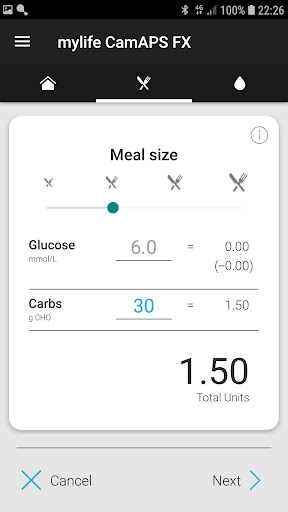
For the model to function correctly, specific information is required at setup and during operation. Body weight is used to estimate glucose and insulin concentrations within the body. The total daily dose of insulin serves as an initial indicator of insulin sensitivity, which is further refined by analyzing continuous glucose monitor (CGM) data, previous insulin infusions and boluses, and meal intake.
The mathematical model then uses these characteristics, along with information about active insulin and meals, to predict future glucose levels and determine the optimal insulin infusion to reach the target glucose level.
In certain situations, such as when CGM glucose is low or decreasing rapidly, the control algorithm may further reduce insulin to mitigate the risk of hypoglycemia.
Instructions for use are available electronically at www.camdiab.com and through the app. A PDF viewer is required to read the electronic instructions. For a paper copy, please contact support@camdiab.com.
Mehr anzeigen

1. Laden das MEmu-Installationsprogramm herunter und beenden die Installation

2. MEmu starten und Google Play auf der Homepage öffnen

3. Suchen CamAPS FX in Google Play
Install
4. Herunterladen und Installieren CamAPS FX
5. Klicken nach Abschluss der Installation auf das Symbol, um es zu starten

6. Verwenden Sie MEmu, um CamAPS FX auf Ihrem PC zu nutzen
MEmu Play ist aktuell der beste kostenlose Android-Emulator und bietet 50 Millionen Nutzern ein überragendes Android-App-Erlebnis. Dank der Virtualisierungstechnologie von MEmu können Sie Tausende von Android-Apps problemlos auf Ihrem Computer nutzen, selbst solche mit hohen Grafikanforderungen.
BGrößeres Bild mit besserer Grafik; Keine unterbrechungen, keine sorgen um Akku
Komplette Tastenbelegung unterstützt mit Maus und Tastatur oder Controller
Mit dem „Multi-Instance-Manager“ können Sie mehrere Spielkonten oder Spiele gleichzeitig auf einem PC ausführen.
Use CamAPS FX on PC by following steps: