
Couple Games - Bloomy
Aktualisiert
Aktuelle Version
3.5.1
Angeboten von

Machen Sie sich keine Sorgen mehr über überhöhte Gebühren, wenn Sie Couple Games - Bloomy auf Ihrem Mobiltelefon verwenden, befreien Sie sich von dem winzigen Bildschirm und genießen Sie die Nutzung der App auf einem viel größeren Display. Von nun an können Sie Ihre App mit Tastatur und Maus im Vollbildmodus nutzen. MEmu bietet Ihnen all die überraschenden Funktionen, die Sie erwartet haben: schnelle Installation und einfache Einrichtung, intuitive Steuerung, keine Einschränkungen mehr durch Batterie, mobile Daten und störende Anrufe. Der brandneue MEmu 9 ist die beste Wahl für die Nutzung von Couple Games - Bloomy auf Ihrem Computer. Mit unserer Absorption kodiert, ermöglicht der Multi-Instanz-Manager die Eröffnung von 2 oder mehr Konten zur gleichen Zeit. Und das Wichtigste, unsere exklusive Emulations-Engine kann das volle Potenzial Ihres PCs freisetzen und alles reibungslos und angenehm gestalten.
Mehr anzeigen
Genieße Couple Games - Bloomy auf deinem PC mit MEmu Play in einer fantastischen Version. Dieser leistungsstarke, kostenlose Android-Emulator bietet dir Zugriff auf Tausende von Android-Apps für deinen Desktop. Bleib mit Freunden in Kontakt und arbeite effizienter! Bloomy – The Ultimate Couples Card Game.
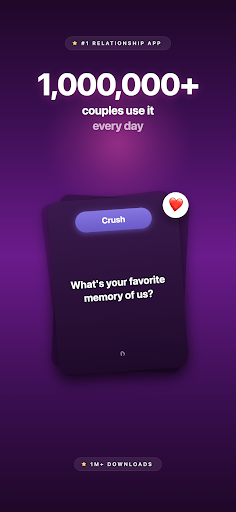
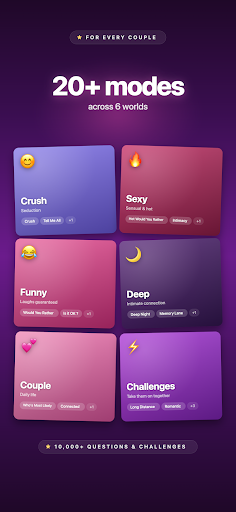
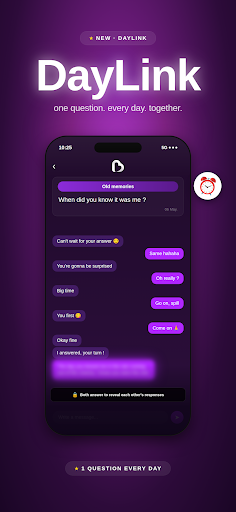
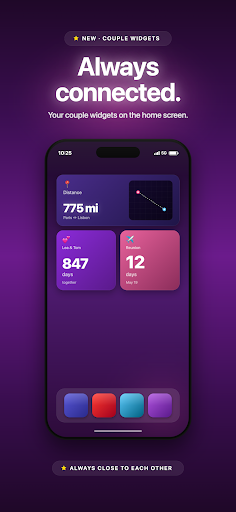
Bloomy – The Ultimate Couples Card Game
Get closer, laugh together, and transform your relationship with Bloomy – the must-have card game app for couples and crushes!
Key Features
Fun & Flirty Games
• Crush: Break the ice with hilarious questions that reveal new sides of your crush.
• Deep Night: Share intimate, nocturnal confessions to spark sincere conversations.
• Connected: Strengthen your bond with thought-provoking questions designed to bring you closer.
• Which of Us?: Play “Who is most likely to…?” and enjoy endless laughter and friendly debates.
• Would You Rather: Navigate surprising dilemmas that add a twist to your evenings.
• Memory Lane: Relive your most cherished moments and create new memories together.
• Would You Rather HOT: Uncover hidden desires to heat up your interactions.
• Intimacy: Explore deeper connections with questions that remove all taboos.
• Hard Dare: Challenge each other with intense, sensual tasks to boost your excitement.
Interactive Couple Experiences
• Challenge Mode: Send remote challenges in romantic, flirty, or extreme categories for fun anytime, anywhere.
• Daylink: Enjoy a daily secret conversation with fresh questions that deepen your intimacy.
• Couple Dashboard: Track your relationship journey and celebrate every milestone together.
Why Choose Bloomy?
• Create Memorable Moments: Turn every interaction into a lasting memory with a game that makes connection fun.
• Rediscover Your Partner: Engage in sincere conversations that reveal new layers of your relationship.
• Boost Your Intimacy: Use innovative tools to enhance your bond and spark exciting conversations.
Unlock Bloomy Premium
Gain full access to all games, challenges, and exclusive features for a complete and unforgettable couples’ card game experience.
Download Bloomy Today!
Turn every moment into an opportunity to connect, laugh, and grow closer. Discover the perfect card game for couples and crushes on Google Play!
Mehr anzeigen

1. Laden das MEmu-Installationsprogramm herunter und beenden die Installation

2. MEmu starten und Google Play auf der Homepage öffnen

3. Suchen Couple Games - Bloomy in Google Play
Install
4. Herunterladen und Installieren Couple Games - Bloomy
5. Klicken nach Abschluss der Installation auf das Symbol, um es zu starten

6. Verwenden Sie MEmu, um Couple Games - Bloomy auf Ihrem PC zu nutzen
MEmu Play ist aktuell der beste kostenlose Android-Emulator und bietet 50 Millionen Nutzern ein überragendes Android-App-Erlebnis. Dank der Virtualisierungstechnologie von MEmu können Sie Tausende von Android-Apps problemlos auf Ihrem Computer nutzen, selbst solche mit hohen Grafikanforderungen.
BGrößeres Bild mit besserer Grafik; Keine unterbrechungen, keine sorgen um Akku
Komplette Tastenbelegung unterstützt mit Maus und Tastatur oder Controller
Mit dem „Multi-Instance-Manager“ können Sie mehrere Spielkonten oder Spiele gleichzeitig auf einem PC ausführen.
Use Couple Games - Bloomy on PC by following steps: