CTEK App
Aktualisiert
Aktuelle Version
4.0.2
Angeboten von

Machen Sie sich keine Sorgen mehr über überhöhte Gebühren, wenn Sie CTEK App auf Ihrem Mobiltelefon verwenden, befreien Sie sich von dem winzigen Bildschirm und genießen Sie die Nutzung der App auf einem viel größeren Display. Von nun an können Sie Ihre App mit Tastatur und Maus im Vollbildmodus nutzen. MEmu bietet Ihnen all die überraschenden Funktionen, die Sie erwartet haben: schnelle Installation und einfache Einrichtung, intuitive Steuerung, keine Einschränkungen mehr durch Batterie, mobile Daten und störende Anrufe. Der brandneue MEmu 9 ist die beste Wahl für die Nutzung von CTEK App auf Ihrem Computer. Mit unserer Absorption kodiert, ermöglicht der Multi-Instanz-Manager die Eröffnung von 2 oder mehr Konten zur gleichen Zeit. Und das Wichtigste, unsere exklusive Emulations-Engine kann das volle Potenzial Ihres PCs freisetzen und alles reibungslos und angenehm gestalten.
Mehr anzeigen
Laden Sie Play CTEK App auf dem PC mit MEmu Android Emulator. Viel Spaß beim Spielen auf großmundieren. CTEK APP.
CTEK APP
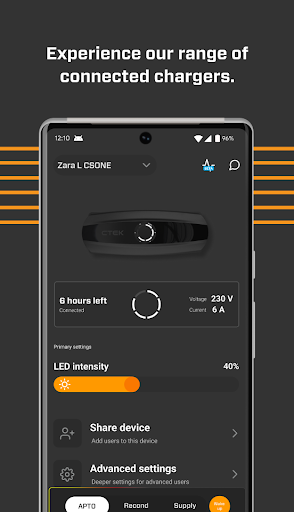
The CTEK APP keeps you on top of all your compatible CTEK charging products, right there in the palm of your hand.
Quickly installed and simple to use, the CTEK APP syncs your CTEK products to your smartphone via BLUETOOTH® and Wi-Fi, or by using BLUETOOTH® only.*
From the clear, easy to read home page you can check the status of all CTEK products that are within range and unlock extra product features to give you even more control. It’s designed to work effortlessly with all compatible CTEK products, including the NJORD® GO portable EV charger** and the CTEK CS ONE smart charger.
Get the most out of your NJORD® GO EV charger
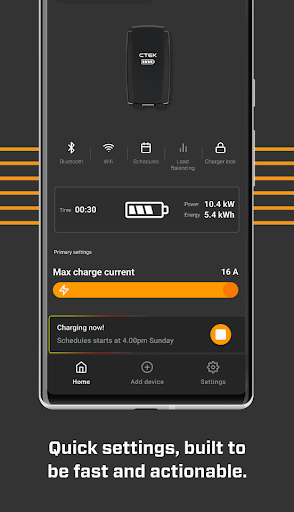
The CTEK APP gives you total control over how and when you charge your EV with your NJORD® GO. Simply connect it to the app over BLUETOOTH® or Wi-Fi and you can:
• Access additional NJORD® GO features and functions
• Start, stop and pause charging remotely, and enable or disable auto start
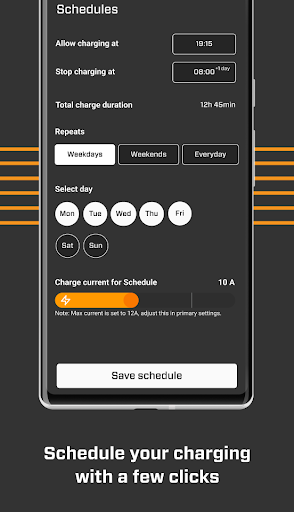
• Schedule charging for any time of day
• Increase or lower the output current during heavy domestic power usage
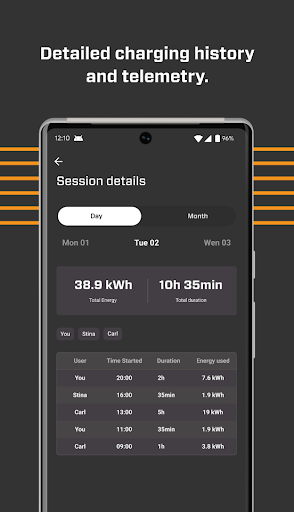
• Record and display your entire charging history
Open up additional features on your CS ONE smart charger
• Connects automatically over BLUETOOTH®
• Revive deeply discharged batteries using the ‘RECOND’ reconditioning mode
• Select ‘LITHIUM WAKE UP’ for lithium-ion batteries with Under Voltage Protection (UVP)
• Turn your CS ONE into a 12V power supply using ‘SUPPLY’ mode to support the battery during service work
• Displays charger voltage and amperage
All you need in a single app
The CTEK APP also gives you access to a range of additional functions, including:
• Quick connection to the CTEK customer support team
• Comprehensive product FAQs and troubleshooting
• Easy access to terms and conditions
The CTEK APP is compatible with most CTEK connected products. If you need any more information on compatibility, check the app and product user manuals or get in touch with our customer support team.
What’s New
• Support for CTEK CS ONE chargers
• Full charging history page (NJORD GO only)
• Date filtering in history page (NJORD GO only)
• General bug fixes
* BLUETOOTH® and Wi-Fi compatibility is subject to product type. Some connected product functions might not be available.
** We call the NJORD® GO an ‘EV charger’ but technically speaking, it’s ‘Electrical Vehicle Supply Equipment’ (EVSE) that provides a safe supply of electricity to power the on-board battery charger in your EV. Most people use the term ‘EV charger’ so to keep things simple, we’re going to use this term as well.
Mehr anzeigen

1. Laden das MEmu-Installationsprogramm herunter und beenden die Installation

2. MEmu starten und Google Play auf der Homepage öffnen

3. Suchen CTEK App in Google Play
Install
4. Herunterladen und Installieren CTEK App
5. Klicken nach Abschluss der Installation auf das Symbol, um es zu starten

6. Verwenden Sie MEmu, um CTEK App auf Ihrem PC zu nutzen
MEmu Play ist aktuell der beste kostenlose Android-Emulator und bietet 50 Millionen Nutzern ein überragendes Android-App-Erlebnis. Dank der Virtualisierungstechnologie von MEmu können Sie Tausende von Android-Apps problemlos auf Ihrem Computer nutzen, selbst solche mit hohen Grafikanforderungen.
BGrößeres Bild mit besserer Grafik; Keine unterbrechungen, keine sorgen um Akku
Komplette Tastenbelegung unterstützt mit Maus und Tastatur oder Controller
Mit dem „Multi-Instance-Manager“ können Sie mehrere Spielkonten oder Spiele gleichzeitig auf einem PC ausführen.
Use CTEK App on PC by following steps: