Infuse
Aktualisiert
Aktuelle Version
1.0.7
Angeboten von

Machen Sie sich keine Sorgen mehr über überhöhte Gebühren, wenn Sie Infuse auf Ihrem Mobiltelefon verwenden, befreien Sie sich von dem winzigen Bildschirm und genießen Sie die Nutzung der App auf einem viel größeren Display. Von nun an können Sie Ihre App mit Tastatur und Maus im Vollbildmodus nutzen. MEmu bietet Ihnen all die überraschenden Funktionen, die Sie erwartet haben: schnelle Installation und einfache Einrichtung, intuitive Steuerung, keine Einschränkungen mehr durch Batterie, mobile Daten und störende Anrufe. Der brandneue MEmu 9 ist die beste Wahl für die Nutzung von Infuse auf Ihrem Computer. Mit unserer Absorption kodiert, ermöglicht der Multi-Instanz-Manager die Eröffnung von 2 oder mehr Konten zur gleichen Zeit. Und das Wichtigste, unsere exklusive Emulations-Engine kann das volle Potenzial Ihres PCs freisetzen und alles reibungslos und angenehm gestalten.
Mehr anzeigen
Laden Sie Play Infuse auf dem PC mit MEmu Android Emulator. Viel Spaß beim Spielen auf großmundieren. Welcome to the Infuse system, where thrilling events and experiences meet cutting-edge technology.
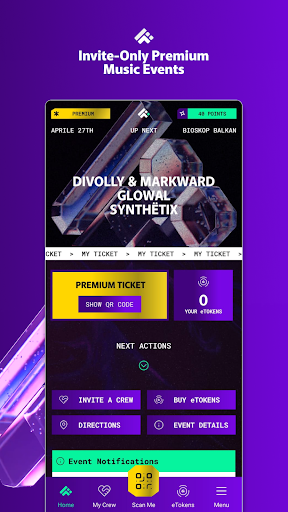
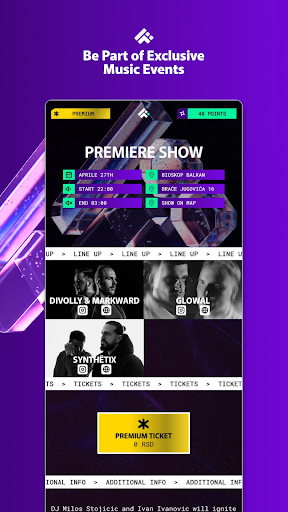
Welcome to the Infuse system, where thrilling events and experiences meet cutting-edge technology. By downloading our app, you've unlocked a gateway to the immersive world of Infuse events. Our app serves as your all-in-one tool for everything Infuse-related, providing unparalleled convenience for all of our users.
Within our community, there are two types of membership: standard and premium. Each type offers its own array of exclusive benefits, ensuring that every user enjoys a personalized experience tailored to their preferences.
As an Infuse member, you'll receive invitations to our events directly through the app. Premium users are guaranteed an invitation to each event, while standard users may join a waiting list for the opportunity to attend. Invitations are active for 72 hours for standard users and up to 96 hours for premium users. If you do not purchase a ticket within this timeframe it will result in the expiration of the invitation. However, standard users will still have the option to purchase one re-invite, while premium users enjoy one free re-invite per event. If you fail to use your re-invite within a limited 24-hour period, you’ll no longer have the chance to attend the event.
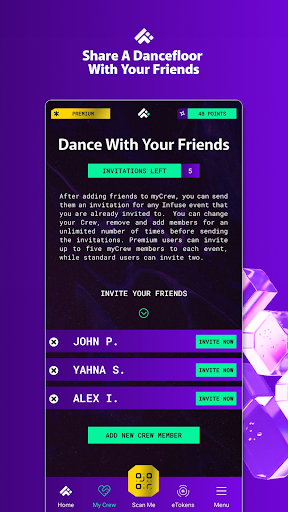
Each user is limited to purchasing one ticket per event through their account. However, our innovative myCrew feature allows users to extend invitations to their friends, fostering a sense of community. Standard users have the option of sending two invitations, while premium users can invite up to five friends through the myCrew page. You can change your list, add and remove Crew members as many times as you like before clicking the invite now button. They will receive a notification only after you send them the invitation to an event.
Once tickets for an event are sold out, there are no additional waiting lists or re-invites available.
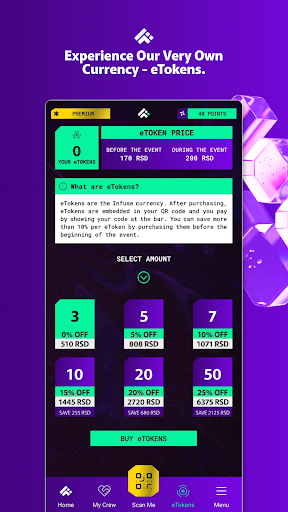
For absolute convenience, everything you need to attend an Infuse event is incorporated in your unique QR code that is connected to your account and specially crafted for each one of our users. Our ticketing system is entirely digital, with tickets being seamlessly embedded into your personal QR code after you purchase them. Additionally, we have created our very own currency - eTokens. You can purchase eTokens through our app before or during an event, they will automatically be integrated into your QR code and can be used to pay for beverages at all Infuse events. You can pay just by presenting your QR code and allowing it to be scanned.
At Infuse, we're dedicated to revolutionizing the event experience, one seamless interaction at a time. Join us in embracing the future of event organization, where convenience, innovation, and a like-minded community come together to create unforgettable moments.
Mehr anzeigen

1. Laden das MEmu-Installationsprogramm herunter und beenden die Installation

2. MEmu starten und Google Play auf der Homepage öffnen

3. Suchen Infuse in Google Play
Install
4. Herunterladen und Installieren Infuse
5. Klicken nach Abschluss der Installation auf das Symbol, um es zu starten

6. Verwenden Sie MEmu, um Infuse auf Ihrem PC zu nutzen
MEmu Play ist aktuell der beste kostenlose Android-Emulator und bietet 50 Millionen Nutzern ein überragendes Android-App-Erlebnis. Dank der Virtualisierungstechnologie von MEmu können Sie Tausende von Android-Apps problemlos auf Ihrem Computer nutzen, selbst solche mit hohen Grafikanforderungen.
BGrößeres Bild mit besserer Grafik; Keine unterbrechungen, keine sorgen um Akku
Komplette Tastenbelegung unterstützt mit Maus und Tastatur oder Controller
Mit dem „Multi-Instance-Manager“ können Sie mehrere Spielkonten oder Spiele gleichzeitig auf einem PC ausführen.
Use Infuse on PC by following steps: