Kia Access
Aktualisiert
Aktuelle Version
7.27.0
Angeboten von

Machen Sie sich keine Sorgen mehr über überhöhte Gebühren, wenn Sie Kia Access auf Ihrem Mobiltelefon verwenden, befreien Sie sich von dem winzigen Bildschirm und genießen Sie die Nutzung der App auf einem viel größeren Display. Von nun an können Sie Ihre App mit Tastatur und Maus im Vollbildmodus nutzen. MEmu bietet Ihnen all die überraschenden Funktionen, die Sie erwartet haben: schnelle Installation und einfache Einrichtung, intuitive Steuerung, keine Einschränkungen mehr durch Batterie, mobile Daten und störende Anrufe. Der brandneue MEmu 9 ist die beste Wahl für die Nutzung von Kia Access auf Ihrem Computer. Mit unserer Absorption kodiert, ermöglicht der Multi-Instanz-Manager die Eröffnung von 2 oder mehr Konten zur gleichen Zeit. Und das Wichtigste, unsere exklusive Emulations-Engine kann das volle Potenzial Ihres PCs freisetzen und alles reibungslos und angenehm gestalten.
Mehr anzeigen
Genieße Kia Access auf deinem PC mit MEmu Play in einer fantastischen Version. Dieser leistungsstarke, kostenlose Android-Emulator bietet dir Zugriff auf Tausende von Android-Apps für deinen Desktop. Bleib mit Freunden in Kontakt und arbeite effizienter! Kia Access is the official Kia America, Inc.
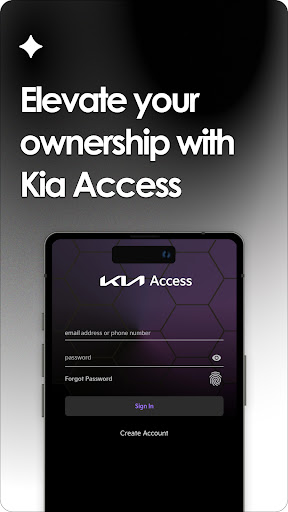
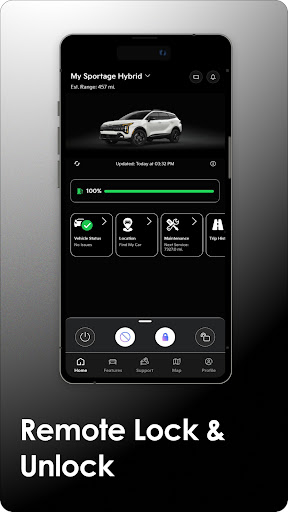
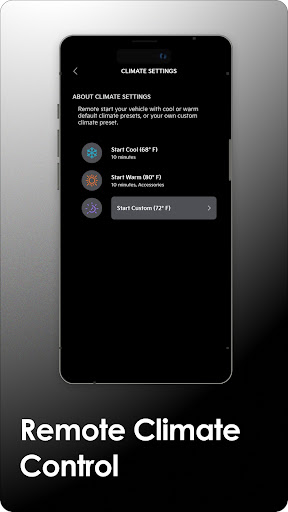
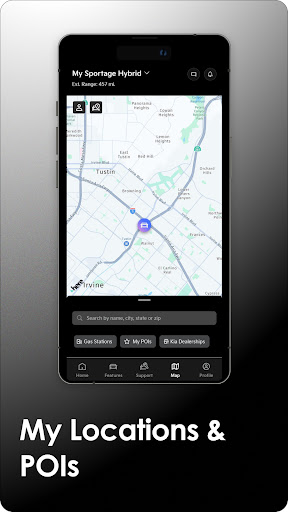
Kia Access is the official Kia America, Inc. owner’s app. Kia Access makes getting your vehicle information and services easier than ever. Gain all the benefits of the Kia Owner’s Portal, combined with many of the convenient, streamlined features of Kia Connect (formerly known as UVO link) (if equipped) [1] [2] [4] – right in the palm of your hand.
Download the app to access:
• Owner’s Manual, quick guides, videos, and warranty information
• Vehicle payment information (if financed through Kia Motors Finance)
• Information about maintenance milestones
Vehicles equipped with Kia Connect may also have access to the following features:
• Vehicle health reports [2]
• Send locations to your vehicle’s navigation system [3]
• Remotely lock/unlock doors and initiate horns & lights [2]
• Remotely find your car [3]
• Remotely set your car’s cabin temperature [4]
Plug-in hybrid and electric vehicles support special features, including:
• Remotely check battery status and estimated driving range
• Locate charging stations
• Schedule charging times
Get Kia Access today!
Also available for Wear OS.
Kia eServices users – Please use the Kia eServices app.
Create an owner account directly from the app or go to: Kia.com/owners
[1] Kia Connect is currently unavailable for Model Year 2022 vehicles sold or purchased in Massachusetts. See Kia Connect Terms of Service for more information.
[2] Features only available for vehicles equipped with Kia Connect. Determine Kia Connect availability for your vehicle by visiting: https://owners.kia.com/content/owners/en/uvo-availability.html/ Vehicle health reports are not a substitute for regularly scheduled maintenance. Vehicle health reports check powertrain, chassis, and airbag systems, and require initial activation. See Owner’s Manual for details and maintenance schedule.
[3] Vehicle must be equipped with Kia Connect and navigation
[4] Some vehicles with Kia Connect may not support remote climate control (e.g., 2019 Optima LX). Do not use remote climate control or remote start if vehicle is in an enclosed area (e.g., closed garage) or a partially enclosed area without ventilation. Close all doors leading from adjacent living areas to the vehicle area before executing a remote climate control or remote start command
Use of Kia Access is subject to agreement to the Kia Privacy Policy (available at https://www.kia.com/us/en/content/privacy-and-legal/privacy-policy) and Terms of Service (available at https://www.kia.com/us/en/content/terms-of-use).
Kia Connect features require an active Kia Connect subscription; purchase/lease of certain new Kia vehicles with Kia Connect includes a complimentary 1-year subscription starting from new vehicle retail sale/lease date as recorded by the dealer. After the complimentary 1-year Kia Connect subscription expires, continued access to the full suite of Kia Connect services available on the vehicle will require a paid subscription at the then-current subscription rate or use of certain Kia Connect features may immediately terminate. Use of Kia Connect is subject to agreement to the Kia Connect Privacy Policy (available at https://owners.kia.com/us/en/privacy-policy.html) and Terms of Service (available at https://owners.kia.com/us/en/terms-of-service.html). Contact Kia at 800-333-4KIA (4542) or https://ksupport.kiausa.com/ConsumerAffairs for questions or help with enrollment.
Only use Kia Connect when safe to do so. Message and data rates may apply. Cellular and GPS coverage is required to use most features. Kia Connect features may vary by model, model year, and trim level. Features, specifications, and fees are subject to change. For more on details and limitations, visit https://owners.kia.com/content/owners/en/uvo-availability.html/ or your authorized Kia dealer. Kia Connect may currently be unavailable for Model Year 2022 and newer vehicles sold or purchased in Massachusetts; please see the Kia Owner's Portal for updates on availability.
Mehr anzeigen

1. Laden das MEmu-Installationsprogramm herunter und beenden die Installation

2. MEmu starten und Google Play auf der Homepage öffnen

3. Suchen Kia Access in Google Play
Install
4. Herunterladen und Installieren Kia Access
5. Klicken nach Abschluss der Installation auf das Symbol, um es zu starten

6. Verwenden Sie MEmu, um Kia Access auf Ihrem PC zu nutzen
MEmu Play ist aktuell der beste kostenlose Android-Emulator und bietet 50 Millionen Nutzern ein überragendes Android-App-Erlebnis. Dank der Virtualisierungstechnologie von MEmu können Sie Tausende von Android-Apps problemlos auf Ihrem Computer nutzen, selbst solche mit hohen Grafikanforderungen.
BGrößeres Bild mit besserer Grafik; Keine unterbrechungen, keine sorgen um Akku
Komplette Tastenbelegung unterstützt mit Maus und Tastatur oder Controller
Mit dem „Multi-Instance-Manager“ können Sie mehrere Spielkonten oder Spiele gleichzeitig auf einem PC ausführen.
Use Kia Access on PC by following steps: