MySubaru
Aktualisiert
Aktuelle Version
3.1.1
Angeboten von

Machen Sie sich keine Sorgen mehr über überhöhte Gebühren, wenn Sie MySubaru auf Ihrem Mobiltelefon verwenden, befreien Sie sich von dem winzigen Bildschirm und genießen Sie die Nutzung der App auf einem viel größeren Display. Von nun an können Sie Ihre App mit Tastatur und Maus im Vollbildmodus nutzen. MEmu bietet Ihnen all die überraschenden Funktionen, die Sie erwartet haben: schnelle Installation und einfache Einrichtung, intuitive Steuerung, keine Einschränkungen mehr durch Batterie, mobile Daten und störende Anrufe. Der brandneue MEmu 9 ist die beste Wahl für die Nutzung von MySubaru auf Ihrem Computer. Mit unserer Absorption kodiert, ermöglicht der Multi-Instanz-Manager die Eröffnung von 2 oder mehr Konten zur gleichen Zeit. Und das Wichtigste, unsere exklusive Emulations-Engine kann das volle Potenzial Ihres PCs freisetzen und alles reibungslos und angenehm gestalten.
Mehr anzeigen
Laden Sie Play MySubaru auf dem PC mit MEmu Android Emulator. Viel Spaß beim Spielen auf großmundieren. The MySubaru app seamlessly connects you to your Subaru.
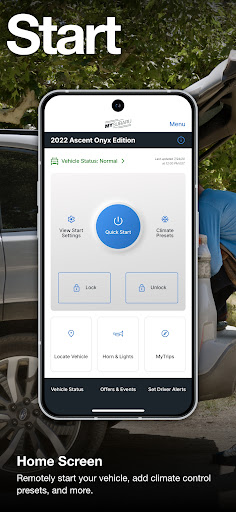
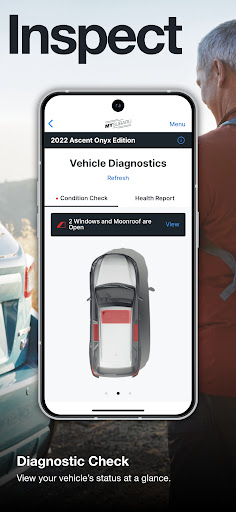
The MySubaru app seamlessly connects you to your Subaru. Enjoy remote start, unlock/lock, service scheduler, digital history, vehicle locator, and 24/7 roadside assistance.
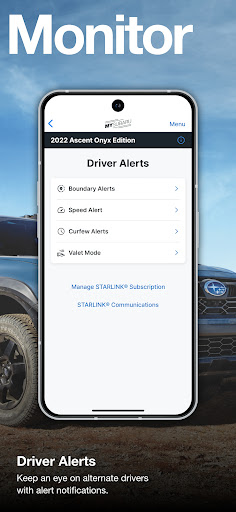
Whether it's starting your vehicle and controlling the car's temperature remotely, scheduling a service appointment, or monitoring authorized drivers, the MySubaru app puts the power of your Subaru at your fingertips. With MySubaru, you can connect to convenience and safety.
Remote Features:
▪Remote Start*
▪Remote Lock, Unlock, and Vehicle Locator***
▪Remote Climate Control settings from your smartphone***
▪Remote Horn and Lights
Service Features:
▪Schedule Service Appointments**
▪Track Your Vehicle’s Service History
▪ Get Vehicle Maintenance Reminders and recall notices
▪Real-time Vehicle Health Notifications***
▪Access Owner’s Manuals and How-To Videos
▪Vehicle Diagnostics*****
▪Usage Report***
▪Find Nearby Subaru Retailers and Certified Collision Centers
Safety and Security Features:
▪24-Hour Roadside Assistance****
▪Automatic Collision Notifications***
▪Access Starlink Safety and Security features***
Convenience Features:
▪Exclusive special offers and coupons
▪Manage the drivers in your household with Boundary, Speed, and Curfew Alerts*****
▪Plan and save trips, then send directions to your Starlink navigation system***
▪ Trip Logs******
▪Driving Journals******
▪Touch and Face ID for Remote Services
▪Valet Mode Status******
▪ Valet Passcode Reset******
▪ Contact Subaru Customer Support
*Remote Engine Start is available on keyless access with push button start vehicles. Remote Engine Start with Climate Control is available on vehicles with keyless access with push button start and automatic climate control. Not available on vehicles with manual transmission.
**Service Scheduler function is not available for all Subaru retailers.
***Subaru owners must have an active Starlink subscription to access remote services.
****24-hour roadside is included in standard 3-year warranty and after 3 years with a gold package.
*****Available on select 2019 and newer models.
******These features are available only for Model Year 2023 and newer Subaru vehicles.
© 2024 Subaru of America, Inc.
Mehr anzeigen

1. Laden das MEmu-Installationsprogramm herunter und beenden die Installation

2. MEmu starten und Google Play auf der Homepage öffnen

3. Suchen MySubaru in Google Play
Install
4. Herunterladen und Installieren MySubaru
5. Klicken nach Abschluss der Installation auf das Symbol, um es zu starten

6. Verwenden Sie MEmu, um MySubaru auf Ihrem PC zu nutzen
MEmu Play ist aktuell der beste kostenlose Android-Emulator und bietet 50 Millionen Nutzern ein überragendes Android-App-Erlebnis. Dank der Virtualisierungstechnologie von MEmu können Sie Tausende von Android-Apps problemlos auf Ihrem Computer nutzen, selbst solche mit hohen Grafikanforderungen.
BGrößeres Bild mit besserer Grafik; Keine unterbrechungen, keine sorgen um Akku
Komplette Tastenbelegung unterstützt mit Maus und Tastatur oder Controller
Mit dem „Multi-Instance-Manager“ können Sie mehrere Spielkonten oder Spiele gleichzeitig auf einem PC ausführen.
Use MySubaru on PC by following steps: