Net ipTV
Aktualisiert
Aktuelle Version
1774446365
Angeboten von

Machen Sie sich keine Sorgen mehr über überhöhte Gebühren, wenn Sie Net ipTV auf Ihrem Mobiltelefon verwenden, befreien Sie sich von dem winzigen Bildschirm und genießen Sie die Nutzung der App auf einem viel größeren Display. Von nun an können Sie Ihre App mit Tastatur und Maus im Vollbildmodus nutzen. MEmu bietet Ihnen all die überraschenden Funktionen, die Sie erwartet haben: schnelle Installation und einfache Einrichtung, intuitive Steuerung, keine Einschränkungen mehr durch Batterie, mobile Daten und störende Anrufe. Der brandneue MEmu 9 ist die beste Wahl für die Nutzung von Net ipTV auf Ihrem Computer. Mit unserer Absorption kodiert, ermöglicht der Multi-Instanz-Manager die Eröffnung von 2 oder mehr Konten zur gleichen Zeit. Und das Wichtigste, unsere exklusive Emulations-Engine kann das volle Potenzial Ihres PCs freisetzen und alles reibungslos und angenehm gestalten.
Mehr anzeigen
Laden Sie Play Net ipTV auf dem PC mit MEmu Android Emulator. Viel Spaß beim Spielen auf großmundieren. Erlebe deine Lieblingsinhalte – Live-TV, Filme und Serien – genau so, wie sie gedacht sind.



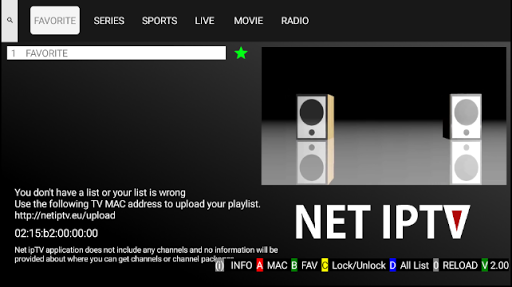
Erlebe deine Lieblingsinhalte – Live-TV, Filme und Serien – genau so, wie sie gedacht sind. Eine intelligente IPTV-Player-Lösung mit allen Funktionen, die du brauchst – jetzt zum Download verfügbar.
NET IPTV PLAYER STELLT KEINE INHALTE BEREIT UND IST NICHT MIT DRITTANBIETERN VERBUNDEN.
Seit 2017 gehört NET IPTV zu den wenigen IPTV-Player-Apps, die kontinuierlich auf allen großen Smart-TV-Plattformen verfügbar sind – darunter Samsung Tizen, LG webOS, Android TV, Fire TV, Apple TV und mehr. Diese langjährige Präsenz spiegelt unser Engagement für Qualität, Stabilität und Benutzerfreundlichkeit wider.
NET IPTV Player unterstützt alle M3U- und Xtream-Playlists, sodass Nutzer ihre eigenen Inhalte hinzufügen und ein erstklassiges IPTV-Streaming-Erlebnis auf allen unterstützten Geräten genießen können.
Hauptfunktionen von NET IPTV:
• Einfache Navigation durch Filme und Serien, einschließlich Staffel- und Episodenanzeige
• Zugriff auf Besetzungsinformationen und Trailer für Filme und Serien
• Favoritenliste für Filme, Serien, Live-TV und Videos
• Wiedergabe genau dort fortsetzen, wo du aufgehört hast
• Intelligente Suchfunktion für effizientes Auffinden von Inhalten
• Anpassbares Seitenverhältnis für optimale Darstellung auf verschiedenen Bildschirmen
• Unterstützung für mehrere M3U- und Xtream-Playlists
• Bild-in-Bild-Unterstützung innerhalb der App
• Hintergrundwiedergabe während der Nutzung anderer Apps
• Schneller Episodenwechsel während der Wiedergabe
Rechtliche Hinweise:
• NET IPTV Player verwendet die TMDB-API zur Bereitstellung von Metadaten, ist jedoch nicht von TMDB unterstützt oder zertifiziert.
• Basierend auf VLCKit, entwickelt von den Machern des VLC Media Players.
• Gezeigte Screenshots dienen nur zur Veranschaulichung und stellen keine echten Inhalte dar.
• NET IPTV Player hostet oder stellt keine Medieninhalte bereit.
• Alle Inhalte müssen vom Nutzer hinzugefügt werden.
• Beispielbilder und -videos stammen aus gemeinfreien Quellen.
Haftungsausschluss:
• NET IPTV Player stellt keine audiovisuellen Inhalte bereit und fordert diese auch nicht an.
• NET IPTV Player ist nicht mit Drittanbietern oder Diensten verbunden.
• Die Verantwortung für die verwendeten Inhalte liegt ausschließlich beim Nutzer.
• Wir unterstützen kein Streaming urheberrechtlich geschützter Inhalte ohne Genehmigung des Rechteinhabers.
Lade NET IPTV Player jetzt herunter und erlebe digitales Streaming so, wie es sein sollte.
NET IPTV – Fernsehen neu definiert.
Mehr anzeigen

1. Laden das MEmu-Installationsprogramm herunter und beenden die Installation

2. MEmu starten und Google Play auf der Homepage öffnen

3. Suchen Net ipTV in Google Play
Install
4. Herunterladen und Installieren Net ipTV
5. Klicken nach Abschluss der Installation auf das Symbol, um es zu starten

6. Verwenden Sie MEmu, um Net ipTV auf Ihrem PC zu nutzen
MEmu Play ist aktuell der beste kostenlose Android-Emulator und bietet 50 Millionen Nutzern ein überragendes Android-App-Erlebnis. Dank der Virtualisierungstechnologie von MEmu können Sie Tausende von Android-Apps problemlos auf Ihrem Computer nutzen, selbst solche mit hohen Grafikanforderungen.
BGrößeres Bild mit besserer Grafik; Keine unterbrechungen, keine sorgen um Akku
Komplette Tastenbelegung unterstützt mit Maus und Tastatur oder Controller
Mit dem „Multi-Instance-Manager“ können Sie mehrere Spielkonten oder Spiele gleichzeitig auf einem PC ausführen.
Use Net ipTV on PC by following steps: