Pcard app
Aktualisiert
Aktuelle Version
3.6.2
Angeboten von

Machen Sie sich keine Sorgen mehr über überhöhte Gebühren, wenn Sie Pcard app auf Ihrem Mobiltelefon verwenden, befreien Sie sich von dem winzigen Bildschirm und genießen Sie die Nutzung der App auf einem viel größeren Display. Von nun an können Sie Ihre App mit Tastatur und Maus im Vollbildmodus nutzen. MEmu bietet Ihnen all die überraschenden Funktionen, die Sie erwartet haben: schnelle Installation und einfache Einrichtung, intuitive Steuerung, keine Einschränkungen mehr durch Batterie, mobile Daten und störende Anrufe. Der brandneue MEmu 9 ist die beste Wahl für die Nutzung von Pcard app auf Ihrem Computer. Mit unserer Absorption kodiert, ermöglicht der Multi-Instanz-Manager die Eröffnung von 2 oder mehr Konten zur gleichen Zeit. Und das Wichtigste, unsere exklusive Emulations-Engine kann das volle Potenzial Ihres PCs freisetzen und alles reibungslos und angenehm gestalten.
Mehr anzeigen
Genieße Pcard app auf deinem PC mit MEmu Play in einer fantastischen Version. Dieser leistungsstarke, kostenlose Android-Emulator bietet dir Zugriff auf Tausende von Android-Apps für deinen Desktop. Bleib mit Freunden in Kontakt und arbeite effizienter! Pcard app: Access the city at your fingertips.
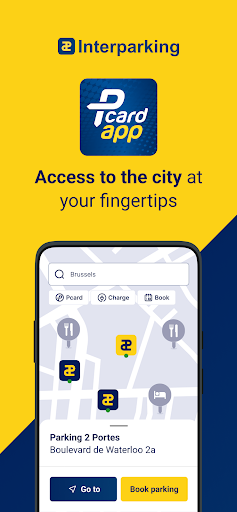
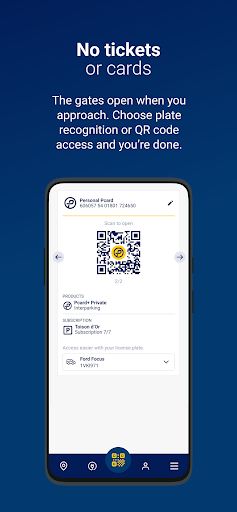
Pcard app: Access the city at your fingertips
Easily access our parking facilities and enjoy preferential rates. License plate or QR code: enter as you wish.
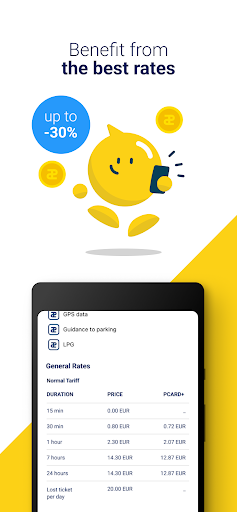
Benefit from the best rates
The Pcard app is free, and you are only charged based on what you actually use. By using it, you get a discount of up to 30% on parking rates.
Easily import your Pcard+
Link your existing Pcard+ in one click using NFC technology, or register directly in the app to access all the benefits.
Charge your car via the app
Activate and deactivate your electric vehicle charging session with a single click. Enjoy the Pcard special rate and manage your charges effortlessly (this service will be available soon in France).
No tickets or cards, enter and pay with your application
Avoid queues at payment machines and easily track your usage with the app.
Find everything you need
Whether you're looking for a real-time available charging station or the nearest car park to your destination, the Pcard app makes your search quick and simple.
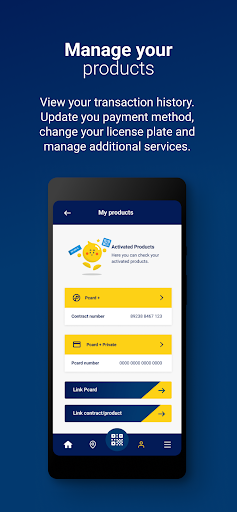
Manage your account
View your transaction history. Update your payment method, change your license plate, and manage additional services.
In Belgium: Access the Fleet-Wash network
Thanks to our partnership with Fleet-Wash, you can now pay for your carwash directly through the app at participating locations.
Easily book your parking spot in participating car parks.
About Interparking
Interparking Group is one of the leading international parking operators. Founded over 60 years ago, the Group operates 2,098 parking facilities across 15 European countries and in Chile, representing 792,000 parking spaces and more than 8,000 electric vehicle charging stations.
The Group brings together several renowned brands, including Interparking, Saba, Contipark, and SIS.
Mehr anzeigen

1. Laden das MEmu-Installationsprogramm herunter und beenden die Installation

2. MEmu starten und Google Play auf der Homepage öffnen

3. Suchen Pcard app in Google Play
Install
4. Herunterladen und Installieren Pcard app
5. Klicken nach Abschluss der Installation auf das Symbol, um es zu starten

6. Verwenden Sie MEmu, um Pcard app auf Ihrem PC zu nutzen
MEmu Play ist aktuell der beste kostenlose Android-Emulator und bietet 50 Millionen Nutzern ein überragendes Android-App-Erlebnis. Dank der Virtualisierungstechnologie von MEmu können Sie Tausende von Android-Apps problemlos auf Ihrem Computer nutzen, selbst solche mit hohen Grafikanforderungen.
BGrößeres Bild mit besserer Grafik; Keine unterbrechungen, keine sorgen um Akku
Komplette Tastenbelegung unterstützt mit Maus und Tastatur oder Controller
Mit dem „Multi-Instance-Manager“ können Sie mehrere Spielkonten oder Spiele gleichzeitig auf einem PC ausführen.
Use Pcard app on PC by following steps: