Popia Chat: AI Roleplay
Aktualisiert
Aktuelle Version
3.6.5
Angeboten von

Machen Sie sich keine Sorgen mehr über überhöhte Gebühren, wenn Sie Popia Chat: AI Roleplay auf Ihrem Mobiltelefon verwenden, befreien Sie sich von dem winzigen Bildschirm und genießen Sie die Nutzung der App auf einem viel größeren Display. Von nun an können Sie Ihre App mit Tastatur und Maus im Vollbildmodus nutzen. MEmu bietet Ihnen all die überraschenden Funktionen, die Sie erwartet haben: schnelle Installation und einfache Einrichtung, intuitive Steuerung, keine Einschränkungen mehr durch Batterie, mobile Daten und störende Anrufe. Der brandneue MEmu 9 ist die beste Wahl für die Nutzung von Popia Chat: AI Roleplay auf Ihrem Computer. Mit unserer Absorption kodiert, ermöglicht der Multi-Instanz-Manager die Eröffnung von 2 oder mehr Konten zur gleichen Zeit. Und das Wichtigste, unsere exklusive Emulations-Engine kann das volle Potenzial Ihres PCs freisetzen und alles reibungslos und angenehm gestalten.
Mehr anzeigen
Genieße Popia Chat: AI Roleplay auf deinem PC mit MEmu Play in einer fantastischen Version. Dieser leistungsstarke, kostenlose Android-Emulator bietet dir Zugriff auf Tausende von Android-Apps für deinen Desktop. Bleib mit Freunden in Kontakt und arbeite effizienter! Create characters.
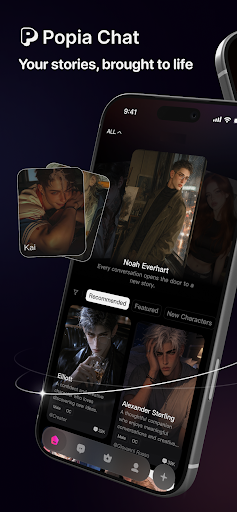
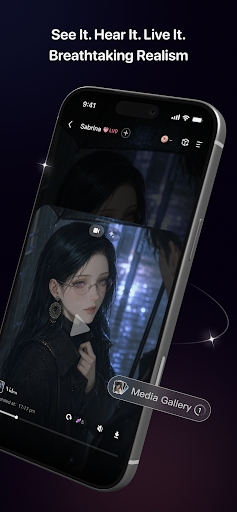
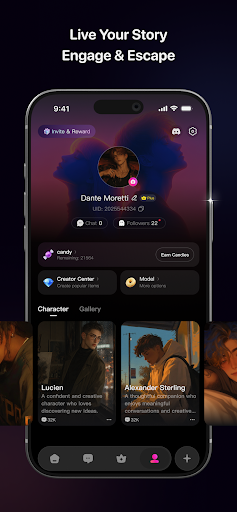
Create characters. Start conversations. Shape stories that grow with you.
Popia Chat is an AI-powered character chat and storytelling app where every conversation can open up a new story. Create original characters, explore immersive fictional worlds, and shape what happens next through interactive chats.
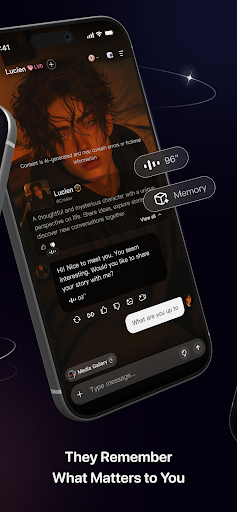
Create AI CharactersDesign characters with distinct personalities, appearances, memories, voices, and backstories. Chat with them and build a connection that develops over time.
Shape Interactive StoriesStep into the story and decide what happens next. Your choices influence conversations, reveal new scenes, and guide each narrative in unexpected directions.
Explore Fictional WorldsEnter fantasy, mystery, royal drama, sci-fi, supernatural adventures, slice-of-life settings, and worlds created by the community.
Bring Scenes to LifeGenerate AI-powered images inspired by your characters, conversations, and story moments.
Pick Up Where You Left OffCharacters can remember past conversations, important events, and story details, helping your stories continue naturally.
Discover Community CreationsMeet characters and explore worlds made by other creators, or start from scratch and build a universe of your own.
Whether you love character chats, interactive fiction, or creating original worlds, Popia Chat gives you a place to imagine, talk, and see where the story goes.
Start with a conversation. Build a world of your own.
Note: Popia Chat includes content moderation systems to support safe and policy-compliant user-generated content.
Privacy Policy: https://www.popia.app/popiachat/en/privacy
Terms of Service: https://www.popia.app/popiachat/en/terms
Mehr anzeigen

1. Laden das MEmu-Installationsprogramm herunter und beenden die Installation

2. MEmu starten und Google Play auf der Homepage öffnen

3. Suchen Popia Chat: AI Roleplay in Google Play
Install
4. Herunterladen und Installieren Popia Chat: AI Roleplay
5. Klicken nach Abschluss der Installation auf das Symbol, um es zu starten

6. Verwenden Sie MEmu, um Popia Chat: AI Roleplay auf Ihrem PC zu nutzen
MEmu Play ist aktuell der beste kostenlose Android-Emulator und bietet 50 Millionen Nutzern ein überragendes Android-App-Erlebnis. Dank der Virtualisierungstechnologie von MEmu können Sie Tausende von Android-Apps problemlos auf Ihrem Computer nutzen, selbst solche mit hohen Grafikanforderungen.
BGrößeres Bild mit besserer Grafik; Keine unterbrechungen, keine sorgen um Akku
Komplette Tastenbelegung unterstützt mit Maus und Tastatur oder Controller
Mit dem „Multi-Instance-Manager“ können Sie mehrere Spielkonten oder Spiele gleichzeitig auf einem PC ausführen.
Use Popia Chat: AI Roleplay on PC by following steps: