Ringtones for Galaxy J Series
Aktualisiert
Aktuelle Version
ringtones for galaxy j
Angeboten von

Machen Sie sich keine Sorgen mehr über überhöhte Gebühren, wenn Sie Ringtones for Galaxy J Series auf Ihrem Mobiltelefon verwenden, befreien Sie sich von dem winzigen Bildschirm und genießen Sie die Nutzung der App auf einem viel größeren Display. Von nun an können Sie Ihre App mit Tastatur und Maus im Vollbildmodus nutzen. MEmu bietet Ihnen all die überraschenden Funktionen, die Sie erwartet haben: schnelle Installation und einfache Einrichtung, intuitive Steuerung, keine Einschränkungen mehr durch Batterie, mobile Daten und störende Anrufe. Der brandneue MEmu 9 ist die beste Wahl für die Nutzung von Ringtones for Galaxy J Series auf Ihrem Computer. Mit unserer Absorption kodiert, ermöglicht der Multi-Instanz-Manager die Eröffnung von 2 oder mehr Konten zur gleichen Zeit. Und das Wichtigste, unsere exklusive Emulations-Engine kann das volle Potenzial Ihres PCs freisetzen und alles reibungslos und angenehm gestalten.
Mehr anzeigen
Genieße Ringtones for Galaxy J Series auf deinem PC mit MEmu Play in einer fantastischen Version. Dieser leistungsstarke, kostenlose Android-Emulator bietet dir Zugriff auf Tausende von Android-Apps für deinen Desktop. Bleib mit Freunden in Kontakt und arbeite effizienter! This app contains the ringing tones of old Samsung J Series phone.
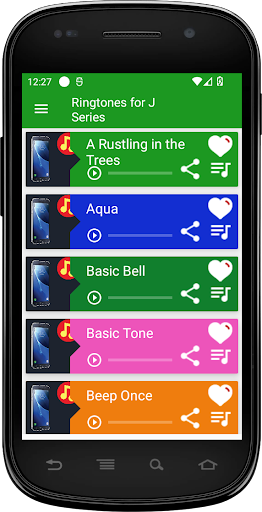
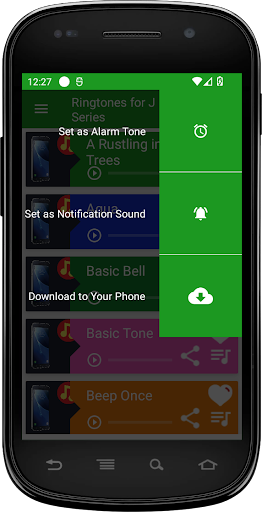
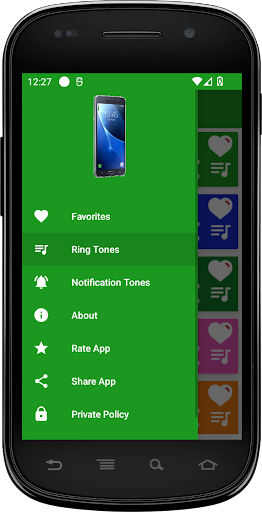
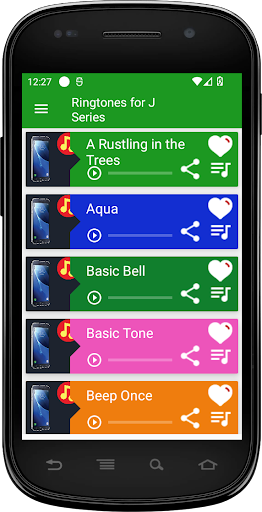
This app contains the ringing tones of old Samsung J Series phone. With this app, you can set old ringtones of J Series as ringtone, message tone, and alarm sound to your own phone.
We have collected popular Samsung J Phone ringtones for you in this app. You can share old Samsung galaxy j ringtones in the app with your friends, set them as ringtone, notification sound, and alarm sound.
Features
• With old J Phone ringtones you can; set as ringtone, set as notification sound, and set as alarm sound.
• Add the retro J Series ringtones you like to favorites.
• You can send ringtones for galaxy J Series to your friends and share them with them.
• 136 old ringtones and notification tones
How Does It Use?
• Download the app and press the ringtone you want to listen to.
• If you want to share the sounds, it will ask you for permission to read and write files. This permission is only used to share sounds.
• If you want to set it as ringtone, alarm sound, or notification sound, you must give permission to change the system settings. This permission is required to change the ringtone.
Disclaimer
All images / videos / narrations in this application are taken from search networks. This app is not affiliated directly with the creator of the images / videos / narrations. It is just a fan application, it has no official connection with Samsung Electronics or Samsung J Series. If you think your usage rights have been violated, please send an e-mail. The content will be removed from the application within 5 business days.
Mehr anzeigen

1. Laden das MEmu-Installationsprogramm herunter und beenden die Installation

2. MEmu starten und Google Play auf der Homepage öffnen

3. Suchen Ringtones for Galaxy J Series in Google Play
Install
4. Herunterladen und Installieren Ringtones for Galaxy J Series
5. Klicken nach Abschluss der Installation auf das Symbol, um es zu starten

6. Verwenden Sie MEmu, um Ringtones for Galaxy J Series auf Ihrem PC zu nutzen
MEmu Play ist aktuell der beste kostenlose Android-Emulator und bietet 50 Millionen Nutzern ein überragendes Android-App-Erlebnis. Dank der Virtualisierungstechnologie von MEmu können Sie Tausende von Android-Apps problemlos auf Ihrem Computer nutzen, selbst solche mit hohen Grafikanforderungen.
BGrößeres Bild mit besserer Grafik; Keine unterbrechungen, keine sorgen um Akku
Komplette Tastenbelegung unterstützt mit Maus und Tastatur oder Controller
Mit dem „Multi-Instance-Manager“ können Sie mehrere Spielkonten oder Spiele gleichzeitig auf einem PC ausführen.
Use Ringtones for Galaxy J Series on PC by following steps: