
Scoremer - Live Score and Tips
Aktualisiert
Aktuelle Version
4.9.1
Angeboten von

Machen Sie sich keine Sorgen mehr über überhöhte Gebühren, wenn Sie Scoremer - Live Score and Tips auf Ihrem Mobiltelefon verwenden, befreien Sie sich von dem winzigen Bildschirm und genießen Sie die Nutzung der App auf einem viel größeren Display. Von nun an können Sie Ihre App mit Tastatur und Maus im Vollbildmodus nutzen. MEmu bietet Ihnen all die überraschenden Funktionen, die Sie erwartet haben: schnelle Installation und einfache Einrichtung, intuitive Steuerung, keine Einschränkungen mehr durch Batterie, mobile Daten und störende Anrufe. Der brandneue MEmu 9 ist die beste Wahl für die Nutzung von Scoremer - Live Score and Tips auf Ihrem Computer. Mit unserer Absorption kodiert, ermöglicht der Multi-Instanz-Manager die Eröffnung von 2 oder mehr Konten zur gleichen Zeit. Und das Wichtigste, unsere exklusive Emulations-Engine kann das volle Potenzial Ihres PCs freisetzen und alles reibungslos und angenehm gestalten.
Mehr anzeigen
Laden Sie Play Scoremer - Live Score and Tips auf dem PC mit MEmu Android Emulator. Viel Spaß beim Spielen auf großmundieren. Scoremer is Your Ultimate Live Score and Football Prediction App.
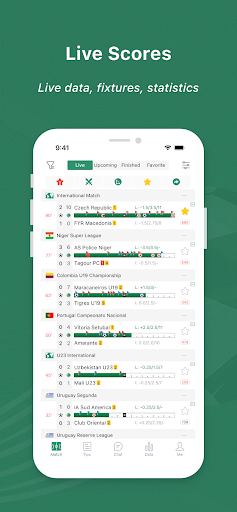
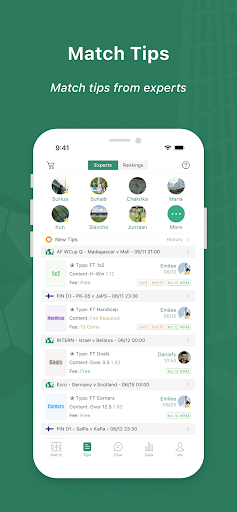
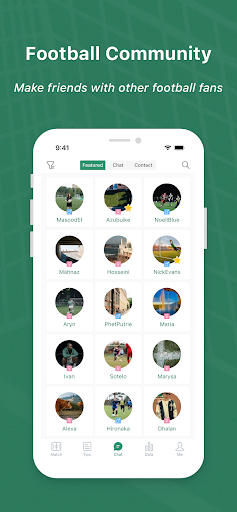
Scoremer is Your Ultimate Live Score and Football Prediction App.
Scoremer is the go-to app for football enthusiasts seeking real-time scores and expert predictions. Our comprehensive live score tracker provides instant updates on goal events, red cards, and substitutions. Stay up-to-date with the latest results and fixtures to never miss a moment of the action. Our coverage spans 211 countries, 1492 leagues, and 22557 teams, ensuring you have access to the most comprehensive football data.
Our expert team of analysts and sports betting professionals provides insightful predictions and tips, empowering you to make informed betting decisions. Whether you're looking for 1X2 odds, over/under goals, handicaps, or halftime/full-time goals, we have you covered.
Key features:
* Real-time live scores for all football matches
* Live Corner Scores
* In-depth match statistics and analysis
* Expert betting tips and predictions
* Coverage of major leagues like Bundesliga, Premier League, La Liga, Ligue 1, Serie A, Europa League, and Champions League
* Odds from leading bookmakers worldwide
We cover all major football leagues, including:
* German Bundesliga
* English Premier League
* Spanish La Liga
* French Ligue 1
* Italian Serie A
* Europa League
* Champions League
* UEFA Euro
* World Cup
Join the millions of football fans who rely on Scoremer for the most accurate and up-to-date live scores, betting tips, and more. Download the app today and elevate your football experience!
We are the best soccer predictor in USA, England, Nigeria, Netherlands, Italy, Ghana, Spain, Germany, France, Kenya, Bulgaria, Greece, Switzerland, Sweden, Norway, Philippines, Turkey, Denmark, Korea, Czech Republic, Romania, Brazil, Finland, Portugal, Tunisia and more countries‘ sports...
Mehr anzeigen

1. Laden das MEmu-Installationsprogramm herunter und beenden die Installation

2. MEmu starten und Google Play auf der Homepage öffnen

3. Suchen Scoremer - Live Score and Tips in Google Play
Install
4. Herunterladen und Installieren Scoremer - Live Score and Tips
5. Klicken nach Abschluss der Installation auf das Symbol, um es zu starten

6. Verwenden Sie MEmu, um Scoremer - Live Score and Tips auf Ihrem PC zu nutzen
MEmu Play ist aktuell der beste kostenlose Android-Emulator und bietet 50 Millionen Nutzern ein überragendes Android-App-Erlebnis. Dank der Virtualisierungstechnologie von MEmu können Sie Tausende von Android-Apps problemlos auf Ihrem Computer nutzen, selbst solche mit hohen Grafikanforderungen.
BGrößeres Bild mit besserer Grafik; Keine unterbrechungen, keine sorgen um Akku
Komplette Tastenbelegung unterstützt mit Maus und Tastatur oder Controller
Mit dem „Multi-Instance-Manager“ können Sie mehrere Spielkonten oder Spiele gleichzeitig auf einem PC ausführen.
Use Scoremer - Live Score and Tips on PC by following steps: