TenantHub: Rental Manager
Aktualisiert
Aktuelle Version
0.0.10
Angeboten von

Machen Sie sich keine Sorgen mehr über überhöhte Gebühren, wenn Sie TenantHub: Rental Manager auf Ihrem Mobiltelefon verwenden, befreien Sie sich von dem winzigen Bildschirm und genießen Sie die Nutzung der App auf einem viel größeren Display. Von nun an können Sie Ihre App mit Tastatur und Maus im Vollbildmodus nutzen. MEmu bietet Ihnen all die überraschenden Funktionen, die Sie erwartet haben: schnelle Installation und einfache Einrichtung, intuitive Steuerung, keine Einschränkungen mehr durch Batterie, mobile Daten und störende Anrufe. Der brandneue MEmu 9 ist die beste Wahl für die Nutzung von TenantHub: Rental Manager auf Ihrem Computer. Mit unserer Absorption kodiert, ermöglicht der Multi-Instanz-Manager die Eröffnung von 2 oder mehr Konten zur gleichen Zeit. Und das Wichtigste, unsere exklusive Emulations-Engine kann das volle Potenzial Ihres PCs freisetzen und alles reibungslos und angenehm gestalten.
Mehr anzeigen
Genieße TenantHub: Rental Manager auf deinem PC mit MEmu Play in einer fantastischen Version. Dieser leistungsstarke, kostenlose Android-Emulator bietet dir Zugriff auf Tausende von Android-Apps für deinen Desktop. Bleib mit Freunden in Kontakt und arbeite effizienter! TenantHub: Rental Manager is an offline-first app built for landlords, rental owners, and property managers who need a practical, private, and professional way to manage rental operations.
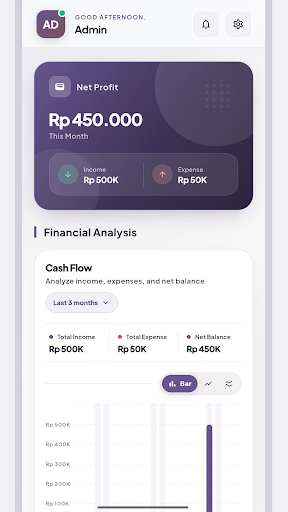
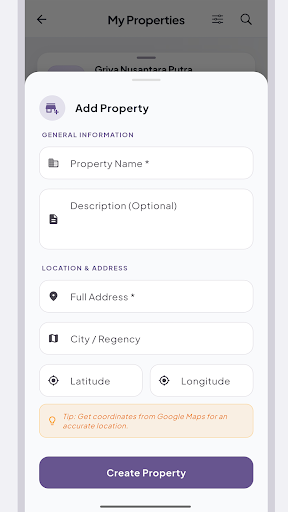
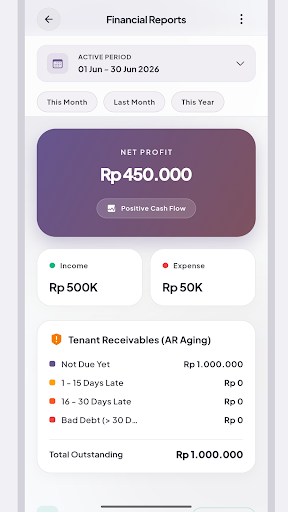
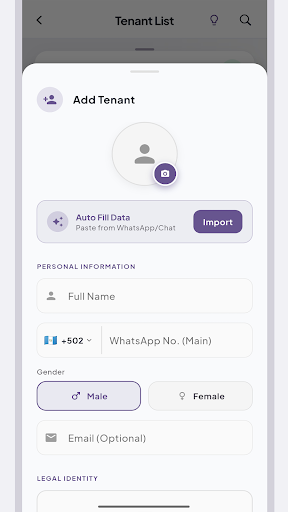
TenantHub: Rental Manager is an offline-first app built for landlords, rental owners, and property managers who need a practical, private, and professional way to manage rental operations.
With TenantHub, you can manage tenants, properties, rental units, rent bills, invoices, payments, expenses, reports, and lease documents from one app. Your core rental data stays on your device, so you can keep working even without a constant internet connection.
Whether you manage boarding houses, apartments, rental homes, rooms, or multiple units, TenantHub helps you stay organized and run your rental business more efficiently.
Property and Unit Management
Manage multiple properties and rental units in one app. Monitor occupied, vacant, and available units with a clear and practical workflow.
Tenant Management in One Place
Keep tenant records organized in a single workspace. Track tenant information, move-in dates, rental periods, deposits, active status, and tenant history more easily.
Rent Bills and Invoices
Create rent bills and invoices quickly. Track payment status such as paid, unpaid, partially paid, and overdue with better clarity.
Lease Contracts and Admin Documents
Prepare professional rental documents for your daily administration. Create, print, and share lease contracts, invoices, and tenant records directly from the app.
Income Tracking and Cashflow
Record rental income and property expenses to better understand your cashflow and keep your rental business organized.
Multi-Language Support
TenantHub supports language settings to make the app more comfortable for different users. You can adjust the app language based on your operational needs.
Multi-Currency Support
TenantHub supports currency settings to help you record rent bills, invoices, payments, and financial reports using the currency format you need.
Offline-First, Private, and Practical
TenantHub is designed for offline-first use. Your core data stays on your device, helping you manage rentals in a faster, more private, and more practical way.
Who Is TenantHub For?
TenantHub is suitable for landlords, rental property owners, boarding house owners, apartment managers, room rental managers, small property management teams, and real estate investors managing rental units.
Why TenantHub?
TenantHub helps you move away from messy spreadsheets, paper notes, and scattered rental administration. It gives you one practical place to manage tenants, rent bills, invoices, payments, lease contracts, and rental documents more professionally.
If you need an app to manage tenants, track rent, create invoices, monitor payments, prepare lease contracts, and adjust language or currency settings, TenantHub can help make your rental operations more organized.
Download TenantHub: Rental Manager today and simplify the way you manage rental properties.
Mehr anzeigen

1. Laden das MEmu-Installationsprogramm herunter und beenden die Installation

2. MEmu starten und Google Play auf der Homepage öffnen

3. Suchen TenantHub: Rental Manager in Google Play
Install
4. Herunterladen und Installieren TenantHub: Rental Manager
5. Klicken nach Abschluss der Installation auf das Symbol, um es zu starten

6. Verwenden Sie MEmu, um TenantHub: Rental Manager auf Ihrem PC zu nutzen
MEmu Play ist aktuell der beste kostenlose Android-Emulator und bietet 50 Millionen Nutzern ein überragendes Android-App-Erlebnis. Dank der Virtualisierungstechnologie von MEmu können Sie Tausende von Android-Apps problemlos auf Ihrem Computer nutzen, selbst solche mit hohen Grafikanforderungen.
BGrößeres Bild mit besserer Grafik; Keine unterbrechungen, keine sorgen um Akku
Komplette Tastenbelegung unterstützt mit Maus und Tastatur oder Controller
Mit dem „Multi-Instance-Manager“ können Sie mehrere Spielkonten oder Spiele gleichzeitig auf einem PC ausführen.
Use TenantHub: Rental Manager on PC by following steps: