Wifi QR, Password & Hotspot
Aktualisiert
Aktuelle Version
1.14
Angeboten von

Machen Sie sich keine Sorgen mehr über überhöhte Gebühren, wenn Sie Wifi QR, Password & Hotspot auf Ihrem Mobiltelefon verwenden, befreien Sie sich von dem winzigen Bildschirm und genießen Sie die Nutzung der App auf einem viel größeren Display. Von nun an können Sie Ihre App mit Tastatur und Maus im Vollbildmodus nutzen. MEmu bietet Ihnen all die überraschenden Funktionen, die Sie erwartet haben: schnelle Installation und einfache Einrichtung, intuitive Steuerung, keine Einschränkungen mehr durch Batterie, mobile Daten und störende Anrufe. Der brandneue MEmu 9 ist die beste Wahl für die Nutzung von Wifi QR, Password & Hotspot auf Ihrem Computer. Mit unserer Absorption kodiert, ermöglicht der Multi-Instanz-Manager die Eröffnung von 2 oder mehr Konten zur gleichen Zeit. Und das Wichtigste, unsere exklusive Emulations-Engine kann das volle Potenzial Ihres PCs freisetzen und alles reibungslos und angenehm gestalten.
Mehr anzeigen
Genieße Wifi QR, Password & Hotspot auf deinem PC mit MEmu Play in einer fantastischen Version. Dieser leistungsstarke, kostenlose Android-Emulator bietet dir Zugriff auf Tausende von Android-Apps für deinen Desktop. Bleib mit Freunden in Kontakt und arbeite effizienter! Tired of typing long WiFi passwords, slow connections, or weak signals?
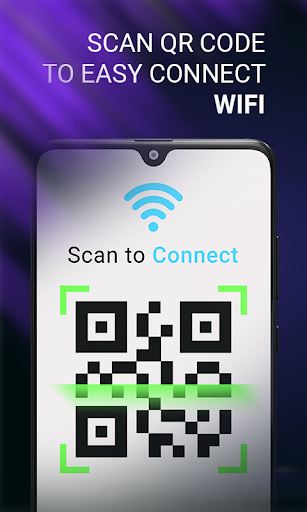
Tired of typing long WiFi passwords, slow connections, or weak signals?
No more asking or typing long WiFi passwords again. Easily scan, connect, and manage WiFi networks with a smart WiFi scanner and network info tool designed for everyday use—at home, office, or while traveling.
Wifi QR, Password & Hotspot helps you instantly connect, share WiFi, generate passwords, manage your hotspot, and analyze network strength—in one simple app.
━━━━━━━━━━━━━━━
CONNECT & SHARE WIFI IN SECONDS
━━━━━━━━━━━━━━━
WiFi QR Scanner & Generator
→ Scan WiFi QR codes and connect instantly
→ Create QR codes for SSID, password & security type
→ Share WiFi with friends without typing passwords
→ Save, preview, and manage QR codes anytime
Perfect for cafes, offices, guests & family sharing
━━━━━━━━━━━━━━━
STRONG PASSWORD GENERATOR
━━━━━━━━━━━━━━━
Generate WiFi passwords in seconds
→ Use uppercase, lowercase, numbers & symbols
→ Set custom password length
→ Copy and use anywhere instantly
Keep your network safe from weak passwords
━━━━━━━━━━━━━━━
WIFI ANALYZER & NETWORK TOOLS
━━━━━━━━━━━━━━━
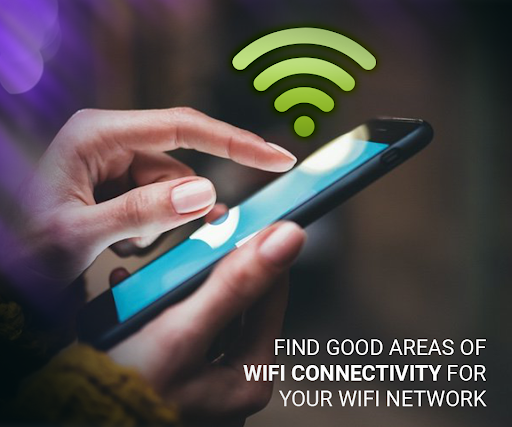
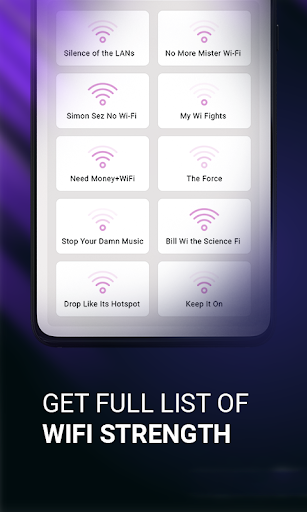
Check WiFi signal strength in real-time
Scan nearby WiFi networks easily
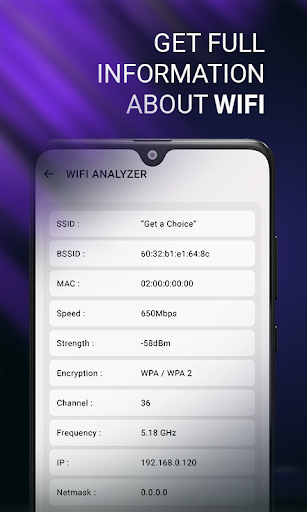
View detailed info (SSID, BSSID, IP, DNS, speed)
Camera WiFi Analyzer for live visual signal tracking
Capture photos/videos for network analysis
Manage saved media (view, share, delete)
Find the best signal spot and improve connection quality
━━━━━━━━━━━━━━━
HOTSPOT MANAGER (QUICK ACCESS)
━━━━━━━━━━━━━━━
Open hotspot settings instantly
Turn hotspot on/off easily
Share internet anytime, anywhere
━━━━━━━━━━━━━━━
WHY THIS APP STANDS OUT
━━━━━━━━━━━━━━━
Fast WiFi QR scanner & connection
Easy WiFi password sharing
Smart WiFi analyzer tools
Password generator
Smart hotspot manager
Clean, lightweight & user-friendly UI
Ideal for students, travelers, professionals, gamers, and anyone who uses WiFi daily.
━━━━━━━━━━━━━━━
PRIVACY & PERMISSIONS TRANSPARENCY
━━━━━━━━━━━━━━━
Your privacy is important. This app only uses permissions required for core features and does NOT misuse your data.
• Location Permission
→ Required by Android to scan nearby WiFi networks
• Camera Permission
→ Used for QR code scanning and camera-based WiFi analyzer
• Storage Permission
→ Save QR codes, images, and recorded videos for your use
• Microphone Permission
→ Required when recording videos in analyzer mode
• Phone State Permission
→ Helps display network status and connection details
No personal data is collected without your consent
No data is sold or shared with third parties
Permissions are used only for app functionality
━━━━━━━━━━━━━━━
COMPLETE WIFI & INTERNET TOOLS
━━━━━━━━━━━━━━━
Connect faster with WiFi QR scanner
Share WiFi instantly without typing
Analyze network strength and speed
Generate strong passwords
Manage hotspot with ease
━━━━━━━━━━━━━━━
INSTALL NOW & SIMPLIFY WIFI
━━━━━━━━━━━━━━━
Stop struggling with passwords and weak signals.
Install now and start connecting in seconds!
Mehr anzeigen

1. Laden das MEmu-Installationsprogramm herunter und beenden die Installation

2. MEmu starten und Google Play auf der Homepage öffnen

3. Suchen Wifi QR, Password & Hotspot in Google Play
Install
4. Herunterladen und Installieren Wifi QR, Password & Hotspot
5. Klicken nach Abschluss der Installation auf das Symbol, um es zu starten

6. Verwenden Sie MEmu, um Wifi QR, Password & Hotspot auf Ihrem PC zu nutzen
MEmu Play ist aktuell der beste kostenlose Android-Emulator und bietet 50 Millionen Nutzern ein überragendes Android-App-Erlebnis. Dank der Virtualisierungstechnologie von MEmu können Sie Tausende von Android-Apps problemlos auf Ihrem Computer nutzen, selbst solche mit hohen Grafikanforderungen.
BGrößeres Bild mit besserer Grafik; Keine unterbrechungen, keine sorgen um Akku
Komplette Tastenbelegung unterstützt mit Maus und Tastatur oder Controller
Mit dem „Multi-Instance-Manager“ können Sie mehrere Spielkonten oder Spiele gleichzeitig auf einem PC ausführen.
Use Wifi QR, Password & Hotspot on PC by following steps: