Crestron Home
Actualizada
Versión actual
4.4.18+pr
Ofrecida por

Deje de preocuparse por los recargos cuando use Crestron Home en su teléfono celular, libérese de la pequeña pantalla y disfrute usando la aplicación en una pantalla mucho más grande. A partir de ahora, obtenga una experiencia de pantalla completa de su aplicación con teclado y mouse. MEmu le ofrece todas las características sorprendentes que esperaba: instalación rápida y configuración fácil, controles intuitivos, no más limitaciones de batería, datos móviles y llamadas molestas. El nuevo MEmu 9 es la mejor opción para usar Crestron Home en su computadora. Codificado con nuestra absorción, el administrador de instancias múltiples hace posible abrir 2 o más cuentas al mismo tiempo. Y lo más importante, nuestro exclusivo motor de emulación puede liberar todo el potencial de su PC, hacer que todo sea fluido y agradable.
Más detalles
Descargar Crestron Home en PC con MEmu Android Emulador. Disfruta jugando en la pentalla grande. The Crestron Home™ app makes it easy to access and control every aspect of your Crestron smart home with the tap of a button on your Android™ device, or with the sound of your voice.
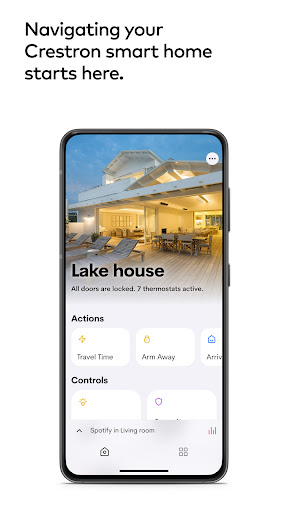
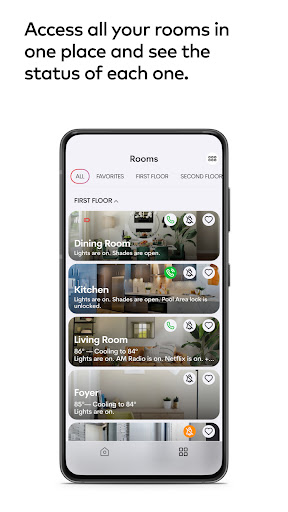
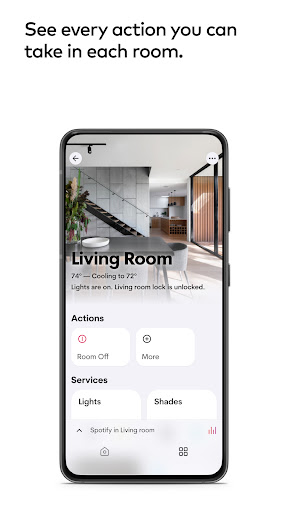
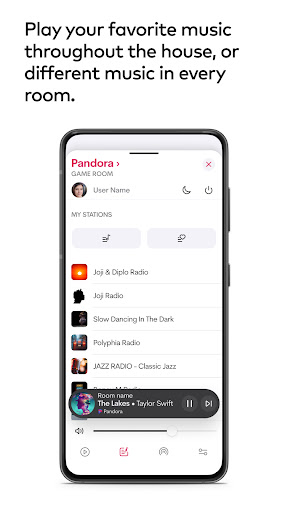
The Crestron Home™ app makes it easy to access and control every aspect of your Crestron smart home with the tap of a button on your Android™ device, or with the sound of your voice. Lighting, climate, audio, video, shades, security, and more are at your command, from wherever you happen to be. Experience rooms that awaken with a single touch and environments that adjust to your every mood. Enjoy the peace of mind that comes with knowing your home is safe and sound, whether you’re home or away. Crestron Home elevates your living experience, transforming your everyday commands into instantaneous delight.
Designed for you
Personalize your experience for every room and space in your home. Create scenes to activate multiple smart home features with one tap. Easily personalize your room images and screen savers.
Seamless, simple control
Easily manage one or multiple homes, remotely or on the premises.
Responsive and intuitive
Access all your home’s information via smooth animations and easy-to-navigate, responsive icons. Organize your favorites, navigate your rooms, and personalize each destination with your image of choice.
Easy accessibility
Instantly activate any level of control you require.
Dynamic performance
Commands are displayed dynamically, from home screen actions to climate control. Set your preferred temperature and see the transition occur right before your eyes.
Connected entertainment
Enjoy what matters, including a rich multimedia experience that features your preferred entertainment services, all easy to access and control.
NOTE: Use of the Crestron Home app requires a Crestron smart home system that has been installed and licensed by a Crestron Authorized Dealer. Visit our Dealer Locator page to find one near you:
https://www.crestron.com/en-US/How-To-Buy/find-a-dealer-or-partner/Elite-Platinum-Residential-Dealers
Más detalles

1. Descargar el instalador de MEmu y finalice la instalación

2. Iniciar MEmu y abrir Google Play en la página de inicio

3. Buscar Crestron Home en Google Play
Install
4. Descargar y instalar Crestron Home
5. Hacer click al icono para iniciar

6. Experiencia Crestron Home en PC con MEmu
MEmu App Player es el mejor emulador de Android gratuito y 50 millones de personas ya están disfrutando su magnífica experiencia de aplicación en Android. La tecnología de virtualización de MEmu te permite jugar a miles de aplicaciones Android suavemente en tu PC, incluso los más intensivos gráficamente.
Pantalla más grande con mejores gráficos; Larga duración, sin limitación de batería o datos móviles.
Soporte completo de keymapping para un control preciso del teclado y el mouse o gamepad.
Múltiples cuentas de juegos o tareas en una sola PC a la vez con el administrador de instancias múltiples.
Use Crestron Home on PC by following steps: