ECU Connect
Actualizada
Versión actual
6.9.4
Ofrecida por

Deje de preocuparse por los recargos cuando use ECU Connect en su teléfono celular, libérese de la pequeña pantalla y disfrute usando la aplicación en una pantalla mucho más grande. A partir de ahora, obtenga una experiencia de pantalla completa de su aplicación con teclado y mouse. MEmu le ofrece todas las características sorprendentes que esperaba: instalación rápida y configuración fácil, controles intuitivos, no más limitaciones de batería, datos móviles y llamadas molestas. El nuevo MEmu 9 es la mejor opción para usar ECU Connect en su computadora. Codificado con nuestra absorción, el administrador de instancias múltiples hace posible abrir 2 o más cuentas al mismo tiempo. Y lo más importante, nuestro exclusivo motor de emulación puede liberar todo el potencial de su PC, hacer que todo sea fluido y agradable.
Más detalles
Descargar ECU Connect en PC con MEmu Android Emulador. Disfruta jugando en la pentalla grande. IMPORTANT.
IMPORTANT
This app requires an EcuTek Bluetooth Vehicle Interface to connect to your car's ECU. These are available from EcuTek Tuners. Find your nearest one at www.ecutek.com/dealers. If you don't have an interface, run the demo mode within the app to see ECU Connect in action.
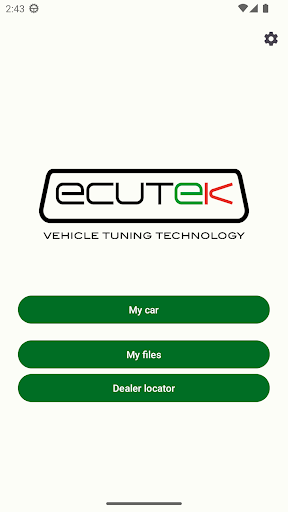
ECU Connect is the free companion app to the new pocket-size Bluetooth Vehicle Interface produced by specialist tuning firm EcuTek Technologies.
Once you have purchased your EcuTek Vehicle Interface, plug it into your car's OBD vehicle diagnostic socket, pair it with your phone in the app and you will open up a whole new world of enjoyment with your car.
With ECU Connect, you can receive and program in a tuned file from one of our EcuTek Master Tuners just with your phone. No laptop, no wires, no fuss. Just create an account in the app, select the tuner you want to work with, and you are ready to receive the tuned file. Discuss with your tuner what you want to achieve from the tune and once the file has been created, you will receive a notification that the file is ready. Go to Program ECU, select the file and follow the on-screen instructions. It's as easy as that. All that's left is for you to enjoy the car!
For more details on programming your car’s ECU with ECU Connect go to www.ecutek.com/phone-flash
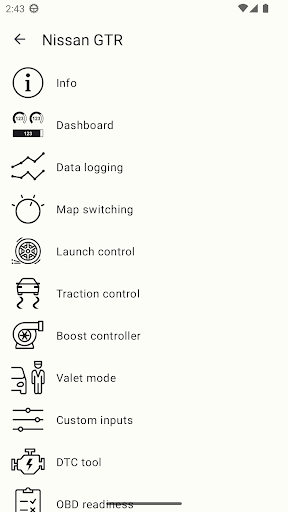
Your EcuTek Tuner can also set up some unique RaceROM features which allows you to control and adjust some aspects of the tune with your phone: Launch RPM; Traction Control settings; boost and torque levels; switch between different set ups such as track mode, economy mode, fast road and flexfuel on the fly. These are just some of the example set ups. Speak to your EcuTek Master Tuner and discuss with them what you'd like. There are lots of options to choose from.
For a list of supported models together with their ECU Connect Features go to www.ecutek.com/ecu-connect
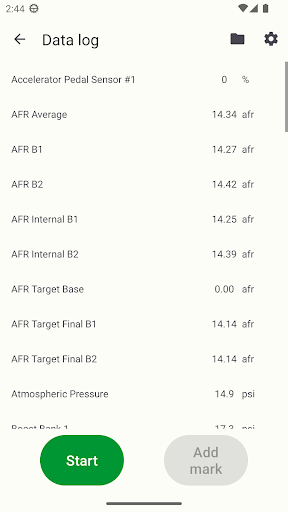
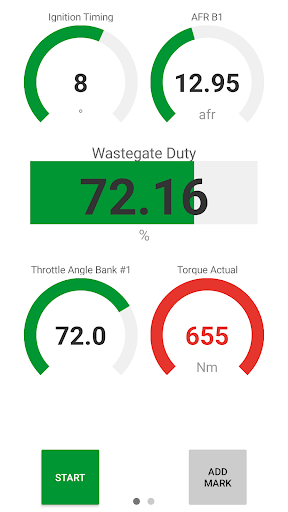
Whether your car is tuned on EcuTek or not, with ECU Connect you can instantly see how your engine is performing as you drive it (even if the car is not officially supported, ECU Connect provides basic support for most cars using generic OBD2 CAN communication protocol available on nearly all vehicles manufactured from 2008 onwards). You can view and log any parameter the ECU records and even create unlimited personalised dashboards if you want to monitor specific groups of parameters. Save and send these logs direct from the app to your tuner. You can also record GPS coordinates in the log files, so you can see what was happening at any given point on your logging run (very useful on track days).
Más detalles

1. Descargar el instalador de MEmu y finalice la instalación

2. Iniciar MEmu y abrir Google Play en la página de inicio

3. Buscar ECU Connect en Google Play
Install
4. Descargar y instalar ECU Connect
5. Hacer click al icono para iniciar

6. Experiencia ECU Connect en PC con MEmu
MEmu App Player es el mejor emulador de Android gratuito y 50 millones de personas ya están disfrutando su magnífica experiencia de aplicación en Android. La tecnología de virtualización de MEmu te permite jugar a miles de aplicaciones Android suavemente en tu PC, incluso los más intensivos gráficamente.
Pantalla más grande con mejores gráficos; Larga duración, sin limitación de batería o datos móviles.
Soporte completo de keymapping para un control preciso del teclado y el mouse o gamepad.
Múltiples cuentas de juegos o tareas en una sola PC a la vez con el administrador de instancias múltiples.
Use ECU Connect on PC by following steps: