MotoScan
Actualizada
Versión actual
5.5.1
Ofrecida por

Deje de preocuparse por los recargos cuando use MotoScan en su teléfono celular, libérese de la pequeña pantalla y disfrute usando la aplicación en una pantalla mucho más grande. A partir de ahora, obtenga una experiencia de pantalla completa de su aplicación con teclado y mouse. MEmu le ofrece todas las características sorprendentes que esperaba: instalación rápida y configuración fácil, controles intuitivos, no más limitaciones de batería, datos móviles y llamadas molestas. El nuevo MEmu 9 es la mejor opción para usar MotoScan en su computadora. Codificado con nuestra absorción, el administrador de instancias múltiples hace posible abrir 2 o más cuentas al mismo tiempo. Y lo más importante, nuestro exclusivo motor de emulación puede liberar todo el potencial de su PC, hacer que todo sea fluido y agradable.
Más detalles
Descargar MotoScan en PC con MEmu Android Emulador. Disfruta jugando en la pentalla grande. MotoScan is a ready-made toolbox for inventory, warehousing and field service scenarios.
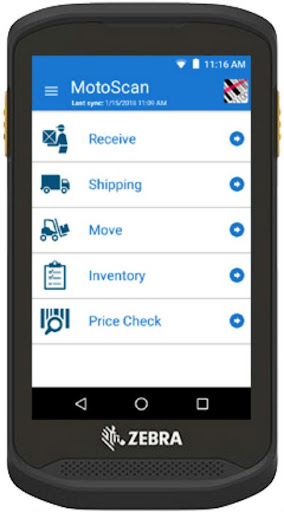
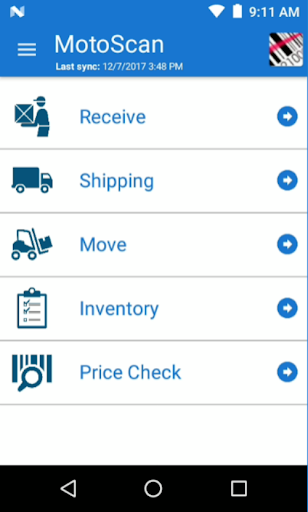
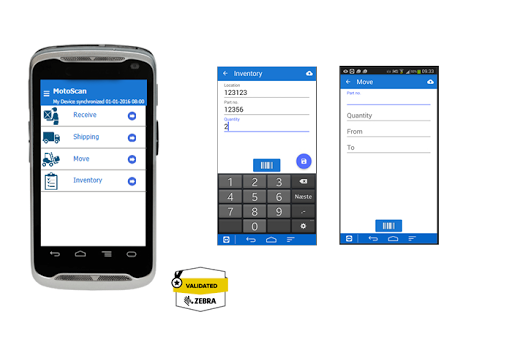
MotoScan is a ready-made toolbox for inventory, warehousing and field service scenarios. MotoScan Android is an app made explicitly for data capture tasks.
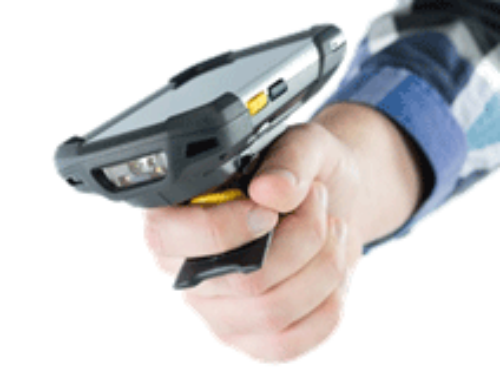
MotoScan makes it easy to setup tracking of goods using barcodes. MotoScan can scan barcodes, manual input text and numbers or taking a picture or look up data in a local database. It supports integrated scanners in all Zebra/Symbol Android devices. It also supports scanning using the camera on devices without an integrated scanner, such as consumer devices like Android phones.
The application comes default with five scenarios, Receive, Shipping, Move, Inventory and Price Check. MotoScan is ready as is or you can configure it easily for individual needs. Inventory is the most common data capture scenario needed. You can brand the app with your own name
In the Price Check menu, it is possible to look up the price based on barcode. At the website Moto-Scan.com it is explained how to customize the look-up function supporting you needs in warehouse, store, maintenance or routing.
Especially for documentation of goods received or maintenance, a photo documentation option is implemented. Making it possible to document maintenance performed or documentation of having received goods.
Adapting the menus and texts for the operator, fitted to your company language or local language. Everything can be easily adapted to your specification or company needs. All configuration is done though the Moto-Scan.com web site where the configurator tool is available when you log in.
The saved data on the devices will be delivered to your FTP server or your Dropbox. You can work off-line: Local buffering makes it possible to do registration without Wi-Fi / GSM connection and automatic upload of data is done when Wi-Fi or GSM is available again.
This is a demo version. In demo mode you can’t connect to any data source or change any configuration. If you initiate a trial account (60 days), you can connect one device with your account, change and adapt one configuration and play with the functions before you decide to purchase licenses. In trial mode only one record can be stored. Purchase a license to convert your account to full functionality. You can purchase licenses directly at the website. If you need multiple licenses (+50), you can contact us for an individual quotation for your company.
MotoScan will run on any Android mobile device from version 4.03 and upwards. It can utilize integrated scanners in Zebra devices, and if the device has no scanner it can use the integrated camera for scanning. This makes it usable on mobile phones for scanning, just remember mobile phones are not designed for fast roaming and they are not made for rough operations like warehouse and field service environments. We recommend using a rugged handheld device, such as Zebra/Symbol Android devices.
MotoScan enables you to get started with data capture without any prior knowledge to programming or logic algorithms. Configuration and maintenance of each device or device group is done through the MotoScan.com web site. The solution is ideal for small or medium sized busineses and we give you the possibility to bring down installation and integration time without lowering the user experience.
For more info, visit www.moto-scan.com
Más detalles

1. Descargar el instalador de MEmu y finalice la instalación

2. Iniciar MEmu y abrir Google Play en la página de inicio

3. Buscar MotoScan en Google Play
Install
4. Descargar y instalar MotoScan
5. Hacer click al icono para iniciar

6. Experiencia MotoScan en PC con MEmu
MEmu App Player es el mejor emulador de Android gratuito y 50 millones de personas ya están disfrutando su magnífica experiencia de aplicación en Android. La tecnología de virtualización de MEmu te permite jugar a miles de aplicaciones Android suavemente en tu PC, incluso los más intensivos gráficamente.
Pantalla más grande con mejores gráficos; Larga duración, sin limitación de batería o datos móviles.
Soporte completo de keymapping para un control preciso del teclado y el mouse o gamepad.
Múltiples cuentas de juegos o tareas en una sola PC a la vez con el administrador de instancias múltiples.
Use MotoScan on PC by following steps: