Prime Print Lite
Actualizada
Versión actual
1.0.6
Ofrecida por

Deje de preocuparse por los recargos cuando use Prime Print Lite en su teléfono celular, libérese de la pequeña pantalla y disfrute usando la aplicación en una pantalla mucho más grande. A partir de ahora, obtenga una experiencia de pantalla completa de su aplicación con teclado y mouse. MEmu le ofrece todas las características sorprendentes que esperaba: instalación rápida y configuración fácil, controles intuitivos, no más limitaciones de batería, datos móviles y llamadas molestas. El nuevo MEmu 9 es la mejor opción para usar Prime Print Lite en su computadora. Codificado con nuestra absorción, el administrador de instancias múltiples hace posible abrir 2 o más cuentas al mismo tiempo. Y lo más importante, nuestro exclusivo motor de emulación puede liberar todo el potencial de su PC, hacer que todo sea fluido y agradable.
Más detalles
Disfruta de una experiencia increíble usando Prime Print Lite en tu PC con MEmu Play. Es un potente emulador de Android gratuito que te ofrece miles de aplicaciones de Android en su versión de escritorio. ¡Conéctate con tus amigos y optimiza tu trabajo! ---Prime Print Lite Features---.
---Prime Print Lite Features---
- Prime Print Lite contains all the features of the full version of Prime Print, but printouts are watermarked.
Prime Print Lite is a demo printing application.
If you are able to print using Prime Print Lite, please purchase Prime Print for full functionality!
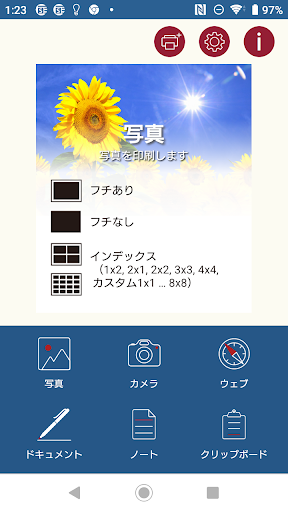
Directly print websites,pdf, photos, and more to a wide range of Wi-Fi printers with ease. Choose from a large variety of layouts to suit your specific needs. Design and create fun and original printouts simply and easily!
Free up your printing! More printers and more options within one app. Print whatever you need, wherever you are.
Print a wide variety of documents directly from your Android. Frustrated with manufacturers’ first-party applications, or by being limited to printing via AirPrint printers? Want more control over the printing format and layout? Looking for something simple to understand and easy to use? Prime Print provides printing with a slightly different touch!
Even if your printer does not support AirPrint, you can use Prime Print.
Prime Print and Prime Print Lite are compatible with the same printers. Please ensure compatibility with your printer by trying the free Prime Print Lite app before purchasing.
** Simple and easy to use. Print almost anything in a variety of layouts!
-Pictures
-Websites
-PDF
-Notes
** Choose the best layout for each! For example:
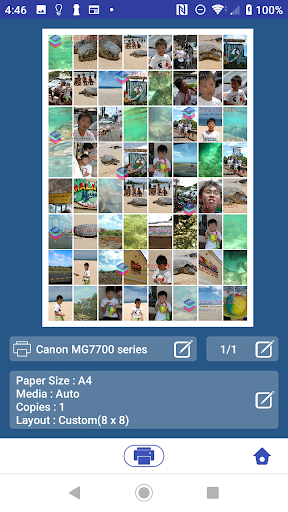
Pictures - Print an index page of your photos, up to 64 in a 8x8 layout. Print with or without frames. Include the date if you wish.
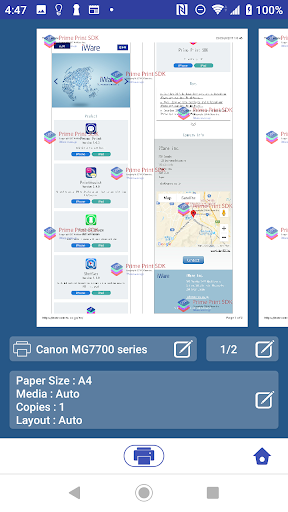
Websites - Print sites out exactly as they appear on your smartphone. You can fit up to 9 pages of content onto one A4 sheet.
-----Prime Print Features
*Print almost anything from almost anywhere! Compatible with many Wi-Fi enabled inkjet, page, and multifunction printers from the following manufacturers:
Epson
Canon
OKI
HP
Sharp
and more!
*Print to AirPrint printers! Prime Print works with the models show in the URL below:
http://support.apple.com/kb/HT4356?viewlocale=en_US
(Your Android must be connected to the same Wi-Fi network as the printer.)
*Get clear printouts!
Prime Print provides for high-resolution printouts. Pictures are crisp and vivid. Text comes out clear and sharp.
*And more!
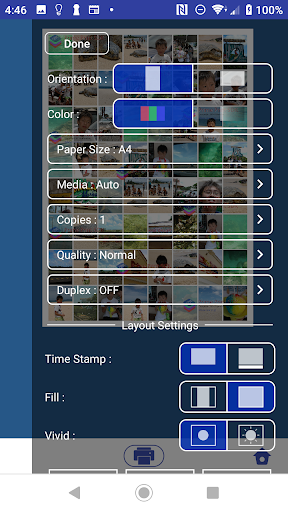
Print to a wide variety of paper types and sizes.
Two-sided printing is available.
Print with frames.
Print headers and footers.
Includes parental controls to limit children from accessing websites.
Más detalles

1. Descargar el instalador de MEmu y finalice la instalación

2. Iniciar MEmu y abrir Google Play en la página de inicio

3. Buscar Prime Print Lite en Google Play
Install
4. Descargar y instalar Prime Print Lite
5. Hacer click al icono para iniciar

6. Experiencia Prime Print Lite en PC con MEmu
MEmu App Player es el mejor emulador de Android gratuito y 50 millones de personas ya están disfrutando su magnífica experiencia de aplicación en Android. La tecnología de virtualización de MEmu te permite jugar a miles de aplicaciones Android suavemente en tu PC, incluso los más intensivos gráficamente.
Pantalla más grande con mejores gráficos; Larga duración, sin limitación de batería o datos móviles.
Soporte completo de keymapping para un control preciso del teclado y el mouse o gamepad.
Múltiples cuentas de juegos o tareas en una sola PC a la vez con el administrador de instancias múltiples.
Use Prime Print Lite on PC by following steps: