Radar Omega - Live Weather
Actualizada
Versión actual
1.3.1
Ofrecida por

Deje de preocuparse por los recargos cuando use Radar Omega - Live Weather en su teléfono celular, libérese de la pequeña pantalla y disfrute usando la aplicación en una pantalla mucho más grande. A partir de ahora, obtenga una experiencia de pantalla completa de su aplicación con teclado y mouse. MEmu le ofrece todas las características sorprendentes que esperaba: instalación rápida y configuración fácil, controles intuitivos, no más limitaciones de batería, datos móviles y llamadas molestas. El nuevo MEmu 9 es la mejor opción para usar Radar Omega - Live Weather en su computadora. Codificado con nuestra absorción, el administrador de instancias múltiples hace posible abrir 2 o más cuentas al mismo tiempo. Y lo más importante, nuestro exclusivo motor de emulación puede liberar todo el potencial de su PC, hacer que todo sea fluido y agradable.
Más detalles
Descargar Radar Omega - Live Weather en PC con MEmu Android Emulador. Disfruta jugando en la pentalla grande. Radar Omega is your ultimate weather companion, providing real-time radar, comprehensive weather forecasts, and essential alerts to keep you informed and prepared.
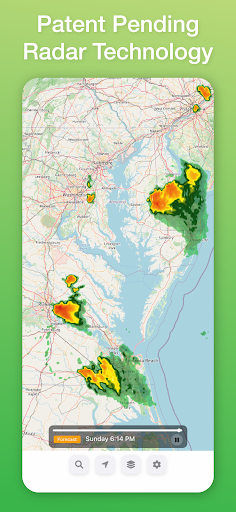
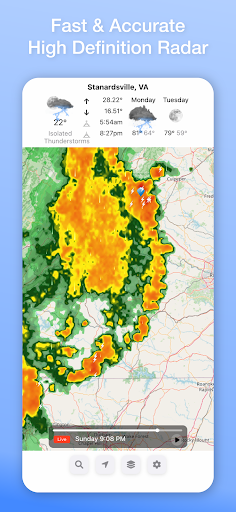
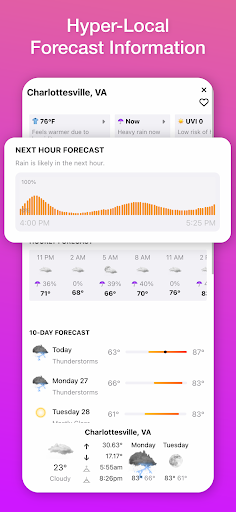
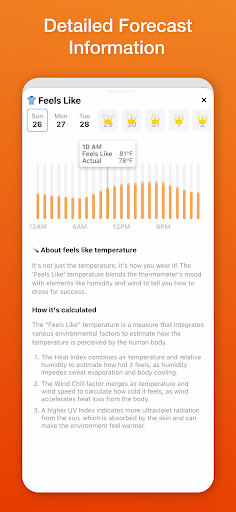
Radar Omega is your ultimate weather companion, providing real-time radar, comprehensive weather forecasts, and essential alerts to keep you informed and prepared. With a user-friendly interface and a plethora of features, Radar Omega ensures you never miss critical weather updates.
Key Features:
Live Radar: Access high-resolution radar imagery to track weather conditions in real-time.
Lightning Proximity Alerts: Get instant notifications about nearby lightning strikes for enhanced safety.
NWS Information: Stay updated with the latest information from the National Weather Service.
Hurricane Notifications & Tracking: Receive timely alerts and track hurricanes with detailed information.
Air Quality Information: Monitor air quality levels to protect your health and well-being.
GFS Overlay Information: View Global Forecast System (GFS) data overlays for detailed weather analysis.
City Search & Save: Easily search for and save your favorite cities for quick access to weather information.
Global Weather Information: Access weather data from around the world, ensuring you stay informed no matter where you are.
10-Day Hourly Forecast: Plan ahead with detailed hourly forecasts for the next 10 days.
Why Choose Radar Omega?
Radar Omega is designed to provide you with accurate, reliable, and timely weather information. Whether you're planning your day, preparing for severe weather, or simply curious about the weather in different locations, Radar Omega has you covered. With advanced features and real-time updates, you'll always be one step ahead.
Don't let the weather catch you off guard. Download Radar Omega now and stay informed with the most comprehensive weather app available. Your safety and preparedness are our priority.
Access Premium Features: Radar Omega - Live Weather is free to use, and you can unlock even more powerful features, including the Hurricane Tracker, Aviation Overlays, and Internet Traffic with a subscription.
Please Note: Location is used to provide navigation services over a moving map and localized weather information.
Current weather and forecast information is provided by Apple's WeatherKit.
Más detalles

1. Descargar el instalador de MEmu y finalice la instalación

2. Iniciar MEmu y abrir Google Play en la página de inicio

3. Buscar Radar Omega - Live Weather en Google Play
Install
4. Descargar y instalar Radar Omega - Live Weather
5. Hacer click al icono para iniciar

6. Experiencia Radar Omega - Live Weather en PC con MEmu
MEmu App Player es el mejor emulador de Android gratuito y 50 millones de personas ya están disfrutando su magnífica experiencia de aplicación en Android. La tecnología de virtualización de MEmu te permite jugar a miles de aplicaciones Android suavemente en tu PC, incluso los más intensivos gráficamente.
Pantalla más grande con mejores gráficos; Larga duración, sin limitación de batería o datos móviles.
Soporte completo de keymapping para un control preciso del teclado y el mouse o gamepad.
Múltiples cuentas de juegos o tareas en una sola PC a la vez con el administrador de instancias múltiples.
Use Radar Omega - Live Weather on PC by following steps: