Lumeshift
تاریخ بهروزرسانی
نسخه کنونی
0.530.530
ارائهکننده

با تمام اشتیاق شما به بازی Lumeshift، قرار نیست دست های شما روی صفحه نمایش کوچک گوشی شما محدود شود. مانند یک حرفه ای بازی کنید و کنترل کامل بازی خود را با صفحه کلید و ماوس بدست آورید.MEmu همه ی انتظاراتی که دارید را برآورده می کند.Lumeshift را بر روی رایانه شخصی دانلود و بازی کنید. تا زمانی که می خواهید بازی کنید، دیگر محدودیتی در باتری، داده تلفن همراه و تماس های مزاحم وجود ندارد.MEmu 9 کاملاً جدید و بهترین انتخاب برای بازی Lumeshift روی رایانه شخصی است. با تخصص ما، سیستم keymapping از پیش تعیین شده عالی،Lumeshift را به یک بازی رایانه شخصی واقعی تبدیل می کند.مدیریت چند موردی MEmu امکان اجرای 2 یا چندین حساب در یک دستگاه را فراهم می کند.و مهمتر از همه، موتور شبیهسازی انحصاری ما میتواند پتانسیل کامل رایانه شما را آزاد کند و همه چیز را روان کند.
بیشتر نشان بده
دانلود بازی Lumeshift برای کامپیوتر با MEmu Play. از بازی روی صفحه نمایش بزرگ لذت ببرید. Lumeshift suits players who want short sessions that still demand teamwork and solid aim.

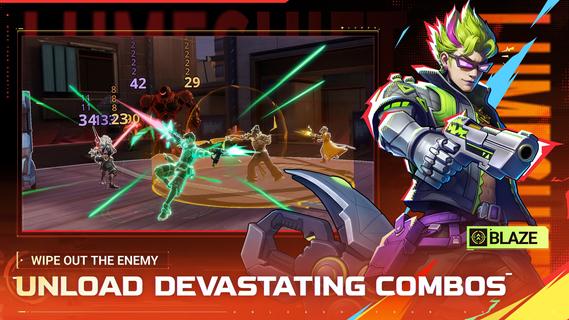
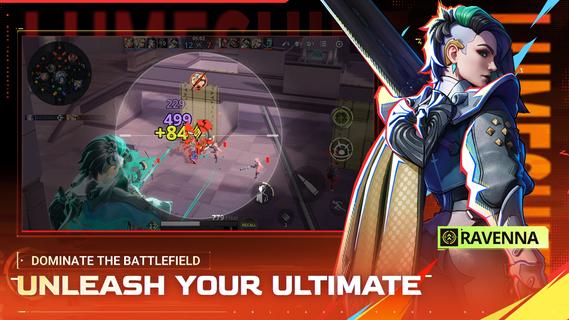
Lumeshift suits players who want short sessions that still demand teamwork and solid aim. It fits users who enjoy tactical objectives on a clear map and steady improvement from match to match. Because every round asks for both planning and mechanical skill, new players can pick up basics while experienced users refine timing. If you prefer installing on Android, the Lumeshift APK offers a simple path to try the game and see how it fits your squad playstyle. Lumeshift FeaturesHybrid lanes and shooter controlLumeshift combines lane control with precise aiming and movement. You read the map, rotate between three lanes, and make quick calls. Strategy sets up the fight, while your positioning and timing decide it. This mix rewards awareness as much as aim.Fast 5v5 battles and Ziplines Matches aim for about 15 minute playtime, so you can complete a full game in one sitting. Ziplines let you move fast into team fights or return to objectives without long downtime. Quick entries keep pressure high, but pacing still matters for clean engagements.Diverse hero rosterYou choose from more than ten heroes with distinct abilities and weapons. Each pick changes how you approach fights and lanes. Experiment to find a kit that fits your role, whether you anchor objectives or dive into skirmishes. The roster supports different team plans and learning curves.Active development and feedbackThe project is actively being built with player input. Adjustments may improve clarity, balance, and flow as testing continues. The Lumeshift latest version reflects ongoing work toward a better competitive experience. Get started and jump into a matchLumeshift focuses on skill, teamwork, and clear objectives across short 5v5 battles. Users who enjoy tactical shooters with structured lanes can learn fundamentals quickly and grow over time. To join matches on mobile at your own pace, download Lumeshift and start practicing with the heroes that fit your role.
بیشتر نشان بده

1. نصب کننده Memu را دانلود کرده و راه اندازی را تمام کنید

2. Memu را اجرا کنید و سپس گوگل پلی را بر روی دستکتاپ باز کنید

3. Lumeshift را بر روی گوگل پلی جستجو کنید
Install
4. Lumeshift را دانلود و نصب کنید
5. پس از اتمام نصب روی آیکون کلیک کنید تا اجرا شود

6. از بازی کردن Lumeshift بر روی رایانه شخصی با MEmu لذت ببرید
MEmu بهترین نمونه ساز رایگان اندروید است و پیش از این 50 میلیون نفر از تجربه بسیار خوب بازی اندروید در آن لذت برده اند. تکنولوژی مجازی ساز MEmu شما را قادر می سازد هزاران بازی اندرویدی را در کامپیوتر به طور روان اجرا کنید، حتی آنهایی که گرافیک سنگین تری دارند.
صفحه نمایش بزرگتر با گرافیک بهتر؛ زمان طولانی تر، بدون محدودیت باتری یا داده تلفن همراه.
پشتیبانی کامل از Keymapping برای کنترل دقیق صفحه کلید و ماوس یا گیم پد.
چندین حساب بازی یا وظایف در یک رایانه شخصی در یک زمان با مدیریت همزمان همه
Play Lumeshift on PC by following steps:





![Delta Touch [10 x Doom engine] PC](https://dl.memuplay.com/new_market/img/com.opentouchgaming.deltatouch.icon.2026-07-31-11-58-34.png)