Lumeshift
อัปเดตเมื่อ
เวอร์ชันปัจจุบัน
8.1.1526.1526
ให้บริการโดย

เวลาคุณเล่น Lumeshift, คุณอาจรู้สึกว่ามือคุณอาจบังจอแล้วทำให้ไม่ได้เล่นแบบเต็มที่. เล่นแบบไร้ขีดจำกัดด้วยเม้าส์และคีย์บอร์ด. MEmu มีตัวเลือกหลายอย่างให้คุณใช้งานเกมที่คุณเล่นแบบที่คุณต้องการ. ดาวน์โหลดและเล่น Lumeshift บน PC. เล่นนานแค่ไหนก็ได้, ไม่ต้องชาร์จแบตเตอรี่, หรือเจอคนโทรเข้ามาระหว่างเล่น. MEmu 9 เป็นตัวเลือกสำหรับการเล่น Lumeshift บน PC. ทางทีมงานเราได้ปรับแต่งเกม, ปรับให้เล่นเกมบางเกมได้เหมือนเล่น Lumeshift เป็นเกม PC เช่นเล็งด้วยเม้าส์หรือใช้คีย์บอร์ด. ระบบของเรายังทำให้คุณสามารถเปิดเล่นได้มากกว่า 2 เกมพร้อมๆกันในคอมของคุณ. และที่สำคัญที่สุด, ระบบโปรแกรมของเราสามารถทำให้คุณใช้ระบบของ PC ทำให้เกมลื่นเหมือนกับใช้โทรศัพท์รุ่นล่าสุด. เราไม่ได้ดูแลเรื่องการเล่นเกม, แต่เราดูแลถึงความสนุกสนานที่คุณได้จากการเล่นด้วย.
แสดงเพิ่มเติม
ดาวน์โหลด Lumeshift บน PC ด้วย MEmu Android Emulator สนุกกับการเล่นบนหน้าจอขนาดใหญ่ Beyond the shooter.

Beyond the shooter. Be your own hero.
Lumeshift is a team-based hero shooter where no two heroes play the same. Chain skills, sync your squad, and pull off the play that wins the match.
Every match is more than a shootout: timing, teamwork, power spikes, and the clutch play your squad will remember as yours.
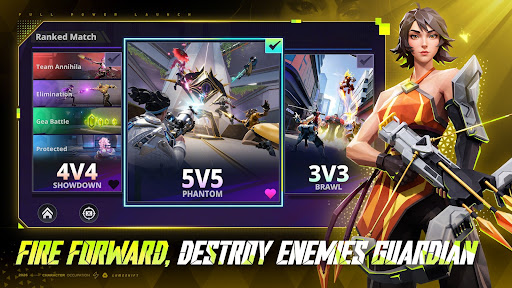
▶FIRE FORWARD. DESTROY THE GUARDIAN.
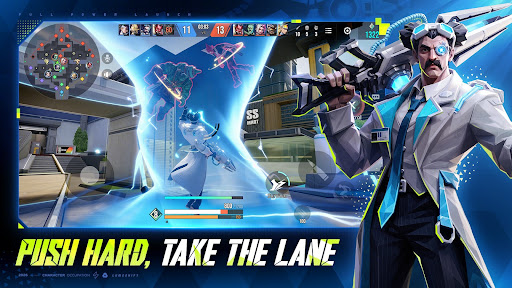
Push lane by lane with your team, win the fight ahead of you, and press toward the enemy Guardian. Every battle moves the frontline. Every breakthrough brings your squad closer to the final takedown.
▶EVERY HERO FIGHTS LIKE NO OTHER
Each hero brings a different weapon style, combat role, and way to control the battle. Dive in, hold ground, burst enemies down, protect teammates, or create space for the squad. Pick your style and make it yours.
▶ONE ULTIMATE. TURN THE TIDE.
When the fight is on the edge, one ultimate can change everything. Stop a push, open a path, save your team, or finish the fight with a moment that flips the match.
▶SQUAD UP. FIND YOUR COMBO.
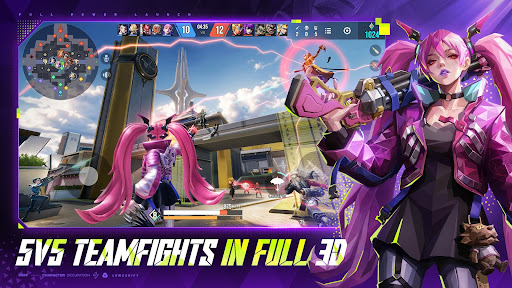
Great squads do more than shoot together. Chain abilities, cover each other, start the fight at the right time, and discover combos that turn pressure into victory.
▶SHOW OFF YOUR PLAYS. BE THE HERO.
Smart flanks, clutch saves, perfect engages, clean finishes—Lumeshift gives you room to create highlights that feel personal. Learn your hero, trust your squad, and become the playmaker.
Lumeshift — be the hero your squad remembers.
▶ OFFICIAL CHANNELS
Discord-Lumeshift
https://discord.com/invite/N9vPCFx53A
Instagram (BR)-lumeshift_br
https://www.instagram.com/lumeshift_br/
Facebook(BR)- lumeshift.br
https://www.facebook.com/lumeshift.br/
Youtube-lumeshift_official
https://www.youtube.com/@lumeshift_official
แสดงเพิ่มเติม

1. ดาวน์โหลดตัวติดตั้ง MEmu และสิ้นสุดการติดตั้ง

2. เริ่ม MEmu จากนั้นเปิด Google Play บนหน้าแรก

3. ค้นหา Lumeshift ใน Google Play
Install
4. ดาวน์โหลดและติดตั้ง Lumeshift
5. เมื่อติดตั้งเสร็จให้คลิกที่ไอคอนเพื่อเริ่มใช้งาน

6. สนุกกับการเล่น Lumeshift บนพีซีด้วย MEmu
MEmu App Player เป็นอีมูเลเตอร์ Android ที่ดีที่สุดและผู้คนกว่า 50 ล้านคนเพลิดเพลินไปกับประสบการณ์การเล่นเกม Android ที่ยอดเยี่ยม เทคโนโลยีการจำลองเสมือนของ MEmu ช่วยให้คุณเล่นเกม Android หลายพันเกมได้อย่างราบรื่นบนพีซีของคุณแม้แต่เกมที่ต้องใช้กราฟิกมากที่สุด
จอใหญ่และกราฟฟิกสวยกว่า; เล่นได้นาน, ไม่ต้องใช้แบตเตอรี่โทรศัพท์หรือเน็ตโทรศัพท์.
ระบบปรับแต่งปุ่มคีย์บอร์ดและเม้าส์ตามที่คุณเลือก
เล่นมากกว่าหนึ่งเกมบน PC ในเวลาเดียวกันด้วยระบบหลายจอหรือ Multi-Instance manager.
Play Lumeshift on PC by following steps: