Google Play Store
تاریخ بهروزرسانی
نسخه کنونی
51.7.21-24 [0] [PR] 923613381
ارائهکننده

در مورد استفاده بیش از حد در هنگام استفاده از Google Play Store بر روی تلفن همراه خود ، نگران نباشید ، خود را از صفحه ریز رها کنید و از استفاده از برنامه در یک صفحه نمایش بسیار بزرگتر لذت ببرید. از این پس ، تجربه تمام صفحه برنامه خود را با صفحه کلید و ماوس دریافت کنید .Mmu تمام ویژگی های شگفت انگیز مورد نظر شما را ارائه می دهد: نصب سریع و نصب آسان ، کنترل های بصری ، محدودیت بیشتر باتری ، داده های تلفن همراه و تماس های مزاحم. نام تجاری جدید MEmu 9 بهترین انتخاب برای استفاده از Google Play Store در رایانه شما است. با جذب ما ، مدیر چند نمونه باعث می شود همزمان 2 یا چند حساب را باز کنید. و از همه مهمتر ، موتور انحصاری منحصر به فرد ما می تواند پتانسیل کامل کامپیوتر شما را آزاد کند ، همه چیز را صاف و لذت بخش کند.
بیشتر نشان بده
از تجربه فوقالعاده استفاده از Google Play Store در کامپیوتر با MEmu Play لذت ببرید. این یک شبیهساز اندروید رایگان و قدرتمند است که هزاران برنامه اندروید را برای نسخه دسکتاپ در اختیار شما قرار میدهد. Google Play Store apk helps when you want one place to find and manage content across Android devices.
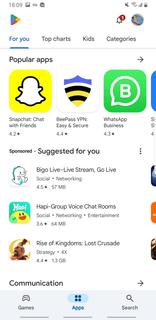
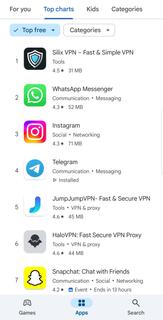
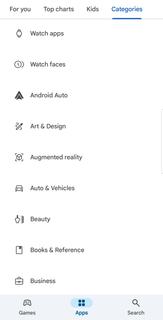
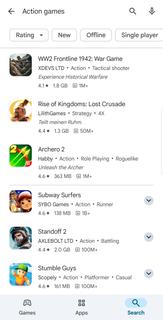
Google Play Store apk helps when you want one place to find and manage content across Android devices. It centralizes browsing, purchases, and your personal library so you can keep track of everything without switching apps. The layout is straightforward, and sections are organized to make discovery simple. As you move between phone and other screens, your activity stays linked to your account. Many users look for stability and clear controls, which the Google Play Store download latest version focuses on delivering. Key features for Android usersCross device discovery and installsGoogle Play Store apk lets you browse and install across phone, tablet, TV, Chromebook, watch, car, and XR. Your picks follow your Google account, so you can start on one device and finish on another. This approach makes it easy to plan installs for the device you use most without repeating searches.Library and account controlsYou can view My Play activity, manage updates, and set install preferences in a few taps. The library shows your apps, media, and past purchases in one place, which helps you stay organized. When you switch devices, your history and preferences move with you for consistent access.Payments and subscriptions managementGoogle Play Store provides clear options to update payment methods, track subscriptions, and redeem codes or gift cards. You can review offers and set reminders so recurring charges do not surprise you. These controls place billing and entitlements alongside your content for easy oversight.Programs and rewardsWith Play Pass, you can access a selection of apps and games under one plan. Play Points rewards eligible purchases and activities, which you can track from your profile. Straightforward refund requests are available for qualifying purchases, helping reduce friction if something does not meet your needs.Curated picks, events, and family toolsPopular apps, Editors’ Choice, and Innovation Corner highlight timely content so you can find tested options faster. Event banners surface updates and activities inside apps at the right moment. For families, a dedicated Kids section, ratings with a Parent Guide, and Family sharing on select purchases support safer, shared experiences. Purchases, gift cards, and refunds on Google Play StoreGift cards and Google Play Store code redemption are supported, which helps if you prefer prepaid options. Refunds for qualifying purchases follow a clear process, and you can view status inside your account. Before buying, check item details and renewal terms so your subscriptions and one time purchases match your expectations. How to use Google Play Store on your phoneNew and returning users can get started quickly with the Google Play app using a few simple steps. The interface groups discovery, your library, and payments in clear sections, which keeps everyday tasks simple. Open Google Play Store from your app list, then sign in to your Google account if prompted.Browse categories like Apps, Games, and Books, or use the search bar to find a specific title.Select a result to view details, screenshots, ratings, and item requirements, then decide if it fits your needs.Tap Install to add it to your device, or choose another device linked to your account when that option appears.After installation, manage updates, subscriptions, payment methods, and code redemption from your profile and Library. Start using Google Play StoreGoogle Play Store apk brings discovery, purchases, and account controls into one familiar place across Android screens. When you are ready, explore curated sections, manage your library, and keep installs organized without extra steps.For official resources and more details, visit the link below.Official website: https://play.google.com/store/apps FAQs1. Why does Google deletes apps from Play Store? Google deletes apps from Play Store when they violate policies, contain malware, use misleading metadata, or infringe copyright. If an app you installed gets removed, you can still find it in your Play Library under "Not on this device" as long as the developer hasn't fully deleted it. 2. How do I download Google Play Store? On most Android phones, the Play Store comes preinstalled. If it's missing or disabled, go to Settings > Apps > look for "Google Play Store" and enable it. If it's truly gone, you can download the official APK from this page. 3. How to change country in Google Play Store? Open the Play Store, tap your profile picture > Settings > General > Account and device preferences > Country and profiles. Select your new country and follow the prompts. You can only change it once per year, and you must have a payment method from that country.
بیشتر نشان بده

1. نصب کننده Memu را دانلود کرده و راه اندازی را تمام کنید

2. Memu را اجرا کنید و سپس گوگل پلی را بر روی دستکتاپ باز کنید

3. Google Play Store را بر روی گوگل پلی جستجو کنید
Install
4. Google Play Store را دانلود و نصب کنید
5. پس از اتمام نصب روی آیکون کلیک کنید تا اجرا شود

6. با استفاده از MEmu، Google Play Store را روی کامپیوتر خود تجربه کنید.
MEmu در حال حاضر بهترین شبیهساز رایگان اندروید است که ۵۰ میلیون کاربر از تجربه استثنایی برنامههای اندروید لذت میبرند. فناوری مجازیسازی MEmu به شما امکان میدهد هزاران برنامه اندروید، حتی بازیهای با گرافیک بالا را به راحتی روی رایانه خود اجرا کنید.
صفحه نمایش بزرگتر با گرافیک بهتر؛ زمان طولانی تر، بدون محدودیت باتری یا داده تلفن همراه.
پشتیبانی کامل از Keymapping برای کنترل دقیق صفحه کلید و ماوس یا گیم پد.
چندین حساب بازی یا وظایف در یک رایانه شخصی در یک زمان با مدیریت همزمان همه
Use Google Play Store on PC by following steps: