
Snaptube
تاریخ بهروزرسانی
نسخه کنونی
7.63.0.76330810
ارائهکننده

در مورد استفاده بیش از حد در هنگام استفاده از Snaptube بر روی تلفن همراه خود ، نگران نباشید ، خود را از صفحه ریز رها کنید و از استفاده از برنامه در یک صفحه نمایش بسیار بزرگتر لذت ببرید. از این پس ، تجربه تمام صفحه برنامه خود را با صفحه کلید و ماوس دریافت کنید .Mmu تمام ویژگی های شگفت انگیز مورد نظر شما را ارائه می دهد: نصب سریع و نصب آسان ، کنترل های بصری ، محدودیت بیشتر باتری ، داده های تلفن همراه و تماس های مزاحم. نام تجاری جدید MEmu 9 بهترین انتخاب برای استفاده از Snaptube در رایانه شما است. با جذب ما ، مدیر چند نمونه باعث می شود همزمان 2 یا چند حساب را باز کنید. و از همه مهمتر ، موتور انحصاری منحصر به فرد ما می تواند پتانسیل کامل کامپیوتر شما را آزاد کند ، همه چیز را صاف و لذت بخش کند.
بیشتر نشان بده
از تجربه فوقالعاده استفاده از Snaptube در کامپیوتر با MEmu Play لذت ببرید. این یک شبیهساز اندروید رایگان و قدرتمند است که هزاران برنامه اندروید را برای نسخه دسکتاپ در اختیار شما قرار میدهد. Snaptube helps when you want to keep clips and songs ready without relying on a connection.
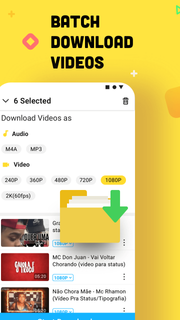



Snaptube helps when you want to keep clips and songs ready without relying on a connection. It brings a simple way to collect content from popular platforms, then store it in formats that match your device and data plan. As a result, you can build a personal library that works on the go and at home. For users searching for Snaptube APK, this overview explains the purpose clearly and keeps the focus on everyday use.Key features of SnaptubeDownload from many sourcesSnaptube supports 50 plus platforms including YouTube, Facebook, Twitter, TikTok, Vevo, and WhatsApp. You paste a link or use the built in search to find the video or music you need. The app keeps everything in one place so you do not switch between apps while gathering content.Flexible quality and format choicesYou choose how files are saved, from 144p up to 4K for video. If you only want audio, Snaptube can extract tracks in MP3 or M4A to help manage storage and data use. This lets you match each download to your phone and connection, then keep playback smooth.Clean interface with quick actionsSnaptube offers a simple layout with search, trends, and daily recommendations to help you find content faster. When you are ready, an in app floating button gives you one tap downloads that feel natural. This reduces extra steps and keeps the process clear from start to finish.Fast, stable, and unlimited downloadsSnaptube handles multiple files without slowing down, so you can queue videos and songs together. Everything is managed in a single Library where you see what is complete and what is in progress. This setup keeps your downloads organized and easy to review.Offline playback, sharing, and no root neededOnce a file is saved, you watch or listen offline directly in Snaptube. You also share through apps like WhatsApp and Messenger with a few taps. The app is 100 percent free and secure, and it works without root, which keeps setup simple and device friendly.How to use Snaptube on AndroidThe steps below show a straightforward process for saving media on a phone. For first time users who plan to download Snaptube, the flow is simple and direct. Everything happens inside the app.Open Snaptube and search for a video or song, or paste a link from YouTube, Facebook, Twitter, TikTok, Vevo, or WhatsApp.Tap the floating button to view format and quality options, then choose video resolution from 144p up to 4K or select MP3 or M4A for audio only.Confirm the download and check progress in the Library, where you can manage multiple files at once.After completion, open the file for offline playback directly in Snaptube.Use the share option to send the file through apps like WhatsApp or Messenger.Get started with SnaptubeSnaptube lets you collect videos and music from many sources and keep them ready offline. Pick formats and qualities that fit your device and data plan, then manage everything in one Library. To stay current, check the Snaptube latest version before installing.
بیشتر نشان بده

1. نصب کننده Memu را دانلود کرده و راه اندازی را تمام کنید

2. Memu را اجرا کنید و سپس گوگل پلی را بر روی دستکتاپ باز کنید

3. Snaptube را بر روی گوگل پلی جستجو کنید
Install
4. Snaptube را دانلود و نصب کنید
5. پس از اتمام نصب روی آیکون کلیک کنید تا اجرا شود

6. با استفاده از MEmu، Snaptube را روی کامپیوتر خود تجربه کنید.
MEmu در حال حاضر بهترین شبیهساز رایگان اندروید است که ۵۰ میلیون کاربر از تجربه استثنایی برنامههای اندروید لذت میبرند. فناوری مجازیسازی MEmu به شما امکان میدهد هزاران برنامه اندروید، حتی بازیهای با گرافیک بالا را به راحتی روی رایانه خود اجرا کنید.
صفحه نمایش بزرگتر با گرافیک بهتر؛ زمان طولانی تر، بدون محدودیت باتری یا داده تلفن همراه.
پشتیبانی کامل از Keymapping برای کنترل دقیق صفحه کلید و ماوس یا گیم پد.
چندین حساب بازی یا وظایف در یک رایانه شخصی در یک زمان با مدیریت همزمان همه
Use Snaptube on PC by following steps: