SnapTube
Updated
Current Version
7.63.0.76330810
Offered By

Stop worrying about high battery drain when using SnapTube on your phone. Free yourself from the tiny screen and enjoy the app on a much larger display. From now on, get a full-screen experience of your app with the convenience of a keyboard and mouse. MEmu offers you all the surprising features you’d expect: quick installation and easy setup, intuitive controls, and no more worries about battery life, mobile data, or unexpected calls. The all-new MEmu 9 is the choice for using SnapTube on your computer. With the MEmu multi-instance manager, you can run two or more accounts at the same time. Most importantly, our exclusive emulation engine unlocks your PC’s full potential, delivering smooth and enjoyable performance.
Show more
Enjoy superb experience of using SnapTube on PC with MEMU App Player. It's a powerful free Android emulator which provides you with thousands of android apps for their desktop version. Enjoy connecting with friends and polishing your work with higher efficiency! Snaptube helps when you want to keep clips and songs ready without relying on a connection.
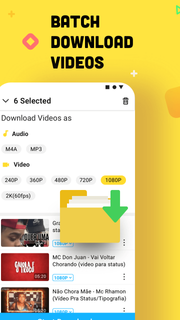



Snaptube helps when you want to keep clips and songs ready without relying on a connection. It brings a simple way to collect content from popular platforms, then store it in formats that match your device and data plan. As a result, you can build a personal library that works on the go and at home. For users searching for Snaptube APK, this overview explains the purpose clearly and keeps the focus on everyday use.Key features of SnaptubeDownload from many sourcesSnaptube supports 50 plus platforms including YouTube, Facebook, Twitter, TikTok, Vevo, and WhatsApp. You paste a link or use the built in search to find the video or music you need. The app keeps everything in one place so you do not switch between apps while gathering content.Flexible quality and format choicesYou choose how files are saved, from 144p up to 4K for video. If you only want audio, Snaptube can extract tracks in MP3 or M4A to help manage storage and data use. This lets you match each download to your phone and connection, then keep playback smooth.Clean interface with quick actionsSnaptube offers a simple layout with search, trends, and daily recommendations to help you find content faster. When you are ready, an in app floating button gives you one tap downloads that feel natural. This reduces extra steps and keeps the process clear from start to finish.Fast, stable, and unlimited downloadsSnaptube handles multiple files without slowing down, so you can queue videos and songs together. Everything is managed in a single Library where you see what is complete and what is in progress. This setup keeps your downloads organized and easy to review.Offline playback, sharing, and no root neededOnce a file is saved, you watch or listen offline directly in Snaptube. You also share through apps like WhatsApp and Messenger with a few taps. The app is 100 percent free and secure, and it works without root, which keeps setup simple and device friendly.How to use Snaptube on AndroidThe steps below show a straightforward process for saving media on a phone. For first time users who plan to download Snaptube, the flow is simple and direct. Everything happens inside the app.Open Snaptube and search for a video or song, or paste a link from YouTube, Facebook, Twitter, TikTok, Vevo, or WhatsApp.Tap the floating button to view format and quality options, then choose video resolution from 144p up to 4K or select MP3 or M4A for audio only.Confirm the download and check progress in the Library, where you can manage multiple files at once.After completion, open the file for offline playback directly in Snaptube.Use the share option to send the file through apps like WhatsApp or Messenger.Get started with SnaptubeSnaptube lets you collect videos and music from many sources and keep them ready offline. Pick formats and qualities that fit your device and data plan, then manage everything in one Library. To stay current, check the Snaptube latest version before installing.
Show more

1. Download MEmu installer and finish the setup

2. Start MEmu then open Google Play on the desktop

3. Search SnapTube in Google Play
Install
4. Download and Install SnapTube
5. On install completion click the icon to start

6. Enjoy using SnapTube on PC with MEmu
MEmu Play is the best Android emulator, and 100 million users already enjoy its superb Android app experience. Powered by advanced virtualization technology, it lets you enjoy thousands of Android apps smoothly on your PC—including the most graphics-intensive ones.
Bigger screen with better graphics; Long duration, without limitation of battery or mobile data.
Full Keymapping support for precise control of keyboard and mouse or gamepad.
Multiple game accounts or tasks on single PC at one time with Multi-Instance manager.
Use SnapTube on PC by following steps: