Grand Theft Auto: Vice City
Mise à jour
Version actuelle
1.1
Proposée par

Avec toute la passion que vous avez à jouer Grand Theft Auto: Vice City, vos mains ne sont pas sensées se limiter à l’infime écran de votre téléphone. Jouez comme un pro et ayez le contrôle total de votre jeu à l’aide du clavier et de la souris. MEmu satisfait toutes vos attentes. Téléchargez et jouez Grand Theft Auto: Vice City sur PC. Jouez aussi longtemps que vous souhaitez sans aucune limitation de batterie, de données mobiles et d’appels embêtants. La toute nouvelle version de MEmu 9 est la meilleure option de jouer Grand Theft Auto: Vice City sur PC. Réalisé par nos experts, l’e magnifique système d’affectation de touches prédéfini fait de Grand Theft Auto: Vice City un jeu réaliste sur PC. Le gestionnaire multi-instances de MEmu permet 2 ou plusieurs comptes de jeu sur le même appareil. Et le plus important, le moteur d’émulation exclusif peut libérer le plein potentiel de votre PC, ce qui facilite tout.
Afficher plus
Téléchargez Grand Theft Auto: Vice City avec le simulateur d’Android MEmu sur votre PC. Profitez de jouer sur un grand écran. Welcome back to GTA Vice City Game.

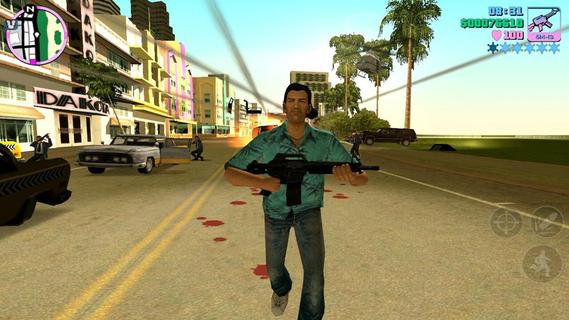
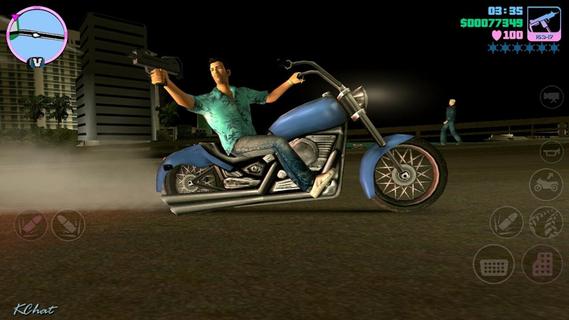
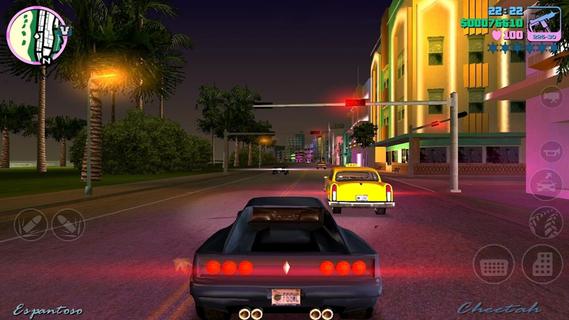
Welcome back to GTA Vice City Game. Welcome back to the Grand Theft Auto: Vice City 1980s.From the decade of big hair, excess and pastel suits comes a story of one man's rise to the top of the criminal pile. Vice City, a huge urban sprawl ranging from the beach to the swamps and the glitz to the ghetto, was one of the most varied, complete and alive digital cities ever created. Combining open-world gameplay with a character driven narrative, you arrive in a town brimming with delights and degradation and given the opportunity to take it over as you choose.To celebrate its 10 year anniversary, Rockstar Games brings Grand Theft Auto: Vice City to mobile devices with high-resolution graphics, updated controls and a host of new features including:• Beautifully updated graphics, character models and lighting effects• New, precisely tailored firing and targeting options• Custom controls with a fully customizable layout• Massive campaign with countless hours of gameplay• Compatible with the MoGa Wireless Game Controller and select USB gamepads• Integrated with Immersion tactile effects • Tailor your visual experience with adjustable graphic settingsLanguages Supported: English, French, Italian, German, Spanish, Korean, Russian, and Japanese.Grand Theft Auto: Vice City is now available on:Android Phones: Motorola Atrix, Motorola Atrix HD, Motorola Atrix 4G, Motorola Photon, HTC Rezound, HTC One X, HTC One X+, Samsung Galaxy Nexus, Samsung Galaxy Note, Samsung Galaxy Note 2, Samsung Galaxy R, Samsung Epic 4G, Samsung Galaxy S2, Samsung Galaxy S3, Google Nexus 4, Sony Xperia Play, Sony Xperia Sola, Sony Xperia S / P / T & TL, Sony Walkman Z Series Media PlayerAndroid Tablets: Acer Iconia, Asus Eee Pad Transformer Prime, Asus Transformer Pad TF300T, Asus Transformer Pad Infinity 700, Motorola Xoom, Samsung Galaxy Tab 7.0 / 7.7 / 8.9 & 10.1, Samsung Galaxy Note 10.1, Sony Tablet S, Sony Tablet P, Sony Xperia Tablet S, Toshiba Thrive, Toshiba Regza, Google Nexus 7, Google Nexus 10, Fujitsu Stylistic 10.1Grand Theft Auto: Vice City was developed and tested only on these devices. If your device is not listed, please check support.rockstargames.com for any updates to this listFor optimal performance, we recommend re-booting your device after downloading and closing other applications when playing Grand Theft Auto: Vice City.Download GTA Voice City Biggest Release of Rockstar Games Free Version Now and Enjoy Your Time.
Afficher plus

1. Téléchargez l'installateur MEmu et terminez l'installation

2. Démarrez MEmu puis ouvrez Google Play sur la page d'accueil

3. Recherchez Grand Theft Auto: Vice City dans Google Play
Install
4. Téléchargez et installez Grand Theft Auto: Vice City
5. Une fois l'installation terminée, cliquez sur l'icône pour démarrer

6. Profitez de jouer Grand Theft Auto: Vice City sur PC avec MEmu
Le lecteur d'application MEmu est le meilleur émulateur Android gratuit, et 50 millions de personnes profitent déjà de sa fantastique expérience de jeu Android. La technologie de virtualisation MEmu vous donne la possibilité de jouer à des milliers de jeux Android sur votre PC sans aucune difficulté, même aux plus gourmands.
L’écran plus grand avec de meilleurs graphismes; Une longue durée, sans limitation de batterie ou de données mobiles.
Soutien du Keymapping pour un contrôle précis du clavier et de la souris ou de la manette de jeu
Plusieurs comptes de jeu ou tâches sur un seul PC en même temps avec le gestionnaire de multi-instance.
Play Grand Theft Auto: Vice City on PC by following steps: