APKMirror Installer (Official) PC

Téléchargez APKMirror Installer (Official) sur PC

APKMirror Installer (Official) PC

APKMirror Installer (Official)

  • Mise à jour

  • Version actuelle

  • Proposée par

    APKMirror Installer (Official) PC

Caractéristiques de APKMirror Installer (Official) sur PC

Ne vous inquiétez plus des surcharges lorsque vous utilisez APKMirror Installer (Official) sur votre téléphone portable, libérez-vous de l'écran minuscule et profitez de l'application sur un écran beaucoup plus grand. Désormais, vous pouvez utiliser votre application en plein écran avec le clavier et la souris. MEmu vous offre toutes les fonctionnalités surprenantes que vous attendiez : installation rapide et configuration facile, commandes intuitives, plus de limitations de batterie, de données mobiles et d'appels dérangeants. Le tout nouveau MEmu 9 est le meilleur choix pour utiliser APKMirror Installer (Official) sur votre ordinateur. Codé avec notre absorption, le gestionnaire multi-instance permet d'ouvrir 2 ou plusieurs comptes en même temps. Et le plus important, notre moteur d'émulation exclusif peut libérer tout le potentiel de votre PC, rendre tout cela fluide et agréable.

Afficher plus

Captures d'écran et Vidéo de APKMirror Installer (Official) PC

Profitez d'une expérience APKMirror Installer (Official) exceptionnelle sur PC grâce à MEmu Play. Cet émulateur Android gratuit et performant vous donne accès à des milliers d'applications Android pour votre ordinateur. Restez en contact avec vos amis et travaillez plus efficacement ! What does this app do?
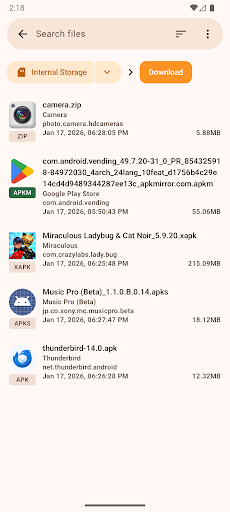
Informations sur la candidature

What does this app do?


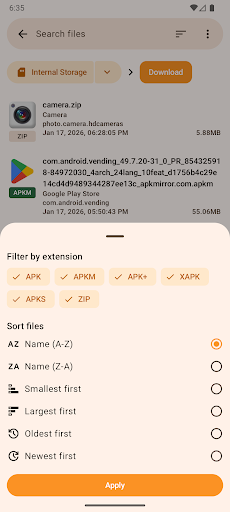
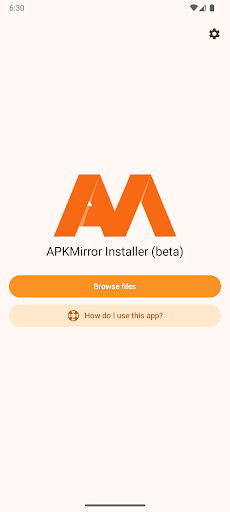
APKMirror Installer is a helper app that lets you install .apkm, .xapk, and .apks app bundle files as well as regular APK files.

We've also added a highly requested bonus feature for regular APK files: if sideloading an APK fails and you want to know why, you can now see the exact failure reason by initiating the installation from APKMirror Installer.

Split APKs - huh?


In mid-2018 at Google I/O, Google announced a new dynamic app delivery format called App Bundles. We highly recommend reading this AndroidPolice post as the illustrations will make the concept a lot easier to understand.

Otherwise, here is a quick explainer. Before app bundles, developers either created a single "fat" APK with all the libraries and resources in them or manually managed multiple APK variants (for example, arm64 320dpi, x86 320dpi, arm64 640dpi, etc.).

The new App Bundles allow developers to transfer the burden of dealing with variants to Google, which then splits the app release into multiple chunks - hence the term split APKs. Each release then consists of a base APK and one or more APK splits.

For example, a single release may now arrive as 5 files: base.apk + arm64.split.apk + 320dpi.split.apk + en-us.lang.split.apk + es-es.lang.split.apk.

Unfortunately, you can't install all these APK splits by just tapping them on your device - you can only install the base APK, which will then crash due to missing resources.

This is where APK Mirror Installer comes in.

Alright, so what are these .apkm files?


As many apps are migrating to the split APK format that cannot be easily shared and installed without a companion app, APKMirror has developed a solution to adapt to these changes and continue to allow easy and safe sideloading options.

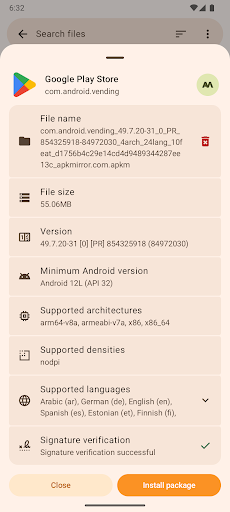
Each .apkm file is comprised of a base APK and a number of split APKs. Once you've installed APK Mirror Installer and downloaded the .apkm file you'd like to install, simply tap on it or use APKMirror Installer to find the download location. You will be able to see the exact contents of each .apkm file and select only the splits you want to install to save space on your device.

APK Mirror Installer and the underlying infrastructure took many months to develop at a considerable cost, so we hope you understand why the app and site are ad-supported. For those who prefer to avoid in-app ads, there are various subscription options to go ad-free and unlock additional features.

Issues and bugs


Xiaomi/Redmi/Poco MIUI users
Unfortunately, Xiaomi modified MIUI and specifically the part of Android that APKMirror Installer uses for installing split APKs.

There is a workaround that should work - disabling MIUI optimizations in developer settings. Please try that, and the installation should succeed.

Further discussion of the issue can be found here: https://github.com/android-police/apkmirror-public/issues/116.

Other issues/bugs
Please report any issues to our Github bug tracker.

Note: This app is a file manager utility and does not have any direct app store features, such as browsing websites or updating applications directly, as that would be against the Play Store ToS.

Afficher plus

Comment télécharger APKMirror Installer (Official) sur PC

  • APKMirror Installer (Official) PC

    1. Téléchargez l'installateur MEmu et terminez l'installation

  • APKMirror Installer (Official) PC

    2. Démarrez MEmu puis ouvrez Google Play sur la page d'accueil

  • APKMirror Installer (Official) PC

    3. Recherchez APKMirror Installer (Official) dans Google Play

  • APKMirror Installer (Official) PC Install

    4. Téléchargez et installez APKMirror Installer (Official)

  • APKMirror Installer (Official) PC

    5. Une fois l'installation terminée, cliquez sur l'icône pour démarrer

  • APKMirror Installer (Official) PC
    APKMirror Installer (Official) PC APKMirror Installer (Official) PC

    6. Utiliser MEmu pour utiliser APKMirror Installer (Official) sur votre ordinateur

Pourquoi utiliser MEmu pour APKMirror Installer (Official)

MEmu Play est actuellement le meilleur émulateur Android gratuit, avec 50 millions d'utilisateurs qui profitent d'une expérience Android exceptionnelle. La technologie de virtualisation de MEmu vous permet de jouer facilement à des milliers d'applications Android sur votre ordinateur, même les plus gourmandes en ressources.

  • L’écran plus grand avec de meilleurs graphismes; Une longue durée, sans limitation de batterie ou de données mobiles.

  • Soutien du Keymapping pour un contrôle précis du clavier et de la souris ou de la manette de jeu

  • Plusieurs comptes de jeu ou tâches sur un seul PC en même temps avec le gestionnaire de multi-instance.

Prêt à commencer à l'utiliser ?

Sujets populaires

APKMirror Installer (Official) - FAQs

  • Comment utiliser APKMirror Installer (Official) sur PC ?

    Use APKMirror Installer (Official) on PC by following steps:

    • Download MEmu, then install and launch it
    • Login to Google Play Store, install the app
    • Enjoy using the app on PC with MEmu
  • Quelles sont les exigences de système minimales pour utiliser APKMirror Installer (Official) sur PC ?
    • Intel or AMD Processor
    • Microsoft Windows 7 and above
    • 2GB of memory
    • 5GB of free disk space
    • Hardware Virtualization Technology