APKMirror Installer (Official) PC

Descargar APKMirror Installer (Official) en PC

APKMirror Installer (Official) PC

APKMirror Installer (Official)

  • Actualizada

  • Versión actual

  • Ofrecida por

    APKMirror Installer (Official) PC

Características de APKMirror Installer (Official) en PC

Deje de preocuparse por los recargos cuando use APKMirror Installer (Official) en su teléfono celular, libérese de la pequeña pantalla y disfrute usando la aplicación en una pantalla mucho más grande. A partir de ahora, obtenga una experiencia de pantalla completa de su aplicación con teclado y mouse. MEmu le ofrece todas las características sorprendentes que esperaba: instalación rápida y configuración fácil, controles intuitivos, no más limitaciones de batería, datos móviles y llamadas molestas. El nuevo MEmu 9 es la mejor opción para usar APKMirror Installer (Official) en su computadora. Codificado con nuestra absorción, el administrador de instancias múltiples hace posible abrir 2 o más cuentas al mismo tiempo. Y lo más importante, nuestro exclusivo motor de emulación puede liberar todo el potencial de su PC, hacer que todo sea fluido y agradable.

Más detalles

Capturas de pantalla y Vídeo de APKMirror Installer (Official) PC

Disfruta de una experiencia increíble usando APKMirror Installer (Official) en tu PC con MEmu Play. Es un potente emulador de Android gratuito que te ofrece miles de aplicaciones de Android en su versión de escritorio. ¡Conéctate con tus amigos y optimiza tu trabajo! What does this app do?
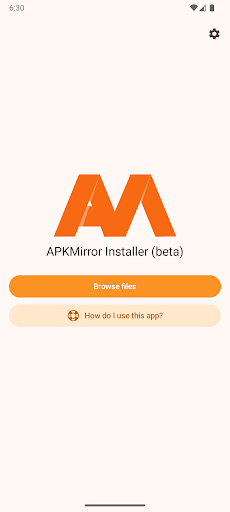
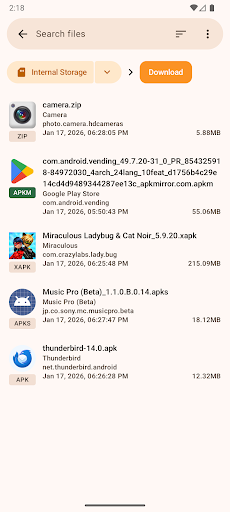
Información aplicación

What does this app do?


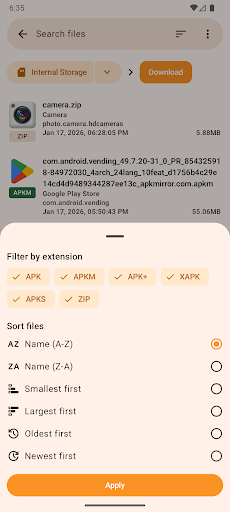
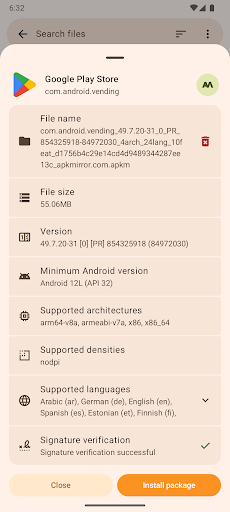
APKMirror Installer is a helper app that lets you install .apkm, .xapk, and .apks app bundle files as well as regular APK files.

We've also added a highly requested bonus feature for regular APK files: if sideloading an APK fails and you want to know why, you can now see the exact failure reason by initiating the installation from APKMirror Installer.

Split APKs - huh?


In mid-2018 at Google I/O, Google announced a new dynamic app delivery format called App Bundles. We highly recommend reading this AndroidPolice post as the illustrations will make the concept a lot easier to understand.

Otherwise, here is a quick explainer. Before app bundles, developers either created a single "fat" APK with all the libraries and resources in them or manually managed multiple APK variants (for example, arm64 320dpi, x86 320dpi, arm64 640dpi, etc.).

The new App Bundles allow developers to transfer the burden of dealing with variants to Google, which then splits the app release into multiple chunks - hence the term split APKs. Each release then consists of a base APK and one or more APK splits.

For example, a single release may now arrive as 5 files: base.apk + arm64.split.apk + 320dpi.split.apk + en-us.lang.split.apk + es-es.lang.split.apk.

Unfortunately, you can't install all these APK splits by just tapping them on your device - you can only install the base APK, which will then crash due to missing resources.

This is where APK Mirror Installer comes in.

Alright, so what are these .apkm files?


As many apps are migrating to the split APK format that cannot be easily shared and installed without a companion app, APKMirror has developed a solution to adapt to these changes and continue to allow easy and safe sideloading options.

Each .apkm file is comprised of a base APK and a number of split APKs. Once you've installed APK Mirror Installer and downloaded the .apkm file you'd like to install, simply tap on it or use APKMirror Installer to find the download location. You will be able to see the exact contents of each .apkm file and select only the splits you want to install to save space on your device.

APK Mirror Installer and the underlying infrastructure took many months to develop at a considerable cost, so we hope you understand why the app and site are ad-supported. For those who prefer to avoid in-app ads, there are various subscription options to go ad-free and unlock additional features.

Issues and bugs


Xiaomi/Redmi/Poco MIUI users
Unfortunately, Xiaomi modified MIUI and specifically the part of Android that APKMirror Installer uses for installing split APKs.

There is a workaround that should work - disabling MIUI optimizations in developer settings. Please try that, and the installation should succeed.

Further discussion of the issue can be found here: https://github.com/android-police/apkmirror-public/issues/116.

Other issues/bugs
Please report any issues to our Github bug tracker.

Note: This app is a file manager utility and does not have any direct app store features, such as browsing websites or updating applications directly, as that would be against the Play Store ToS.

Más detalles

Cómo Descargar APKMirror Installer (Official) en PC

  • APKMirror Installer (Official) PC

    1. Descargar el instalador de MEmu y finalice la instalación

  • APKMirror Installer (Official) PC

    2. Iniciar MEmu y abrir Google Play en la página de inicio

  • APKMirror Installer (Official) PC

    3. Buscar APKMirror Installer (Official) en Google Play

  • APKMirror Installer (Official) PC Install

    4. Descargar y instalar APKMirror Installer (Official)

  • APKMirror Installer (Official) PC

    5. Hacer click al icono para iniciar

  • APKMirror Installer (Official) PC
    APKMirror Installer (Official) PC APKMirror Installer (Official) PC

    6. Experiencia APKMirror Installer (Official) en PC con MEmu

Por qué usar MEmu para APKMirror Installer (Official)

MEmu App Player es el mejor emulador de Android gratuito y 50 millones de personas ya están disfrutando su magnífica experiencia de aplicación en Android. La tecnología de virtualización de MEmu te permite jugar a miles de aplicaciones Android suavemente en tu PC, incluso los más intensivos gráficamente.

  • Pantalla más grande con mejores gráficos; Larga duración, sin limitación de batería o datos móviles.

  • Soporte completo de keymapping para un control preciso del teclado y el mouse o gamepad.

  • Múltiples cuentas de juegos o tareas en una sola PC a la vez con el administrador de instancias múltiples.

¿Listo para empezar a usarlo?

Temas más populares

APKMirror Installer (Official) - FAQs

  • ¿Cómo usar APKMirror Installer (Official) en una computadora?

    Use APKMirror Installer (Official) on PC by following steps:

    • Download MEmu, then install and launch it
    • Login to Google Play Store, install the app
    • Enjoy using the app on PC with MEmu
  • ¿Cuáles son los requisitos mínimos del sistema para ejecutar APKMirror Installer (Official) en una computadora?
    • Intel or AMD Processor
    • Microsoft Windows 7 and above
    • 2GB of memory
    • 5GB of free disk space
    • Hardware Virtualization Technology