TV Control for Roku TV
Mise à jour
Version actuelle
9
Proposée par

Ne vous inquiétez plus des surcharges lorsque vous utilisez TV Control for Roku TV sur votre téléphone portable, libérez-vous de l'écran minuscule et profitez de l'application sur un écran beaucoup plus grand. Désormais, vous pouvez utiliser votre application en plein écran avec le clavier et la souris. MEmu vous offre toutes les fonctionnalités surprenantes que vous attendiez : installation rapide et configuration facile, commandes intuitives, plus de limitations de batterie, de données mobiles et d'appels dérangeants. Le tout nouveau MEmu 9 est le meilleur choix pour utiliser TV Control for Roku TV sur votre ordinateur. Codé avec notre absorption, le gestionnaire multi-instance permet d'ouvrir 2 ou plusieurs comptes en même temps. Et le plus important, notre moteur d'émulation exclusif peut libérer tout le potentiel de votre PC, rendre tout cela fluide et agréable.
Afficher plus
Téléchargez TV Control for Roku TV avec le simulateur d’Android MEmu sur votre PC. Profitez de jouer sur un grand écran. Roku TV Remote helps you control your TVs from the comfort of your phone.
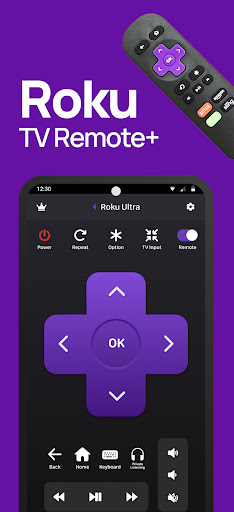
Roku TV Remote helps you control your TVs from the comfort of your phone.
This Remote Control App is compatible with all Roku TVs will full Remote Controller Access
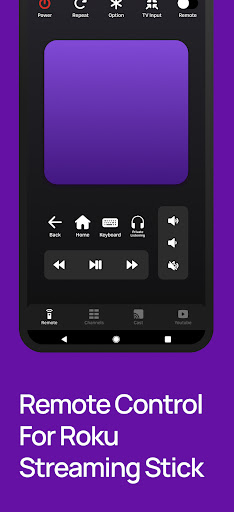
Quick Cast To TV and Share Photos & Videos in high-definition from your Gallery directly onto your devices with the tap of a button on the dedicated ""Cast"" tab. Search effortlessly by using our friendly keyboard on the app.
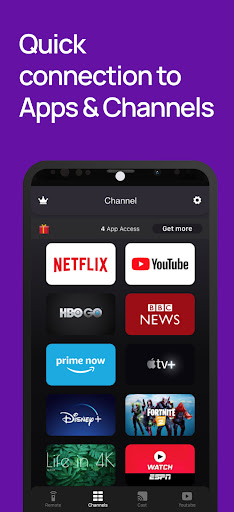
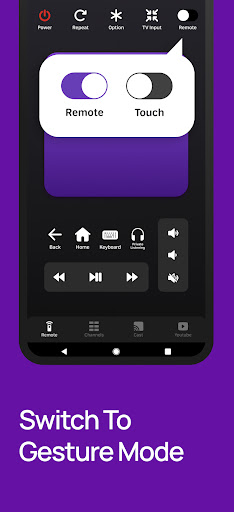
Enjoy quick access to your favorite TV Streaming media channels like HBONow, Chill TLC, Shattered channel, YouTube, Rookie and others with the dedicated ""Channels"" Tab. This Smart TV Remote Control app also helps you use swipe-based gestures on your devices for easier navigation.
This Roku TV Remote app is the prime way for you to watch, cast to TV and play games on TV conveniently.
Features:
+ Intuitive remote control.
+ Quick access to your favorite apps and channels.
+ SmartCast feature: Cast media directly from your library.
Setup: Please connect both devices to the same WiFi network. Select your Roku TV in the app and, when prompted, ""Allow"" the app. That's it! Simple, quick, with complete features.
(Please note that this application cannot turn on your TV. Your TV is not connected to WiFi when it is OFF, so it can't accept the commands.)
Terms of Use: http://vulcanlabs.co/terms-of-use/
Privacy Policy: http://vulcanlabs.co/privacy-policy/"
DISCLAIMER:
This application is not affiliated nor endorsed by Roku Inc. and it is not an official product of Roku Inc. or its affiliates.
Afficher plus

1. Téléchargez l'installateur MEmu et terminez l'installation

2. Démarrez MEmu puis ouvrez Google Play sur la page d'accueil

3. Recherchez TV Control for Roku TV dans Google Play
Install
4. Téléchargez et installez TV Control for Roku TV
5. Une fois l'installation terminée, cliquez sur l'icône pour démarrer

6. Utiliser MEmu pour utiliser TV Control for Roku TV sur votre ordinateur
MEmu Play est actuellement le meilleur émulateur Android gratuit, avec 50 millions d'utilisateurs qui profitent d'une expérience Android exceptionnelle. La technologie de virtualisation de MEmu vous permet de jouer facilement à des milliers d'applications Android sur votre ordinateur, même les plus gourmandes en ressources.
L’écran plus grand avec de meilleurs graphismes; Une longue durée, sans limitation de batterie ou de données mobiles.
Soutien du Keymapping pour un contrôle précis du clavier et de la souris ou de la manette de jeu
Plusieurs comptes de jeu ou tâches sur un seul PC en même temps avec le gestionnaire de multi-instance.
Use TV Control for Roku TV on PC by following steps: