Vidix-AI Photo Video Generator
Mise à jour
Version actuelle
7.4
Proposée par

Ne vous inquiétez plus des surcharges lorsque vous utilisez Vidix-AI Photo Video Generator sur votre téléphone portable, libérez-vous de l'écran minuscule et profitez de l'application sur un écran beaucoup plus grand. Désormais, vous pouvez utiliser votre application en plein écran avec le clavier et la souris. MEmu vous offre toutes les fonctionnalités surprenantes que vous attendiez : installation rapide et configuration facile, commandes intuitives, plus de limitations de batterie, de données mobiles et d'appels dérangeants. Le tout nouveau MEmu 9 est le meilleur choix pour utiliser Vidix-AI Photo Video Generator sur votre ordinateur. Codé avec notre absorption, le gestionnaire multi-instance permet d'ouvrir 2 ou plusieurs comptes en même temps. Et le plus important, notre moteur d'émulation exclusif peut libérer tout le potentiel de votre PC, rendre tout cela fluide et agréable.
Afficher plus
Profitez d'une expérience Vidix-AI Photo Video Generator exceptionnelle sur PC grâce à MEmu Play. Cet émulateur Android gratuit et performant vous donne accès à des milliers d'applications Android pour votre ordinateur. Restez en contact avec vos amis et travaillez plus efficacement ! Vidix – AI Photo Video Generator is the ultimate creative studio powered by advanced AI.


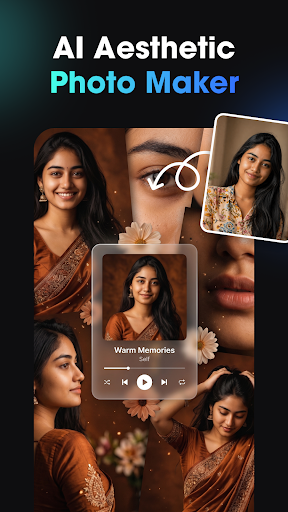
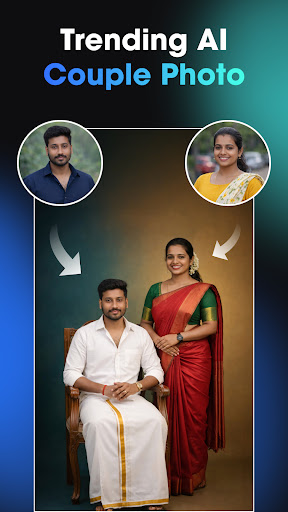
Vidix – AI Photo Video Generator is the ultimate creative studio powered by advanced AI. Instantly transform your photos, ideas, or text prompts into stunning AI videos, 3D characters, digital art, and trending visual effects without needing a photo editor or video editor.
Whether you want to create an AI reel, design a cartoon-style avatar, or generate a realistic AI photo, Vidix gives you everything in just a few taps. No editing skills required - just imagination.
AI Video Generator
Turn any image or selfie into a cinematic AI video. Watch your photos move, smile, and express emotions through next-gen AI animation. Create story-style clips, portraits in motion, or short videos instantly with our intelligent AI video generator.
3D AI Figure & Avatar Creator
Generate your own 3D AI avatar or digital character using powerful AI generator tools. Choose trending poses, outfits, and artistic styles. Perfect for creators, influencers, and anyone exploring AI art or 3D design.
Text-to-Image & Text-to-Video Generator
Type what you imagine — Vidix’s smart AI image generator converts your text into beautiful visuals or cinematic videos. Describe a scene, photo idea, or character, and watch it appear instantly.
AI Effects, Filters & Trending Styles
Discover popular AI filters, cartoon effects, anime styles, and cinematic looks updated regularly. Transform your appearance, background, or outfit using AI-driven photo editor enhancements and creative styles.
AI Photo to Video Transformation
Upload any portrait and turn it into an animated story. From classic photography to stylized AI art, Vidix converts static photos into dynamic AI videos with smooth, natural motion.
Save & Share
Export your AI creations in HD and share them across any platform, or anywhere you showcase creative photo or video content.
⭐ Why Creators Love Vidix
Powerful AI photo generator & AI video generator
Simple, intuitive interface — no editing needed
Trending AI effects and artistic styles
Fast processing & HD quality
Perfect for social-media content, AI art, and digital creators
Unleash Your Imagination
From selfies to full cinematic scenes - create everything inside Vidix – AI Photo Video Generator.
It’s time to try Vidix and turn your imagination into stunning AI photos and videos using the most creative AI generator tools.
Afficher plus

1. Téléchargez l'installateur MEmu et terminez l'installation

2. Démarrez MEmu puis ouvrez Google Play sur la page d'accueil

3. Recherchez Vidix-AI Photo Video Generator dans Google Play
Install
4. Téléchargez et installez Vidix-AI Photo Video Generator
5. Une fois l'installation terminée, cliquez sur l'icône pour démarrer

6. Utiliser MEmu pour utiliser Vidix-AI Photo Video Generator sur votre ordinateur
MEmu Play est actuellement le meilleur émulateur Android gratuit, avec 50 millions d'utilisateurs qui profitent d'une expérience Android exceptionnelle. La technologie de virtualisation de MEmu vous permet de jouer facilement à des milliers d'applications Android sur votre ordinateur, même les plus gourmandes en ressources.
L’écran plus grand avec de meilleurs graphismes; Une longue durée, sans limitation de batterie ou de données mobiles.
Soutien du Keymapping pour un contrôle précis du clavier et de la souris ou de la manette de jeu
Plusieurs comptes de jeu ou tâches sur un seul PC en même temps avec le gestionnaire de multi-instance.
Use Vidix-AI Photo Video Generator on PC by following steps: