Retrolife: Life Simulator
Ενημερώθηκε
Τρέχουσα έκδοση
1.0.22
Προσφέρεται από

Με όλο το πάθος σας για το παιχνίδι Retrolife: Life Simulator, τα χέρια σας δεν πρέπει να περιορίζονται σε μια μικροσκοπική οθόνη του τηλεφώνου σας. Παίξτε σαν επαγγελματίας και αποκτήστε τον πλήρη έλεγχο του παιχνιδιού σας με πληκτρολόγιο και ποντίκι. Το MEmu σας προσφέρει όλα όσα περιμένετε. Κατεβάστε και παίξτε Retrolife: Life Simulator σε υπολογιστή. Παίξτε όσο θέλετε, χωρίς άλλους περιορισμούς μπαταρίας, δεδομένων κινητής τηλεφωνίας και ενοχλητικών κλήσεων. Το ολοκαίνουργιο MEmu 9 είναι η καλύτερη επιλογή για να παίξετε Retrolife: Life Simulator σε υπολογιστή. Ετοιμασμένο με την εμπειρία μας, το εξαιρετικό σύστημα προκαθορισμένης αντιστοίχισης πλήκτρων καθιστά το Retrolife: Life Simulator ένα πραγματικό παιχνίδι υπολογιστή. Ο διαχειριστής πολλαπλών περιπτώσεων MEmu καθιστά δυνατό το παιχνίδι με 2 ή περισσότερους λογαριασμούς στην ίδια συσκευή. Και το πιο σημαντικό, η αποκλειστική μηχανή εξομοίωσης μας μπορεί να απελευθερώσει πλήρως τις δυνατότητες του υπολογιστή σας, κάνοντας τα πάντα ομαλά.
Show more
Απολαύστε την υπέροχη εμπειρία αναπαραγωγής του Retrolife: Life Simulator σε υπολογιστή με το MEMU App Player. Πρόκειται για έναν ισχυρό δωρεάν εξομοιωτή Android που σας επιτρέπει να παίζετε χιλιάδες παιχνίδια Android. Retrolife is a text-based life simulator set in real history.
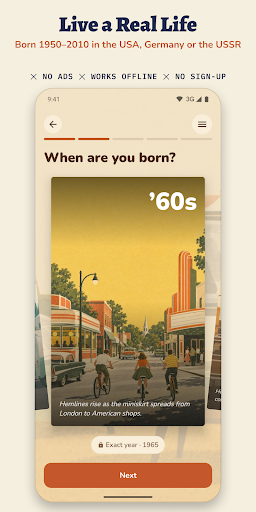
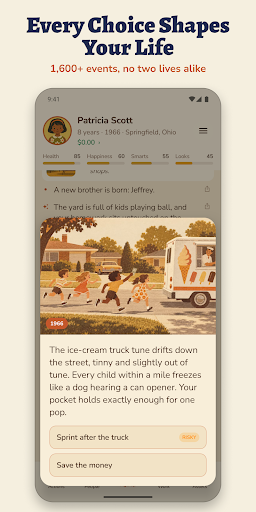
Retrolife is a text-based life simulator set in real history. Be born anywhere from 1950 to 2010 in the USA, in West or East Germany, or in the Soviet Union, and live a whole life one real year at a time, from your first day to your last.
A LIFE SIM WITH REAL DECADES
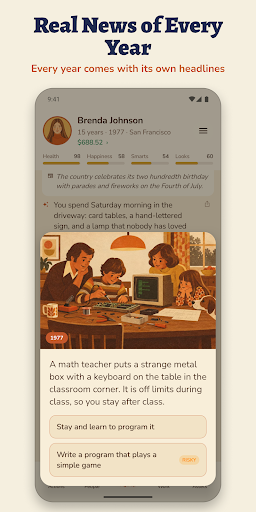
Most life simulation games give you a random life in a random place. In Retrolife the 60s, 70s, 80s and 90s are the real ones. Every year shows the real news of that year with an illustration, and your daily life follows the place and the time: the first home computer, the late Soviet cooperatives, the night the Berlin Wall came down, the dot-com crash, the 2008 crisis. Prices and wages are in the money of the year, from dollars and Deutsche Marks to East German marks, rubles and euros.
GROWING UP, YEAR BY YEAR
Go to school, serve in the army or do alternative service, study at college or a trade school, find your first job, fall in love, raise children and retire. Choose from 39 careers with real steps up the ladder. More than 1,600 life events give you real choices that change your health, happiness, money and the people around you. Brothers, sisters, parents, friends and partners live their own lives and grow old with you.
YOUR YEAR, YOUR ACTIONS
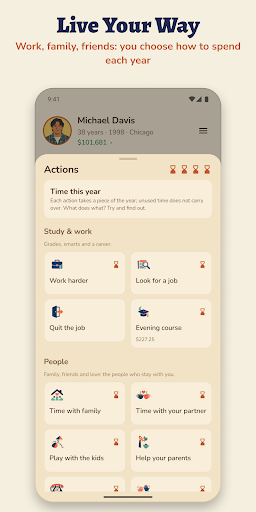
Each year gives you a handful of actions: study, work, look through job openings, date, spend time with family, save or spend. Buy a home with a mortgage, or join a housing cooperative in the USSR. Pick a calm, normal or real difficulty, start a random life, or try the Life of the Day that every player gets.
HISTORY GAME AND STORY GAME IN ONE
Historical turning points arrive in their own year: the first man in space, the missile crisis, the Wall going up and coming down, the 1991 coup and more. What they mean for you depends on your age at the time. Echoes of the past link your childhood to moments decades later, so every life reads like a story you wrote with your choices. When today is behind you, life goes on into future eras up to the 2060s.
FAMILY TREE AND DYNASTY
When your hero dies, an heir carries the family on. Play generation after generation, build a family tree and see how your dynasty moves through the decades: grandparents born in the 50s, grandchildren who grow up with smartphones.
GOALS, KEEPSAKES AND FRIENDS
• Life goals and a challenge of the week
• A yearbook, a life chart, an album and a passport of eras for every country and decade
• A tear-off calendar with a page for every day you play
• "Live it better than me": share a life code and let a friend start the same life, then compare
• Postcards to share your story with friends
• Music for every decade
A FAIR, OFFLINE GAME
• Free to play: every country and every decade. Premium is a one-time purchase, no subscription
• No ads
• An offline game: plays without wifi or mobile data, no account needed
• Premium adds: no waiting for more years, a choice of family wealth and character, rewinding a year, and the style of any era
RETRO STYLE
The art is retro risograph-style illustration of each country and decade. The game is in English, German and Russian.
WHO IT IS FOR
• Fans of life sim and choices games who want something deeper than a random life
• Anyone nostalgic for the 60s, 70s, 80s or 90s, or curious how their parents and grandparents lived
• Players looking for a calm single-player game to play offline on the bus, on a flight or before sleep
For teens and adults: romance, light crime, occasional alcohol and tobacco. History is shown through everyday life, without real politicians or brands.
Start a new life, make your choices and see how far your family goes.
Show more

1. Κατεβάστε το πρόγραμμα εγκατάστασης MEmu και ολοκληρώστε την εγκατάσταση

2. Ξεκινήστε το MEmu και στη συνέχεια ανοίξτε το Google Play στην επιφάνεια εργασίας

3. Αναζητήστε τον Retrolife: Life Simulator στο Google Play
Install
4. Λήψη και εγκατάσταση του Retrolife: Life Simulator
5. Μόλις ολοκληρωθεί η εγκατάσταση, κάντε κλικ στο εικονίδιο για να ξεκινήσετε

6. Enjoy playing Retrolife: Life Simulator on PC with MEmu
Το MEmu Play, αποτελεί την ιδανικότερη δωρεάν λύση για την εξομοίωση του λειτουργικού Android, και χρησιμοποιείται ήδη από περισσότερους από 50 εκατομμύρια χρήστες, ο οποίοι απολαμβάνουν, την καταπληκτική εμπειρία παιχνιδιού που προσφέρεται μέσω της εφαρμογής. Με τη χρήση του MEmu Virtualization, είναι δυνατή η αναπαραγωγή παιχνιδιών Android στον υπολογιστή, ακόμη και εκείνων που απαιτούν μεγάλη επεξεργαστική ισχύ γραφικών, δίχως συμβιβασμούς στην ποιότητα και στην εμπειρία χρήσης, ακριβώς όπως ένα τελευταίας γενιάς κινητό τηλέφωνο.
Μεγαλύτερη οθόνη με καλύτερα γραφικά. Μεγάλη διάρκεια ζωής, χωρίς περιορισμό μπαταρίας ή δεδομένων κινητής τηλεφωνίας.
Πλήρης υποστήριξη αντιστοίχισης πλήκτρων για ακριβή έλεγχο του πληκτρολογίου και του ποντικιού ή του gamepad.
Πολλαπλοί λογαριασμοί παιχνιδιών ή εργασίες σε έναν υπολογιστή ταυτόχρονα με τον διαχειριστή πολλαπλών περιπτώσεων.
Play Retrolife: Life Simulator on PC by following steps: