Retrolife: Life Simulator
Updated
Current Version
1.0.22
Offered By

With your passion for Retrolife: Life Simulator, you shouldn’t have to limit yourself to the small screen of a phone. Play like a pro and take full control of the game using a keyboard and mouse. MEmu gives you everything you’re looking for. Download and play Retrolife: Life Simulator on PC. Play as long as you want — no more worries about battery life, mobile data, or unexpected calls. The all-new MEmu 9 is the best way to play Retrolife: Life Simulator on PC. With our expertly designed keymapping system, Retrolife: Life Simulator feels just like a real PC game. The MEmu multi-instance manager lets you run two or more accounts on the same device at the same time. Most importantly, our exclusive emulation engine unlocks your PC’s full potential, delivering smooth and seamless performance.
Show more
Download Retrolife: Life Simulator on PC with MEmu Android Emulator. Enjoy playing on big screen. Retrolife is a text-based life simulator set in real history.
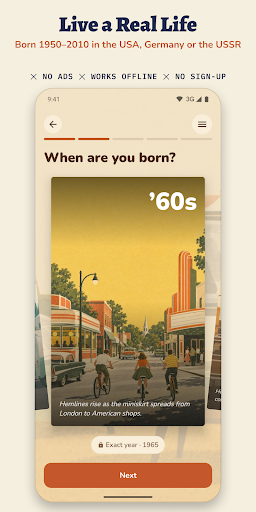
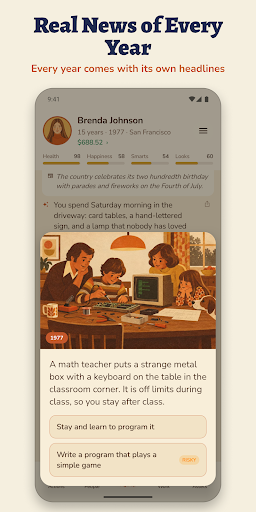
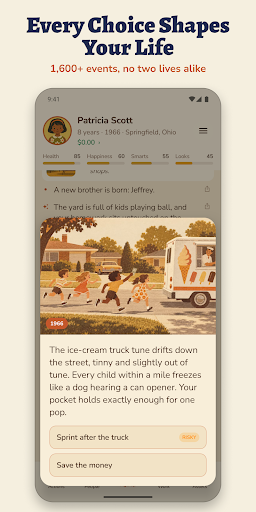
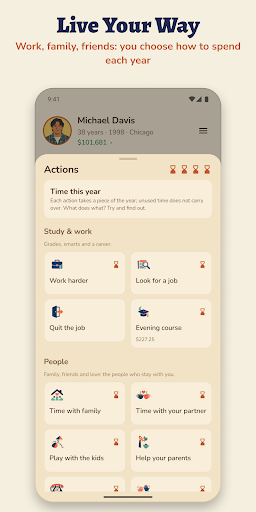
Retrolife is a text-based life simulator set in real history. Be born anywhere from 1950 to 2010 in the USA, in West or East Germany, or in the Soviet Union, and live a whole life one real year at a time, from your first day to your last.
A LIFE SIM WITH REAL DECADES
Most life simulation games give you a random life in a random place. In Retrolife the 60s, 70s, 80s and 90s are the real ones. Every year shows the real news of that year with an illustration, and your daily life follows the place and the time: the first home computer, the late Soviet cooperatives, the night the Berlin Wall came down, the dot-com crash, the 2008 crisis. Prices and wages are in the money of the year, from dollars and Deutsche Marks to East German marks, rubles and euros.
GROWING UP, YEAR BY YEAR
Go to school, serve in the army or do alternative service, study at college or a trade school, find your first job, fall in love, raise children and retire. Choose from 39 careers with real steps up the ladder. More than 1,600 life events give you real choices that change your health, happiness, money and the people around you. Brothers, sisters, parents, friends and partners live their own lives and grow old with you.
YOUR YEAR, YOUR ACTIONS
Each year gives you a handful of actions: study, work, look through job openings, date, spend time with family, save or spend. Buy a home with a mortgage, or join a housing cooperative in the USSR. Pick a calm, normal or real difficulty, start a random life, or try the Life of the Day that every player gets.
HISTORY GAME AND STORY GAME IN ONE
Historical turning points arrive in their own year: the first man in space, the missile crisis, the Wall going up and coming down, the 1991 coup and more. What they mean for you depends on your age at the time. Echoes of the past link your childhood to moments decades later, so every life reads like a story you wrote with your choices. When today is behind you, life goes on into future eras up to the 2060s.
FAMILY TREE AND DYNASTY
When your hero dies, an heir carries the family on. Play generation after generation, build a family tree and see how your dynasty moves through the decades: grandparents born in the 50s, grandchildren who grow up with smartphones.
GOALS, KEEPSAKES AND FRIENDS
• Life goals and a challenge of the week
• A yearbook, a life chart, an album and a passport of eras for every country and decade
• A tear-off calendar with a page for every day you play
• "Live it better than me": share a life code and let a friend start the same life, then compare
• Postcards to share your story with friends
• Music for every decade
A FAIR, OFFLINE GAME
• Free to play: every country and every decade. Premium is a one-time purchase, no subscription
• No ads
• An offline game: plays without wifi or mobile data, no account needed
• Premium adds: no waiting for more years, a choice of family wealth and character, rewinding a year, and the style of any era
RETRO STYLE
The art is retro risograph-style illustration of each country and decade. The game is in English, German and Russian.
WHO IT IS FOR
• Fans of life sim and choices games who want something deeper than a random life
• Anyone nostalgic for the 60s, 70s, 80s or 90s, or curious how their parents and grandparents lived
• Players looking for a calm single-player game to play offline on the bus, on a flight or before sleep
For teens and adults: romance, light crime, occasional alcohol and tobacco. History is shown through everyday life, without real politicians or brands.
Start a new life, make your choices and see how far your family goes.
Show more

1. Download MEmu installer and finish the setup

2. Start MEmu then open Google Play on the desktop

3. Search Retrolife: Life Simulator in Google Play
Install
4. Download and Install Retrolife: Life Simulator
5. On install completion click the icon to start

6. Enjoy playing Retrolife: Life Simulator on PC with MEmu
MEmu Play is the best Android emulator and 100 million people already enjoy its superb Android gaming experience. The MEmu virtualization technology empowers you to play thousands of Android games smoothly on your PC, even the most graphic-intensive ones.
Bigger screen with better graphics; Long duration, without limitation of battery or mobile data.
Full Keymapping support for precise control of keyboard and mouse or gamepad.
Multiple game accounts or tasks on single PC at one time with Multi-Instance manager.
Play Retrolife: Life Simulator on PC by following steps: