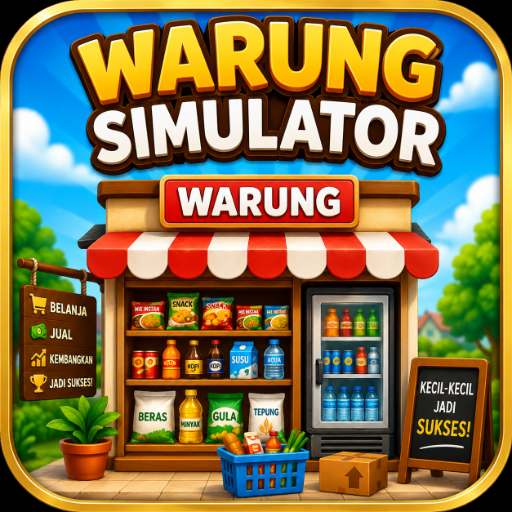
Warung Simulator
Ενημερώθηκε
Τρέχουσα έκδοση
1.1
Προσφέρεται από

Με όλο το πάθος σας για το παιχνίδι Warung Simulator, τα χέρια σας δεν πρέπει να περιορίζονται σε μια μικροσκοπική οθόνη του τηλεφώνου σας. Παίξτε σαν επαγγελματίας και αποκτήστε τον πλήρη έλεγχο του παιχνιδιού σας με πληκτρολόγιο και ποντίκι. Το MEmu σας προσφέρει όλα όσα περιμένετε. Κατεβάστε και παίξτε Warung Simulator σε υπολογιστή. Παίξτε όσο θέλετε, χωρίς άλλους περιορισμούς μπαταρίας, δεδομένων κινητής τηλεφωνίας και ενοχλητικών κλήσεων. Το ολοκαίνουργιο MEmu 9 είναι η καλύτερη επιλογή για να παίξετε Warung Simulator σε υπολογιστή. Ετοιμασμένο με την εμπειρία μας, το εξαιρετικό σύστημα προκαθορισμένης αντιστοίχισης πλήκτρων καθιστά το Warung Simulator ένα πραγματικό παιχνίδι υπολογιστή. Ο διαχειριστής πολλαπλών περιπτώσεων MEmu καθιστά δυνατό το παιχνίδι με 2 ή περισσότερους λογαριασμούς στην ίδια συσκευή. Και το πιο σημαντικό, η αποκλειστική μηχανή εξομοίωσης μας μπορεί να απελευθερώσει πλήρως τις δυνατότητες του υπολογιστή σας, κάνοντας τα πάντα ομαλά.
Show more
Απολαύστε την υπέροχη εμπειρία αναπαραγωγής του Warung Simulator σε υπολογιστή με το MEMU App Player. Πρόκειται για έναν ισχυρό δωρεάν εξομοιωτή Android που σας επιτρέπει να παίζετε χιλιάδες παιχνίδια Android. WARUNG SIMULATOR – BECOME A WARUNG BOSS!
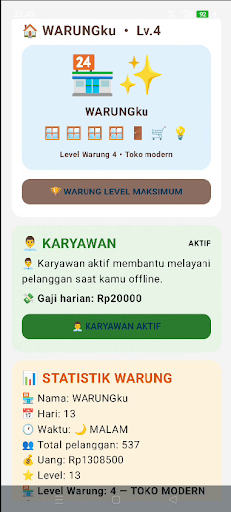
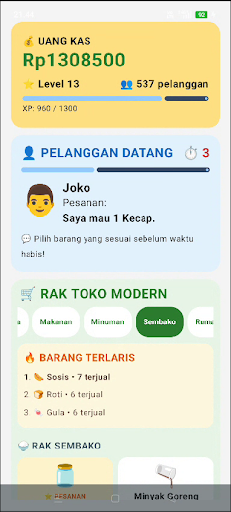
WARUNG SIMULATOR – BECOME A WARUNG BOSS!
Have you ever imagined what it would be like to own and manage your own warung?
In Warung Simulator, you'll start your journey from a simple warung and grow it into a modern, bustling shop. Serve orders quickly, manage stock, collect money, hire employees, and upgrade your warung!
MANAGE YOUR WARUNG
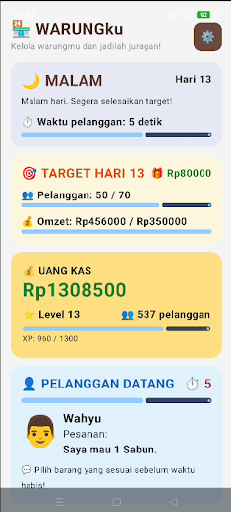
Customers will come in with various orders. Pay attention to what they want and serve them before time runs out.
The faster and more accurately you serve customers, the greater your chances of growing your warung.
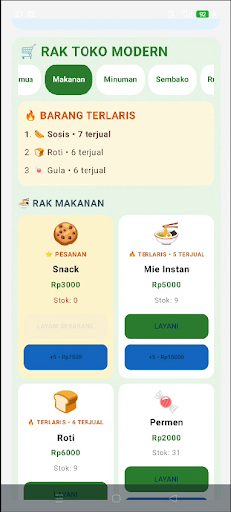
MANAGE ITEM STOCK
Make sure you always have a variety of items available. When stock starts to run low, use cash to replenish inventory.
You'll need to smartly manage your money between purchasing stock, paying employee salaries, and making upgrades.
COLLECT REVENUE
Every customer you successfully serve will generate income for your warung.
Use the proceeds to grow your shop and reach higher levels.
RECRUIT EMPLOYEES
Your shop is growing and needs help.
Hire employees to help serve customers. Employees can also help generate income while you're offline.
Don't forget to pay attention to your shop's salary costs and financial situation!
UPGRADE YOUR STORE
Start with a simple shop and work your way up to a modern store.
Upgrade to increase your shop's level and unlock new opportunities.
KEEP CUSTOMERS COMING
Every customer has a different order and serving time.
Pay attention to orders, choose the right items, and serve them as quickly as possible!
GOALS AND PROGRESS
Achieve daily targets, serve customers, collect income, level up, and continue to grow your business.
The more your shop grows, the greater the challenges you'll face.
REWARDED ADS
If you need additional help, you can voluntarily watch rewarded ads to earn virtual rewards in the game.
Rewards are used only as part of the gameplay and have no real monetary value.
SOUND EFFECTS
Enjoy sound effects while performing various in-game activities to make the experience of managing a stall more immersive.
KEY FEATURES
• Manage your own stall
• Serve customers within a time limit
• 24 types of goods to manage
• Inventory system
• Money and income system
• Daily targets
• Player level system
• Stall upgrades
• Recruit employees
• Employee salary system
• Offline income
• Virtual rewards
• Game sound effects
• Simple and easy-to-play gameplay
BECOME A BOSS!
Starting from a small stall, serve customers, manage inventory, collect money, hire employees, and continuously upgrade.
Can you transform your small stall into a bustling and successful modern store?
Download Warung Simulator now and begin your journey to becoming a warung tycoon!
Note: Warung Simulator is a simulation game. All money, income, rewards, and transactions in the game are part of the gameplay mechanics and have no real monetary value.
Show more

1. Κατεβάστε το πρόγραμμα εγκατάστασης MEmu και ολοκληρώστε την εγκατάσταση

2. Ξεκινήστε το MEmu και στη συνέχεια ανοίξτε το Google Play στην επιφάνεια εργασίας

3. Αναζητήστε τον Warung Simulator στο Google Play
Install
4. Λήψη και εγκατάσταση του Warung Simulator
5. Μόλις ολοκληρωθεί η εγκατάσταση, κάντε κλικ στο εικονίδιο για να ξεκινήσετε

6. Enjoy playing Warung Simulator on PC with MEmu
Το MEmu Play, αποτελεί την ιδανικότερη δωρεάν λύση για την εξομοίωση του λειτουργικού Android, και χρησιμοποιείται ήδη από περισσότερους από 50 εκατομμύρια χρήστες, ο οποίοι απολαμβάνουν, την καταπληκτική εμπειρία παιχνιδιού που προσφέρεται μέσω της εφαρμογής. Με τη χρήση του MEmu Virtualization, είναι δυνατή η αναπαραγωγή παιχνιδιών Android στον υπολογιστή, ακόμη και εκείνων που απαιτούν μεγάλη επεξεργαστική ισχύ γραφικών, δίχως συμβιβασμούς στην ποιότητα και στην εμπειρία χρήσης, ακριβώς όπως ένα τελευταίας γενιάς κινητό τηλέφωνο.
Μεγαλύτερη οθόνη με καλύτερα γραφικά. Μεγάλη διάρκεια ζωής, χωρίς περιορισμό μπαταρίας ή δεδομένων κινητής τηλεφωνίας.
Πλήρης υποστήριξη αντιστοίχισης πλήκτρων για ακριβή έλεγχο του πληκτρολογίου και του ποντικιού ή του gamepad.
Πολλαπλοί λογαριασμοί παιχνιδιών ή εργασίες σε έναν υπολογιστή ταυτόχρονα με τον διαχειριστή πολλαπλών περιπτώσεων.
Play Warung Simulator on PC by following steps: