Background Video Recorder Pro
Ενημερώθηκε
Τρέχουσα έκδοση
1780550466
Προσφέρεται από

Σταματήστε να ανησυχείτε για υπερβολικές χρεώσεις όταν χρησιμοποιείτε το Background Video Recorder Pro στο κινητό σας, απελευθερώστε τον εαυτό σας από τη μικροσκοπική οθόνη και απολαύστε τη χρήση της εφαρμογής σε μια πολύ μεγαλύτερη οθόνη. Από τώρα και στο εξής, αποκτήστε εμπειρία πλήρους οθόνης της εφαρμογής σας με πληκτρολόγιο και ποντίκι. Το MEmu σας προσφέρει όλες τις εκπληκτικές δυνατότητες που περιμένατε: γρήγορη εγκατάσταση και εύκολη εγκατάσταση, διαισθητικά χειριστήρια, όχι περισσότερους περιορισμούς μπαταρίας, δεδομένα κινητής τηλεφωνίας και ενοχλητικές κλήσεις. Το ολοκαίνουργιο MEmu 9 είναι η καλύτερη επιλογή για χρήση του Background Video Recorder Pro στον υπολογιστή σας. Κωδικοποιημένο με την απορρόφηση μας, ο διαχειριστής πολλαπλών παρουσιών καθιστά δυνατό το άνοιγμα 2 ή περισσότερων λογαριασμών ταυτόχρονα. Και το πιο σημαντικό, ο αποκλειστικός κινητήρας εξομοίωσης μπορεί να απελευθερώσει όλες τις δυνατότητες του υπολογιστή σας, να κάνει τα πάντα ομαλά και ευχάριστα.
Show more
Απολαύστε την υπέροχη εμπειρία αναπαραγωγής του Background Video Recorder Pro σε υπολογιστή με το MEMU Play. Πρόκειται για έναν ισχυρό δωρεάν εξομοιωτή Android που σας επιτρέπει να παίζετε χιλιάδες παιχνίδια Android. this app helps you record videos in the background also with a closed display.
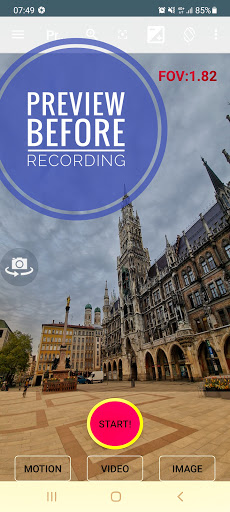
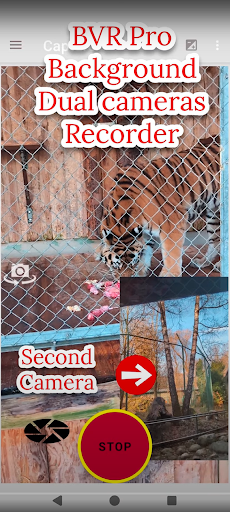
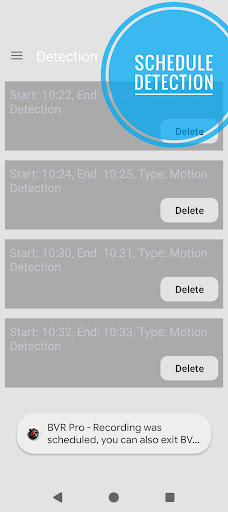
this app helps you record videos in the background also with a closed display. other useful features: dual camera screen recorder, overlay, filters, dash cam, motion detection using A.I., camera remote for your Wear OS, baby monitoring, video streaming, schedule recording, burst image capturing.
you can also control the camera using the volume buttons or 1 of the 3 supporting widgets.
"big red button" - video recording.
"big green button" - motion detection.
https://www.youtube.com/shorts/carL0rsfw6I
"big orange button" - burst image capturing + night/HDR/bokeh.
https://youtu.be/vjn_cifx4Vo
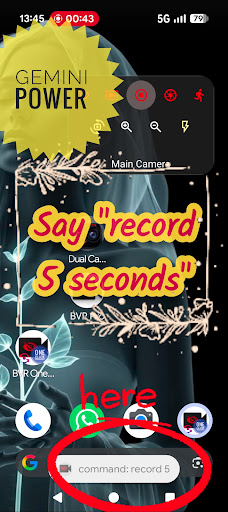
use Gemini power to talk to your phone say "record 5 seconds"
https://www.youtube.com/shorts/p-qrfxfvQz0
Widget Revolution - preview and zoom from launcher. also : motion photo.
https://youtube.com/shorts/enLm4Dmyy2E
https://www.youtube.com/watch?v=S7jjsoakjS4
cameraX filters - color blending
https://youtube.com/shorts/KzO8Shewnlk
https://youtube.com/shorts/Dm-D7NKUIeE
dual camera
https://youtube.com/shorts/-4cDC3kdbJM
dual camera screen recorder + stickers:
https://www.youtube.com/shorts/onEognB6--w
Camerax (premium) - pop up dual 10 bits HDR camera recording:
https://youtu.be/LuEsWXpSLHs
background overlay: with loaded image, text or time.
https://youtu.be/JWzqp4p7Ij0
gamma correction filter low light
https://youtu.be/fRWFkO1WUN8
motion detection tutorials:
https://youtu.be/wok88i6aQBs
https://youtu.be/g7dpYED6k08
dual dash cam
https://youtu.be/msByNqBC-W4
https://youtu.be/p4wopq8pqqU
premium - screen recorder + dual cameras streams + rounded or selfie mask
templates:
https://youtube.com/shorts/0c5kEacrPoo
baby monitor & supportive https://www.bvr-pro.com website:
https://www.youtube.com/watch?v=zf1A93PcShw
home security: monitor up to 4 cameras from our secured website:
https://bvr-pro.com/stream
https://youtu.be/gBV4U6uOywE
extra features:
1. start recording using the volume buttons.
Wear OS remote - 10 bits dual HDR cameras.
https://youtu.be/eWKwQC5T0QQ
preview, record, capture, A.I. motion detect, flip camera, zoom ,flash, walkie talkie.
background slow motion
https://youtu.be/PUdXACAlF2s
text OCR
https://youtu.be/aHsZWjOLkuo
android tv - real time 30 FPS streaming + A.I. motion detection X 4 cameras:
https://www.youtube.com/watch?v=w0SNcFSHLYE
https://www.youtube.com/watch?v=KovtrQeF5N0
https://www.youtube.com/watch?v=ocPtnhlUn78
dual camera on supported devices:
https://youtu.be/jmKMjVGnS_o
https://youtu.be/CURKycGRF2Q
Important notices:
1. best practices: https://www.youtube.com/watch?v=WoLSq32DIew
2. run the settings:permission wizard.
3. https://dontkillmyapp.com/
4. It includes 3 icons with 3 different features - you can disable 2 from the settings:
https://www.youtube.com/watch?v=yGQWhMf1f5g
5. disable "face unlock". two apps cannot access the camera at the same time.
6. do not open the camera on other apps while recording.
7. long exposure creates low frame rate videos.
8. for best video quality: try beta resolutions(not stable) & change the bitrate.
on detection you can:
1. capture images.
2. sound alarm.
3. premium users can also record videos.
languages: hindi, german, spanish, portuguese, arabic and more.
how to guides:
https://www.arbelsolutions.com/howto.html
your privacy matters:
https://www.arbelsolutions.com/PrivacyPolicy.html
suggestions or questions? we will be happy to hear from you mailto:arbelsolutions@gmail.com
most functions are free, premium version includes:
1. no ads
2. cameraX.
3. saving to the removable SD card
4. Wear OS.
5. baby monitoring.
6. save videos on motion detection.
7. upload videos to google drive.
8. monitor until 4 camera simultaneously(and not only 1).
8. repeat schedule recording.
becoming a premium user : press the "buy premium" button on the main menu.
If you like the app please rate it 5 stars . We will really appreciate it.
follow us:
https://www.facebook.com/Background-video-recorder-Ultimate-121145775953677/
Show more

1. Κατεβάστε το πρόγραμμα εγκατάστασης MEmu και ολοκληρώστε την εγκατάσταση

2. Ξεκινήστε το MEmu και στη συνέχεια ανοίξτε το Google Play στην επιφάνεια εργασίας

3. Αναζητήστε τον Background Video Recorder Pro στο Google Play
Install
4. Λήψη και εγκατάσταση του Background Video Recorder Pro
5. Μόλις ολοκληρωθεί η εγκατάσταση, κάντε κλικ στο εικονίδιο για να ξεκινήσετε

6. Απολαύστε τη χρήση του Background Video Recorder Pro σε υπολογιστή με το MEmu
Το MEmu Play είναι ο καλύτερος δωρεάν εξομοιωτής Android, που χρησιμοποιείται αυτήν τη στιγμή από πάνω από 50 εκατομμύρια χρήστες που απολαμβάνουν την εμπειρία εφαρμογών που προσφέρει. Μέσω της τεχνολογίας εικονικοποίησης MEmu 9, οι χρήστες μπορούν να δοκιμάσουν εφαρμογές Android στους υπολογιστές τους, ακόμα και σε εκείνους που απαιτούν υψηλή ισχύ επεξεργασίας γραφικών, οι οποίες λειτουργούν ομαλά σαν να λειτουργούν στα κινητά τηλέφωνα τελευταίας γενιάς, χωρίς να θυσιάζεται η ποιότητα της εικόνας και η εμπειρία χρήστη.
Μεγαλύτερη οθόνη με καλύτερα γραφικά. Μεγάλη διάρκεια ζωής, χωρίς περιορισμό μπαταρίας ή δεδομένων κινητής τηλεφωνίας.
Πλήρης υποστήριξη αντιστοίχισης πλήκτρων για ακριβή έλεγχο του πληκτρολογίου και του ποντικιού ή του gamepad.
Πολλαπλοί λογαριασμοί παιχνιδιών ή εργασίες σε έναν υπολογιστή ταυτόχρονα με τον διαχειριστή πολλαπλών περιπτώσεων.
Use Background Video Recorder Pro on PC by following steps: