
Background Video Recorder Pro
Updated
Current Version
1780550466
Offered By

Stop worrying about high battery drain when using Background Video Recorder Pro on your phone. Free yourself from the tiny screen and enjoy the app on a much larger display. From now on, get a full-screen experience of your app with the convenience of a keyboard and mouse. MEmu offers you all the surprising features you’d expect: quick installation and easy setup, intuitive controls, and no more worries about battery life, mobile data, or unexpected calls. The all-new MEmu 9 is the choice for using Background Video Recorder Pro on your computer. With the MEmu multi-instance manager, you can run two or more accounts at the same time. Most importantly, our exclusive emulation engine unlocks your PC’s full potential, delivering smooth and enjoyable performance.
Show more
Enjoy superb experience of using Background Video Recorder Pro on PC with MEMU App Player. It's a powerful free Android emulator which provides you with thousands of android apps for their desktop version. Enjoy connecting with friends and polishing your work with higher efficiency! this app helps you record videos in the background also with a closed display.
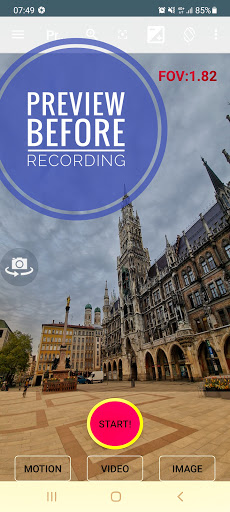
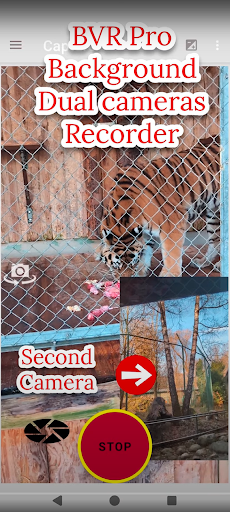
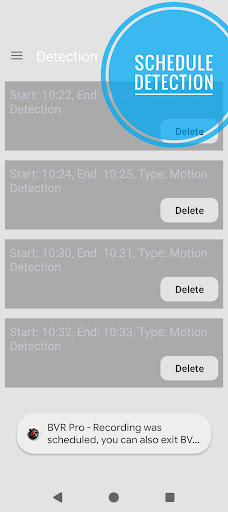
this app helps you record videos in the background also with a closed display. other useful features: dual camera screen recorder, overlay, filters, dash cam, motion detection using A.I., camera remote for your Wear OS, baby monitoring, video streaming, schedule recording, burst image capturing.
you can also control the camera using the volume buttons or 1 of the 3 supporting widgets.
"big red button" - video recording.
"big green button" - motion detection.
https://www.youtube.com/shorts/carL0rsfw6I
"big orange button" - burst image capturing + night/HDR/bokeh.
https://youtu.be/vjn_cifx4Vo
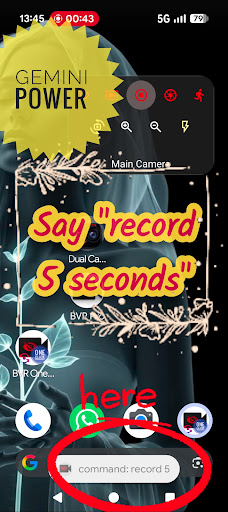
use Gemini power to talk to your phone say "record 5 seconds"
https://www.youtube.com/shorts/p-qrfxfvQz0
Widget Revolution - preview and zoom from launcher. also : motion photo.
https://youtube.com/shorts/enLm4Dmyy2E
https://www.youtube.com/watch?v=S7jjsoakjS4
cameraX filters - color blending
https://youtube.com/shorts/KzO8Shewnlk
https://youtube.com/shorts/Dm-D7NKUIeE
dual camera
https://youtube.com/shorts/-4cDC3kdbJM
dual camera screen recorder + stickers:
https://www.youtube.com/shorts/onEognB6--w
Camerax (premium) - pop up dual 10 bits HDR camera recording:
https://youtu.be/LuEsWXpSLHs
background overlay: with loaded image, text or time.
https://youtu.be/JWzqp4p7Ij0
gamma correction filter low light
https://youtu.be/fRWFkO1WUN8
motion detection tutorials:
https://youtu.be/wok88i6aQBs
https://youtu.be/g7dpYED6k08
dual dash cam
https://youtu.be/msByNqBC-W4
https://youtu.be/p4wopq8pqqU
premium - screen recorder + dual cameras streams + rounded or selfie mask
templates:
https://youtube.com/shorts/0c5kEacrPoo
baby monitor & supportive https://www.bvr-pro.com website:
https://www.youtube.com/watch?v=zf1A93PcShw
home security: monitor up to 4 cameras from our secured website:
https://bvr-pro.com/stream
https://youtu.be/gBV4U6uOywE
extra features:
1. start recording using the volume buttons.
Wear OS remote - 10 bits dual HDR cameras.
https://youtu.be/eWKwQC5T0QQ
preview, record, capture, A.I. motion detect, flip camera, zoom ,flash, walkie talkie.
background slow motion
https://youtu.be/PUdXACAlF2s
text OCR
https://youtu.be/aHsZWjOLkuo
android tv - real time 30 FPS streaming + A.I. motion detection X 4 cameras:
https://www.youtube.com/watch?v=w0SNcFSHLYE
https://www.youtube.com/watch?v=KovtrQeF5N0
https://www.youtube.com/watch?v=ocPtnhlUn78
dual camera on supported devices:
https://youtu.be/jmKMjVGnS_o
https://youtu.be/CURKycGRF2Q
Important notices:
1. best practices: https://www.youtube.com/watch?v=WoLSq32DIew
2. run the settings:permission wizard.
3. https://dontkillmyapp.com/
4. It includes 3 icons with 3 different features - you can disable 2 from the settings:
https://www.youtube.com/watch?v=yGQWhMf1f5g
5. disable "face unlock". two apps cannot access the camera at the same time.
6. do not open the camera on other apps while recording.
7. long exposure creates low frame rate videos.
8. for best video quality: try beta resolutions(not stable) & change the bitrate.
on detection you can:
1. capture images.
2. sound alarm.
3. premium users can also record videos.
languages: hindi, german, spanish, portuguese, arabic and more.
how to guides:
https://www.arbelsolutions.com/howto.html
your privacy matters:
https://www.arbelsolutions.com/PrivacyPolicy.html
suggestions or questions? we will be happy to hear from you mailto:arbelsolutions@gmail.com
most functions are free, premium version includes:
1. no ads
2. cameraX.
3. saving to the removable SD card
4. Wear OS.
5. baby monitoring.
6. save videos on motion detection.
7. upload videos to google drive.
8. monitor until 4 camera simultaneously(and not only 1).
8. repeat schedule recording.
becoming a premium user : press the "buy premium" button on the main menu.
If you like the app please rate it 5 stars . We will really appreciate it.
follow us:
https://www.facebook.com/Background-video-recorder-Ultimate-121145775953677/
Show more

1. Download MEmu installer and finish the setup

2. Start MEmu then open Google Play on the desktop

3. Search Background Video Recorder Pro in Google Play
Install
4. Download and Install Background Video Recorder Pro
5. On install completion click the icon to start

6. Enjoy using Background Video Recorder Pro on PC with MEmu
MEmu Play is the best Android emulator, and 100 million users already enjoy its superb Android app experience. Powered by advanced virtualization technology, it lets you enjoy thousands of Android apps smoothly on your PC—including the most graphics-intensive ones.
Bigger screen with better graphics; Long duration, without limitation of battery or mobile data.
Full Keymapping support for precise control of keyboard and mouse or gamepad.
Multiple game accounts or tasks on single PC at one time with Multi-Instance manager.
Use Background Video Recorder Pro on PC by following steps: