Claude by Anthropic
Ενημερώθηκε
Τρέχουσα έκδοση
1.261113.19
Προσφέρεται από

Σταματήστε να ανησυχείτε για υπερβολικές χρεώσεις όταν χρησιμοποιείτε το Claude by Anthropic στο κινητό σας, απελευθερώστε τον εαυτό σας από τη μικροσκοπική οθόνη και απολαύστε τη χρήση της εφαρμογής σε μια πολύ μεγαλύτερη οθόνη. Από τώρα και στο εξής, αποκτήστε εμπειρία πλήρους οθόνης της εφαρμογής σας με πληκτρολόγιο και ποντίκι. Το MEmu σας προσφέρει όλες τις εκπληκτικές δυνατότητες που περιμένατε: γρήγορη εγκατάσταση και εύκολη εγκατάσταση, διαισθητικά χειριστήρια, όχι περισσότερους περιορισμούς μπαταρίας, δεδομένα κινητής τηλεφωνίας και ενοχλητικές κλήσεις. Το ολοκαίνουργιο MEmu 9 είναι η καλύτερη επιλογή για χρήση του Claude by Anthropic στον υπολογιστή σας. Κωδικοποιημένο με την απορρόφηση μας, ο διαχειριστής πολλαπλών παρουσιών καθιστά δυνατό το άνοιγμα 2 ή περισσότερων λογαριασμών ταυτόχρονα. Και το πιο σημαντικό, ο αποκλειστικός κινητήρας εξομοίωσης μπορεί να απελευθερώσει όλες τις δυνατότητες του υπολογιστή σας, να κάνει τα πάντα ομαλά και ευχάριστα.
Show more
Απολαύστε την υπέροχη εμπειρία αναπαραγωγής του Claude by Anthropic σε υπολογιστή με το MEMU Play. Πρόκειται για έναν ισχυρό δωρεάν εξομοιωτή Android που σας επιτρέπει να παίζετε χιλιάδες παιχνίδια Android. Meet Claude, your AI problem solver and thinking partner.


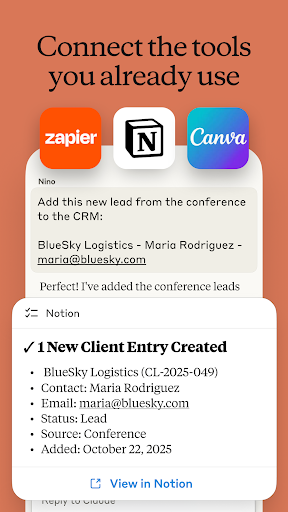
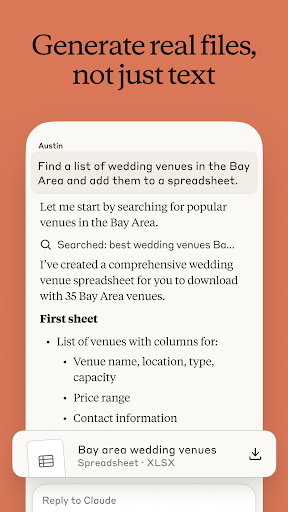
Meet Claude, your AI problem solver and thinking partner. Claude works with you to write, research, code, and tackle complex problems and hard questions with depth and precision. It enhances your thinking and expands what you're capable of, right from your phone.
AI ASSISTANT FOR TASKS
Get AI assistance on everyday tasks like filling out forms, planning a trip, drafting a reply, or making sense of a long document. Connect to your email account, file drives, and other tools so it can actually get stuff done for you. Nothing goes out without your approval.
More than just an AI chat app, Claude is a digital assistant for work and life, helping you move through to-do lists and think through parts that need more than a quick answer.
AI WRITING ASSISTANT
Whether you're crafting social media posts, professional emails, or complex reports, Claude refines tone, structure, and clarity, with each iteration. Get writing support from a smart writing assistant that understands what you're trying to say, even when you're still figuring it out.
AI CODING AND PROGRAMMING
Your AI coding partner, Claude Code, helps you to review code, debug complex issues, and explore new languages. Work through problems in Python, JavaScript, TypeScript, and dozens of other languages—from quick scripts to multi-step architecture.
Use Claude as your coding assistant to plan multi-step tasks, pull in relevant context, and adapt the approach as your project evolves. Write programs through natural conversation and use Claude to identify and fix errors faster. It scales from a single function to enterprise-level development.
WORK RESEARCH AND DATA INSIGHTS
Go deeper on the questions that matter. Search the web, compile findings with accurate citations, and highlight what's useful. Connect Google Drive, Gmail, and Calendar to bring context into the conversation. Whether you're conducting business analysis, project research, or exploring new ideas, Claude thinks through problems with you, from the first question to the one you didn’t know to ask.
AI PRODUCTIVITY ASSISTANT
Teach Claude your workflows and assign recurring tasks that eat up your day. Task automation gives you time back, so your productivity goes toward your work.
VISUAL ANALYSIS
Upload any photo, PDF, or screenshot for instant analysis. Claude extracts text, interprets charts and graphs, evaluates UI layouts and technical diagrams, and explains what it sees. Get thoughtful feedback on app designs and data visualizations. Generate SVG code for graphics and illustrations, right from your phone.
NO TYPING NEEDED
Think out loud. Use Claude as your AI voice assistant to have conversations on the app in multiple languages—perfect for brainstorming sessions or working through ideas on the go.
EXPAND WHAT YOU CAN DO
Claude helps you:
▶ Develop and refine content with AI writing
▶ Work through meeting notes to surface key insights
▶ Build reports and marketing content iteratively with a reliable AI generator
▶ Explore complex math problems with step-by-step reasoning
▶ Plan projects, structure ideas, and build flowcharts together
▶ Analyze PDFs, screenshots, and visual content for deeper patterns
▶ Think through problems hands-free with voice dictation
TRUSTED AND RELIABLE
Claude is designed to be reliable, accurate, and collaborative. It’s built by Anthropic, an AI research company dedicated to building safe and dependable AI tools. Powered by Claude Fable, Opus, Sonnet, and Haiku, it brings advanced reasoning, creativity, and problem-solving capabilities to your most important challenges.
TRY CLAUDE FOR FREE
Join millions of users who trust Claude for their work on the problems that matter. Whether you're coding, writing, researching, or tackling business challenges, Claude helps you think deeper and reach further.
Terms of Service: https://www.anthropic.com/legal/consumer-terms
Privacy Policy: https://www.anthropic.com/legal/privacy
© 2026 Anthropic, PBC
Show more

1. Κατεβάστε το πρόγραμμα εγκατάστασης MEmu και ολοκληρώστε την εγκατάσταση

2. Ξεκινήστε το MEmu και στη συνέχεια ανοίξτε το Google Play στην επιφάνεια εργασίας

3. Αναζητήστε τον Claude by Anthropic στο Google Play
Install
4. Λήψη και εγκατάσταση του Claude by Anthropic
5. Μόλις ολοκληρωθεί η εγκατάσταση, κάντε κλικ στο εικονίδιο για να ξεκινήσετε

6. Απολαύστε τη χρήση του Claude by Anthropic σε υπολογιστή με το MEmu
Το MEmu Play είναι ο καλύτερος δωρεάν εξομοιωτής Android, που χρησιμοποιείται αυτήν τη στιγμή από πάνω από 50 εκατομμύρια χρήστες που απολαμβάνουν την εμπειρία εφαρμογών που προσφέρει. Μέσω της τεχνολογίας εικονικοποίησης MEmu 9, οι χρήστες μπορούν να δοκιμάσουν εφαρμογές Android στους υπολογιστές τους, ακόμα και σε εκείνους που απαιτούν υψηλή ισχύ επεξεργασίας γραφικών, οι οποίες λειτουργούν ομαλά σαν να λειτουργούν στα κινητά τηλέφωνα τελευταίας γενιάς, χωρίς να θυσιάζεται η ποιότητα της εικόνας και η εμπειρία χρήστη.
Μεγαλύτερη οθόνη με καλύτερα γραφικά. Μεγάλη διάρκεια ζωής, χωρίς περιορισμό μπαταρίας ή δεδομένων κινητής τηλεφωνίας.
Πλήρης υποστήριξη αντιστοίχισης πλήκτρων για ακριβή έλεγχο του πληκτρολογίου και του ποντικιού ή του gamepad.
Πολλαπλοί λογαριασμοί παιχνιδιών ή εργασίες σε έναν υπολογιστή ταυτόχρονα με τον διαχειριστή πολλαπλών περιπτώσεων.
Use Claude by Anthropic on PC by following steps: