Claude by Anthropic
Updated
Current Version
1.261022.20
Offered By

Stop worrying about high battery drain when using Claude by Anthropic on your phone. Free yourself from the tiny screen and enjoy the app on a much larger display. From now on, get a full-screen experience of your app with the convenience of a keyboard and mouse. MEmu offers you all the surprising features you’d expect: quick installation and easy setup, intuitive controls, and no more worries about battery life, mobile data, or unexpected calls. The all-new MEmu 9 is the choice for using Claude by Anthropic on your computer. With the MEmu multi-instance manager, you can run two or more accounts at the same time. Most importantly, our exclusive emulation engine unlocks your PC’s full potential, delivering smooth and enjoyable performance.
Show more
Enjoy superb experience of using Claude by Anthropic on PC with MEMU App Player. It's a powerful free Android emulator which provides you with thousands of android apps for their desktop version. Enjoy connecting with friends and polishing your work with higher efficiency! Meet Claude, your AI problem solver and thinking partner.


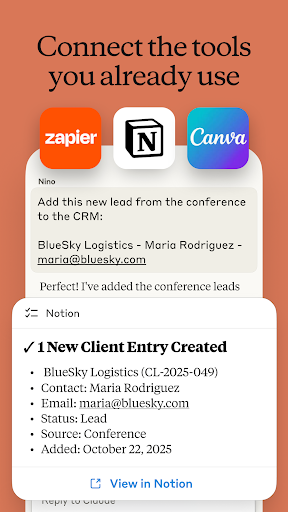
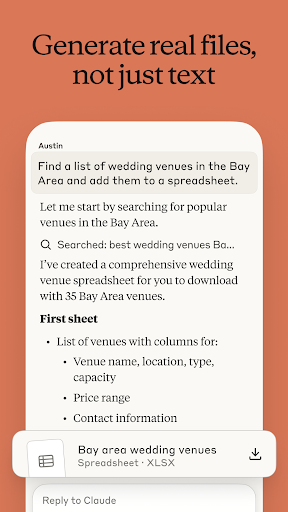
Meet Claude, your AI problem solver and thinking partner. Claude works with you to write, research, code, and tackle complex problems and hard questions with depth and precision. It enhances your thinking and expands what you're capable of, right from your phone.
AI WRITING ASSISTANT
Turn rough ideas into polished work. Whether you're crafting social media posts, professional emails, or complex reports, Claude refines tone, structure, and clarity, iterating with you until your voice comes through. Get writing support that understands what you're trying to say, even when you're still figuring it out.
AI CODING AND PROGRAMMING HELP
Claude handles production-level development work. Review code, debug complex issues, and explore new languages with an AI coding assistant that explains the "why" behind every solution. Work through problems in Python, JavaScript, TypeScript, and dozens of other languages, from quick scripts to multi-step architecture.
As a versatile coding assistant, Claude plans multi-step tasks, pulls in relevant context, and adapts its approach as your project evolves. Write programs through natural conversation and use Claude to identify and fix errors faster. It scales from a single function to enterprise-level development.
RESEARCH AND DATA INSIGHTS
Go deeper on the questions that matter. Claude searches the web, compiles findings with accurate citations, and surfaces what's actually useful. Connect Google Drive, Gmail, and Calendar to bring your own context into the conversation. Whether you're conducting business analysis, building reports, improving your health and well-being, or exploring new ideas, Claude thinks through problems with you, from the first question to the one you didn't know to ask.
VISUAL ANALYSIS
Upload any photo, PDF, or screenshot for instant analysis. Claude extracts text, interprets charts and graphs, evaluates UI layouts and technical diagrams, and explains what it sees. Get thoughtful feedback on app designs and data visualizations. Generate SVG code for graphics and illustrations, right from your phone.
NO TYPING NEEDED
Think out loud. Use Claude as your AI voice assistant to have conversations in multiple languages, perfect for brainstorming sessions or working through ideas on the go.
EXPAND WHAT YOU CAN DO
Take on projects outside your usual expertise. Whether you're learning something new, navigating unfamiliar territory, or need a thoughtful second opinion, Claude helps you take on the hard questions you otherwise don't have time or bandwidth for.
Claude helps you:
▶ Develop and refine content with AI writing
▶ Work through meeting notes to surface key insights
▶ Build reports and marketing content iteratively
▶ Explore complex math problems with step-by-step reasoning
▶ Plan projects, structure ideas, and build flowcharts together
▶ Analyze PDFs, screenshots, and visual content for deeper patterns
▶ Think through problems hands-free with voice dictation
▶ Identify trends in your health and wellness data to facilitate conversation with your doctor
TRUSTED AND RELIABLE
Claude is designed to be reliable, accurate, and collaborative. It's built by Anthropic, an AI research company dedicated to building safe and dependable AI tools. Powered by Claude Fable, Opus, Sonnet, and Haiku, it brings advanced reasoning, creativity, and problem-solving capabilities to your most important challenges.
TRY CLAUDE FOR FREE
Join millions of users who trust Claude for their work on the problems that matter. Whether you're coding, writing, researching, or tackling business challenges, Claude helps you think deeper and reach further.
Terms of Service: https://www.anthropic.com/legal/consumer-terms
Privacy Policy: https://www.anthropic.com/legal/privacy
© 2026 Anthropic, PBC
Show more

1. Download MEmu installer and finish the setup

2. Start MEmu then open Google Play on the desktop

3. Search Claude by Anthropic in Google Play
Install
4. Download and Install Claude by Anthropic
5. On install completion click the icon to start

6. Enjoy using Claude by Anthropic on PC with MEmu
MEmu Play is the best Android emulator, and 100 million users already enjoy its superb Android app experience. Powered by advanced virtualization technology, it lets you enjoy thousands of Android apps smoothly on your PC—including the most graphics-intensive ones.
Bigger screen with better graphics; Long duration, without limitation of battery or mobile data.
Full Keymapping support for precise control of keyboard and mouse or gamepad.
Multiple game accounts or tasks on single PC at one time with Multi-Instance manager.
Use Claude by Anthropic on PC by following steps: