Google Gemini
Ενημερώθηκε
Τρέχουσα έκδοση
1.0.971139365
Προσφέρεται από

Σταματήστε να ανησυχείτε για υπερβολικές χρεώσεις όταν χρησιμοποιείτε το Google Gemini στο κινητό σας, απελευθερώστε τον εαυτό σας από τη μικροσκοπική οθόνη και απολαύστε τη χρήση της εφαρμογής σε μια πολύ μεγαλύτερη οθόνη. Από τώρα και στο εξής, αποκτήστε εμπειρία πλήρους οθόνης της εφαρμογής σας με πληκτρολόγιο και ποντίκι. Το MEmu σας προσφέρει όλες τις εκπληκτικές δυνατότητες που περιμένατε: γρήγορη εγκατάσταση και εύκολη εγκατάσταση, διαισθητικά χειριστήρια, όχι περισσότερους περιορισμούς μπαταρίας, δεδομένα κινητής τηλεφωνίας και ενοχλητικές κλήσεις. Το ολοκαίνουργιο MEmu 9 είναι η καλύτερη επιλογή για χρήση του Google Gemini στον υπολογιστή σας. Κωδικοποιημένο με την απορρόφηση μας, ο διαχειριστής πολλαπλών παρουσιών καθιστά δυνατό το άνοιγμα 2 ή περισσότερων λογαριασμών ταυτόχρονα. Και το πιο σημαντικό, ο αποκλειστικός κινητήρας εξομοίωσης μπορεί να απελευθερώσει όλες τις δυνατότητες του υπολογιστή σας, να κάνει τα πάντα ομαλά και ευχάριστα.
Show more
Απολαύστε την υπέροχη εμπειρία αναπαραγωγής του Google Gemini σε υπολογιστή με το MEMU Play. Πρόκειται για έναν ισχυρό δωρεάν εξομοιωτή Android που σας επιτρέπει να παίζετε χιλιάδες παιχνίδια Android. From your morning commute to late-night deep dives, Google Gemini is your personal, proactive and powerful AI assistant.
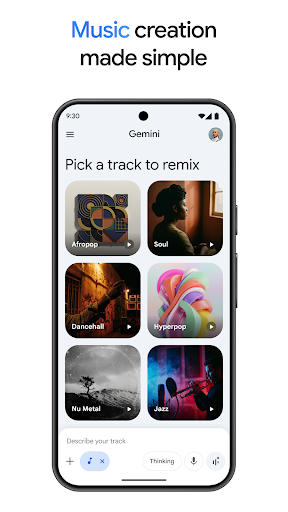
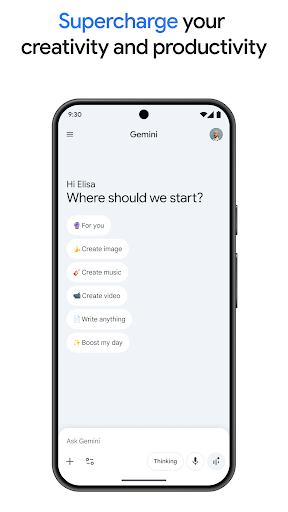
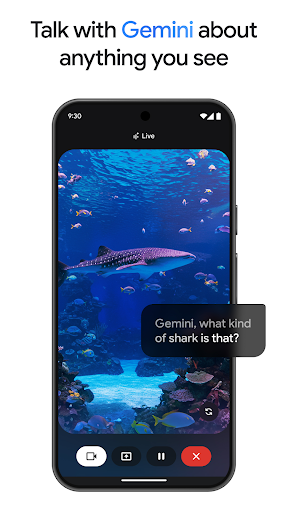
From your morning commute to late-night deep dives, Google Gemini is your personal, proactive and powerful AI assistant.
WHY USERS LOVE GEMINI
• Our latest models, Gemini 3.6 and Gemini Omni, unlock a new world of productivity and creativity.
• Talk things out with Gemini Live: Brainstorm in real time or share your screen/camera to discuss exactly what you see.
• Instead of a wall of text, you get carefully crafted responses with interleaved images, timelines, and interactive visuals.
• Get more personalized help by connecting your favorite Google apps like Gmail, Calendar, Google Photos, YouTube, and Search.
• Upload documents, spreadsheets, photos, videos, and more to get answers, summaries, and insights about your content.
BRING YOUR CREATIVE IDEAS TO LIFE
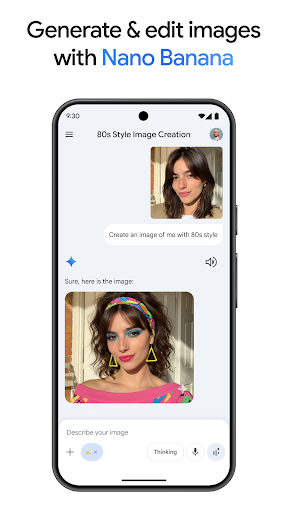
• Generate and edit photos with Nano Banana 2: Apply camera and lighting controls, create mockups by blending multiple images, design posters with sharp text, and effortlessly build diagrams. Then, resize as needed.
• Turn your ideas into cinematic videos with Gemini Omni for Google AI Plus, Pro, Ultra, and Workspace users.
• Create custom soundtracks for any moment with Lyria 3.
BOOST YOUR PRODUCTIVITY
• Research with NotebookLM: Get deeper, more relevant responses that are grounded in the sources in your notebook
• Study help and exam prep made easy: Upload your class notes to generate custom practice quizzes and interactive visuals.
• Turn a simple prompt into a prototype: Build web pages, games, or dashboards. You can even convert your files into a podcast-style overview to listen to while you're on the move.
UNLOCK MORE WHEN YOU UPGRADE
Level up your Gemini app experience by upgrading to the Google AI Plus, Pro, or Ultra plans, helping you tackle more complex tasks and projects.
Review the Gemini Apps Privacy Notice: g.co/gemini/privacynotice.
If you opt in to the Gemini app, it will replace your Google Assistant as the primary assistant on the phone. Some Google Assistant voice features aren't available through the Gemini app yet. You can switch back to Google Assistant in settings.
Show more

1. Κατεβάστε το πρόγραμμα εγκατάστασης MEmu και ολοκληρώστε την εγκατάσταση

2. Ξεκινήστε το MEmu και στη συνέχεια ανοίξτε το Google Play στην επιφάνεια εργασίας

3. Αναζητήστε τον Google Gemini στο Google Play
Install
4. Λήψη και εγκατάσταση του Google Gemini
5. Μόλις ολοκληρωθεί η εγκατάσταση, κάντε κλικ στο εικονίδιο για να ξεκινήσετε

6. Απολαύστε τη χρήση του Google Gemini σε υπολογιστή με το MEmu
Το MEmu Play είναι ο καλύτερος δωρεάν εξομοιωτής Android, που χρησιμοποιείται αυτήν τη στιγμή από πάνω από 50 εκατομμύρια χρήστες που απολαμβάνουν την εμπειρία εφαρμογών που προσφέρει. Μέσω της τεχνολογίας εικονικοποίησης MEmu 9, οι χρήστες μπορούν να δοκιμάσουν εφαρμογές Android στους υπολογιστές τους, ακόμα και σε εκείνους που απαιτούν υψηλή ισχύ επεξεργασίας γραφικών, οι οποίες λειτουργούν ομαλά σαν να λειτουργούν στα κινητά τηλέφωνα τελευταίας γενιάς, χωρίς να θυσιάζεται η ποιότητα της εικόνας και η εμπειρία χρήστη.
Μεγαλύτερη οθόνη με καλύτερα γραφικά. Μεγάλη διάρκεια ζωής, χωρίς περιορισμό μπαταρίας ή δεδομένων κινητής τηλεφωνίας.
Πλήρης υποστήριξη αντιστοίχισης πλήκτρων για ακριβή έλεγχο του πληκτρολογίου και του ποντικιού ή του gamepad.
Πολλαπλοί λογαριασμοί παιχνιδιών ή εργασίες σε έναν υπολογιστή ταυτόχρονα με τον διαχειριστή πολλαπλών περιπτώσεων.
Use Google Gemini on PC by following steps: