Grok Bot
Ενημερώθηκε
Τρέχουσα έκδοση
1.12.0
Προσφέρεται από

Σταματήστε να ανησυχείτε για υπερβολικές χρεώσεις όταν χρησιμοποιείτε το Grok Bot στο κινητό σας, απελευθερώστε τον εαυτό σας από τη μικροσκοπική οθόνη και απολαύστε τη χρήση της εφαρμογής σε μια πολύ μεγαλύτερη οθόνη. Από τώρα και στο εξής, αποκτήστε εμπειρία πλήρους οθόνης της εφαρμογής σας με πληκτρολόγιο και ποντίκι. Το MEmu σας προσφέρει όλες τις εκπληκτικές δυνατότητες που περιμένατε: γρήγορη εγκατάσταση και εύκολη εγκατάσταση, διαισθητικά χειριστήρια, όχι περισσότερους περιορισμούς μπαταρίας, δεδομένα κινητής τηλεφωνίας και ενοχλητικές κλήσεις. Το ολοκαίνουργιο MEmu 9 είναι η καλύτερη επιλογή για χρήση του Grok Bot στον υπολογιστή σας. Κωδικοποιημένο με την απορρόφηση μας, ο διαχειριστής πολλαπλών παρουσιών καθιστά δυνατό το άνοιγμα 2 ή περισσότερων λογαριασμών ταυτόχρονα. Και το πιο σημαντικό, ο αποκλειστικός κινητήρας εξομοίωσης μπορεί να απελευθερώσει όλες τις δυνατότητες του υπολογιστή σας, να κάνει τα πάντα ομαλά και ευχάριστα.
Show more
Απολαύστε την υπέροχη εμπειρία αναπαραγωγής του Grok Bot σε υπολογιστή με το MEMU Play. Πρόκειται για έναν ισχυρό δωρεάν εξομοιωτή Android που σας επιτρέπει να παίζετε χιλιάδες παιχνίδια Android. Meet Grok Bot, AI teammates and AI coworkers you can hand real work to.
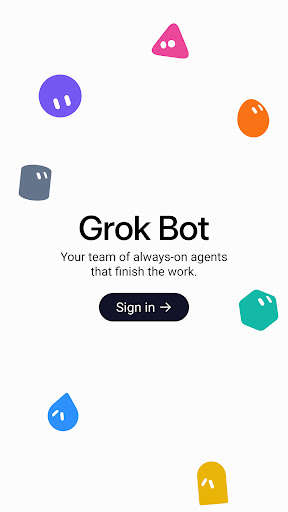
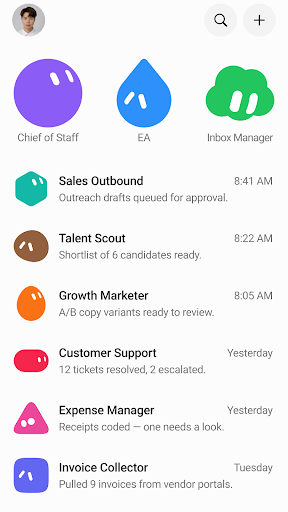
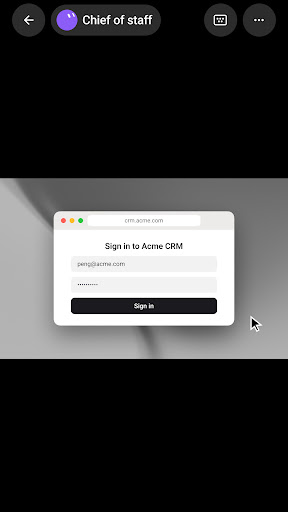
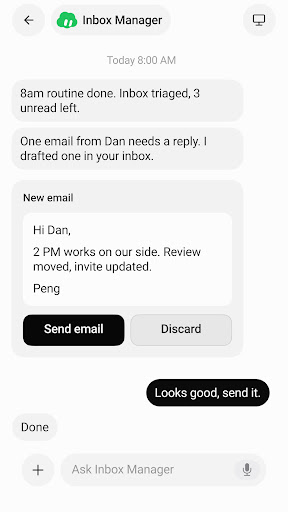
Meet Grok Bot, AI teammates and AI coworkers you can hand real work to. Grok Bots sign in, work across your tools and websites, and keep going even after you close your laptop.
Message an AI agent from your phone or desktop like a coworker, and it takes projects from start to finish instead of leaving you with another chat draft.
GROK BOT WORKS WHERE YOU WORK
Log Grok Bot in once. It uses your apps and websites just like you would, including tools that are harder to navigate: vendor portals, ad managers, CRMs, inboxes, and older ops tools. Your AI agent finishes work in the same places you already work, so automation is not a separate system you babysit. Hand off sales outbound, inbox triage, recruiting, expenses, or account follow-ups, and the work lands where a human coworker would put it.
MESSAGE BOTS LIKE TEAMMATES
Give tasks to Grok Bots like you would an AI coworker, on desktop or Android. They keep context on how you work, remember preferences across handoffs, and get smarter over time. Text from your phone or pick up the same thread on desktop. Each AI agent finishes multi-step workflows end to end and only comes back when your approval is needed.
WORK WITH MANY BOTS AT ONCE
Create a Bot, give it a task, and add another AI agent when the work grows. One owns a project, one runs outbound, one keeps systems moving. They work in parallel, collaborate where it makes sense, and keep working 24/7. Put a few Bots in the same thread and they pass work between themselves. Stand up a specialist AI coworker for each lane, then promote one to coordinate when you need a single update.
SHOW A BOT HOW IT'S DONE
Ask an AI agent to follow along as you complete a workflow once. It saves the steps as a routine and runs it on its own next time. Show it how you want email drafted, candidates sourced, or invoices pulled, and corrections stick. Your AI coworker learns your judgment instead of starting from zero.
Grok Bot helps you:
▶ Hand off real work to an AI agent across the tools and websites you already use
▶ Automate multi-step workflows without living in a chat window
▶ Message an AI coworker from your phone or desktop
▶ Run many AI agents in parallel on different jobs
▶ Show a workflow once so it runs as a routine next time
▶ Stay in the loop only when something needs your yes
WORK YOU CAN HAND OFF
· Sales Outbound: research, outreach drafts, CRM updates, queue only until you approve
· Talent Scout: source candidates, skip anyone in your ATS, draft LinkedIn in your voice
· Inbox Manager: triage email, flag what's urgent, draft replies, never send without you
· Expense Manager: pull receipts, code expenses, chase missing items across portals
· Invoice Collector: log into vendor portals, download invoices, park for review
· Account Health: digests, risk flags, and next-step drafts so accounts stay warm
· Bug Reproduction: recreate issues and hand eng a clean write-up
· Competitive Intelligence: overnight watch for launches and stale messaging
MEET YOUR FIRST BOT
Teammates you can trust to get work done.
Support: https://cursor.com/help
Terms of Service: https://cursor.com/terms-of-service
Grok Bot Terms: https://cursor.com/terms/grok-bot
Privacy Policy: https://cursor.com/privacy
© 2026 Anysphere, Inc.
Show more

1. Κατεβάστε το πρόγραμμα εγκατάστασης MEmu και ολοκληρώστε την εγκατάσταση

2. Ξεκινήστε το MEmu και στη συνέχεια ανοίξτε το Google Play στην επιφάνεια εργασίας

3. Αναζητήστε τον Grok Bot στο Google Play
Install
4. Λήψη και εγκατάσταση του Grok Bot
5. Μόλις ολοκληρωθεί η εγκατάσταση, κάντε κλικ στο εικονίδιο για να ξεκινήσετε

6. Απολαύστε τη χρήση του Grok Bot σε υπολογιστή με το MEmu
Το MEmu Play είναι ο καλύτερος δωρεάν εξομοιωτής Android, που χρησιμοποιείται αυτήν τη στιγμή από πάνω από 50 εκατομμύρια χρήστες που απολαμβάνουν την εμπειρία εφαρμογών που προσφέρει. Μέσω της τεχνολογίας εικονικοποίησης MEmu 9, οι χρήστες μπορούν να δοκιμάσουν εφαρμογές Android στους υπολογιστές τους, ακόμα και σε εκείνους που απαιτούν υψηλή ισχύ επεξεργασίας γραφικών, οι οποίες λειτουργούν ομαλά σαν να λειτουργούν στα κινητά τηλέφωνα τελευταίας γενιάς, χωρίς να θυσιάζεται η ποιότητα της εικόνας και η εμπειρία χρήστη.
Μεγαλύτερη οθόνη με καλύτερα γραφικά. Μεγάλη διάρκεια ζωής, χωρίς περιορισμό μπαταρίας ή δεδομένων κινητής τηλεφωνίας.
Πλήρης υποστήριξη αντιστοίχισης πλήκτρων για ακριβή έλεγχο του πληκτρολογίου και του ποντικιού ή του gamepad.
Πολλαπλοί λογαριασμοί παιχνιδιών ή εργασίες σε έναν υπολογιστή ταυτόχρονα με τον διαχειριστή πολλαπλών περιπτώσεων.
Use Grok Bot on PC by following steps: